正文
11 熵与激活函数
11.1 熵和信息熵
11.1 熵的概念
【毕导】你会点进这个视频,并一脸懵逼地出去,而这一切已被物理规律注定了
11.2 信息熵的概念
如果 对一条信息越难预测信息量就越高信息熵就越高
信息熵等于对单个符号对应的信息量(不确定性), 乘以它出现的概率, 再求和(单个符号不确定性的平均值)
11.1.3 应用 Python 函数库计算信息熵
(1) 均匀分布事件的不确定性计算和信息熵计算
import numpy as np
import matplotlib.pyplot as plt

plt.figure(figsize=(8, 5), dpi=80)
ax = plt.subplot(111)
ax.spines['right'].set_color('none')  # 隐藏右边的边框
ax.spines['top'].set_color('none')
ax.xaxis.set_ticks_position('bottom')
ax.spines['bottom'].set_position(('data', 0))
ax.yaxis.set_ticks_position('left')
ax.spines['left'].set_position(('data', 0))
ax.yaxis.set_ticks([1, 2, 3, 4, 5, 6])

# 定义均匀分布 U[0, 1]
X = np.linspace(0, 1, 101, endpoint=True)
X = X[1:100]
print(X)

# 计算不确定性
Y = -1 * X * np.log2(X)
print("概率值为{}时信息熵分量(单个符号的不确定性)达到最大值{}".format(X[np.argmax(Y)], np.max(Y)))

plt.plot(X, Y, color="green", linewidth=2, label="p * log2(p)")
plt.scatter(X[np.argmax(Y)], np.max(Y), color="black")
plt.text(X[np.argmax(Y)], np.max(Y) + 0.2, "({}, {})".format(X[np.argmax(Y)], np.round(np.max(Y), 2)))

# 计算信息熵
Y = -1 * np.log2(X)
plt.plot(X, Y, color="red", linestyle="dashed", label="log2(p)")

plt.scatter(0.5, 1, color="black")
plt.text(0.5, 1.2, "(0.5, 1.0)")

plt.legend()  # 显示图例标注
plt.show()
[0.01 0.02 0.03 0.04 0.05 0.06 0.07 0.08 0.09 0.1 0.11 0.12 0.13 0.14
0.15 0.16 0.17 0.18 0.19 0.2 0.21 0.22 0.23 0.24 0.25 0.26 0.27 0.28
0.29 0.3 0.31 0.32 0.33 0.34 0.35 0.36 0.37 0.38 0.39 0.4 0.41 0.42
0.43 0.44 0.45 0.46 0.47 0.48 0.49 0.5 0.51 0.52 0.53 0.54 0.55 0.56
0.57 0.58 0.59 0.6 0.61 0.62 0.63 0.64 0.65 0.66 0.67 0.68 0.69 0.7
0.71 0.72 0.73 0.74 0.75 0.76 0.77 0.78 0.79 0.8 0.81 0.82 0.83 0.84
0.85 0.86 0.87 0.88 0.89 0.9 0.91 0.92 0.93 0.94 0.95 0.96 0.97 0.98
0.99]
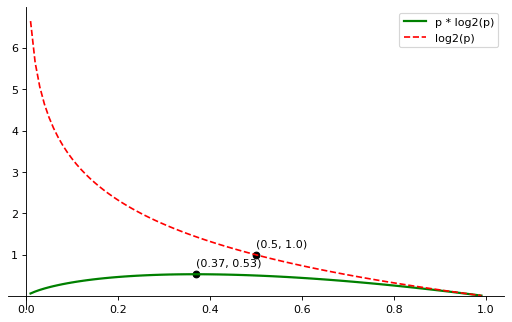
概率值为 0.37 时信息熵分量(单个符号的不确定性)达到最大值 0.5307290449339367
-
(选择到某一个事件的)概率不断增加时, 事情的状态越来越确定, 不确定性越来越小, (单个符号不确定性的平均值)信息熵也越来越小
-
对于两个状态的均匀分布(两种状态对应的概率都为 0.5, 如抛硬币), 信息熵为 1
-
当概率变为 1 时, 事情已经完全确定, 结果不会有任何变化, 此时信息熵变为 0
-
熵可以应用到分类任务中, 熵值越低分类效果越好
-
熵可以衡量两个指标对结果的影响大小, 熵值越小的指标对结果的影响更大
(2) 均匀分布的信息熵和非均匀分布的信息熵
对同一个随机事件, 均匀分布时的信息熵是最大的
import numpy as np

# create some probilities with the sum = 1
np.random.seed(42)
x = np.random.randint(200,size=10)
x = np.unique(x)
x = x / np.sum(x)
print("非均匀分布的概率分布:", x)

# output information entropy of uniform probility and random probility
print("非均匀分布对应的信息熵:", np.sum(-1 * x * np.log2(x)))
print("均匀分布的信息熵:", -1 * np.log2(1 / len(x)))
非均匀分布的概率分布: [0.01567749 0.02239642 0.07950728 0.10302352 0.11422172 0.11870101
0.13549832 0.20044793 0.21052632]
非均匀分布对应的信息熵: 2.8962045966225145
均匀分布的信息熵: 3.1699250014423126
11.2 激活函数
11.2 激活函数的概念
每一个神经元有一个激活函数, 作用于本神经元的输入, 产生输出如下:
如果没有激活函数或激活函数是线性的, 即, 网络计算能力就相当有限.
使用非线性激活函数, 可以将线性作用变成非线性作用, 以获得描述复杂的表单数据, 具有学习复杂事务的能力
11.2.2 常见的几种激活函数
Sigmoid 函数
import numpy as np
import matplotlib.pyplot as plt
# matplotlib.ticker.MultipleLocatorclass 用于为视图间隔内的基数的每个整数倍设置刻度。
from matplotlib.ticker import MultipleLocator, FormatStrFormatter


def sigmoid(x):
    return 1 / (1 + np.exp(-x))


def sigmoid_derivative(x):
    return sigmoid(x) * (1 - sigmoid(x))


plt.figure(figsize=(8, 5), dpi=80)
ax = plt.subplot(111)
ax.spines['right'].set_color('none')
ax.spines['top'].set_color('none')
ax.xaxis.set_ticks_position('bottom')
ax.spines['bottom'].set_position(('data', 0))
ax.yaxis.set_ticks_position('left')
ax.spines['left'].set_position(('data', 0))
ax.yaxis.set_ticks([0.2, 0.4, 0.6, 0.8, 1.0])
ax.xaxis.set_minor_locator(MultipleLocator(0.5))
ax.yaxis.set_minor_locator(MultipleLocator(0.1))

X = np.linspace(-10, 10, 201, endpoint=True)
print("X: ", X)

Y1 = sigmoid(X)
plt.plot(X, Y1, color="green", linewidth=2, label="sigmoid funciton")

Y2 = sigmoid_derivative(X)
plt.plot(X, Y2, color="red", linewidth=2, linestyle="dashed", label="sigmoid derivative funciton")

ax.set_title("sigmoid function & sigmoid derivative funciton", fontsize=16)
plt.legend()
plt.show()
X: [-10. -9.9 -9.8 -9.7 -9.6 -9.5 -9.4 -9.3 -9.2 -9.1 -9. -8.9
-8.8 -8.7 -8.6 -8.5 -8.4 -8.3 -8.2 -8.1 -8. -7.9 -7.8 -7.7
-7.6 -7.5 -7.4 -7.3 -7.2 -7.1 -7. -6.9 -6.8 -6.7 -6.6 -6.5
-6.4 -6.3 -6.2 -6.1 -6. -5.9 -5.8 -5.7 -5.6 -5.5 -5.4 -5.3
-5.2 -5.1 -5. -4.9 -4.8 -4.7 -4.6 -4.5 -4.4 -4.3 -4.2 -4.1
-4. -3.9 -3.8 -3.7 -3.6 -3.5 -3.4 -3.3 -3.2 -3.1 -3. -2.9
-2.8 -2.7 -2.6 -2.5 -2.4 -2.3 -2.2 -2.1 -2. -1.9 -1.8 -1.7
-1.6 -1.5 -1.4 -1.3 -1.2 -1.1 -1. -0.9 -0.8 -0.7 -0.6 -0.5
-0.4 -0.3 -0.2 -0.1 0. 0.1 0.2 0.3 0.4 0.5 0.6 0.7
0.8 0.9 1. 1.1 1.2 1.3 1.4 1.5 1.6 1.7 1.8 1.9
2. 2.1 2.2 2.3 2.4 2.5 2.6 2.7 2.8 2.9 3. 3.1
3.2 3.3 3.4 3.5 3.6 3.7 3.8 3.9 4. 4.1 4.2 4.3
4.4 4.5 4.6 4.7 4.8 4.9 5. 5.1 5.2 5.3 5.4 5.5
5.6 5.7 5.8 5.9 6. 6.1 6.2 6.3 6.4 6.5 6.6 6.7
6.8 6.9 7. 7.1 7.2 7.3 7.4 7.5 7.6 7.7 7.8 7.9
8. 8.1 8.2 8.3 8.4 8.5 8.6 8.7 8.8 8.9 9. 9.1
9.2 9.3 9.4 9.5 9.6 9.7 9.8 9.9 10. ]
-
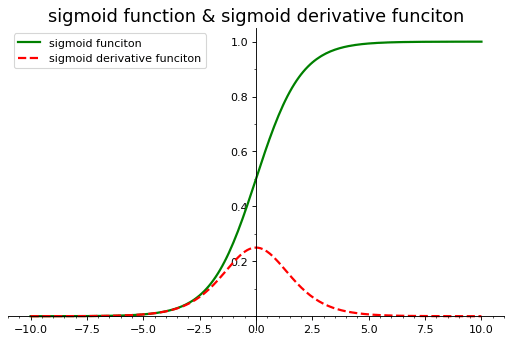
能够把输入的连续实值压缩到[0, 1]区间上有助于输出值的收敛
-
会出现梯度消失情况,
-
非原点中心对称, 不利于下层的计算(可以直接-0.5?)
-
含有幂运算, 相对耗时较长
tanh 函数
import numpy as np
import matplotlib.pyplot as plt
from matplotlib.ticker import MultipleLocator, FormatStrFormatter


def tanh(x):
    return (np.exp(x) - np.exp(-x)) / (np.exp(x) + np.exp(-x))


def tanh_derivative(x):
    return 1 - tanh(x) * tanh(x)


plt.figure(figsize=(8, 5), dpi=80)
ax = plt.subplot(111)
ax.spines['right'].set_color('none')
ax.spines['top'].set_color('none')
ax.xaxis.set_ticks_position('bottom')
ax.spines['bottom'].set_position(('data', 0))
ax.yaxis.set_ticks_position('left')
ax.spines['left'].set_position(('data', 0))
ax.yaxis.set_ticks([0.2, 0.4, 0.6, 0.8, 1.0])
ax.xaxis.set_minor_locator(MultipleLocator(0.5))
ax.yaxis.set_minor_locator(MultipleLocator(0.1))

X = np.linspace(-10, 10, 201, endpoint=True)
print("X: ", X)

Y1 = tanh(X)
plt.plot(X, Y1, color="green", linewidth=2, label="tanh funciton")

Y2 = tanh_derivative(X)
plt.plot(X, Y2, color="red", linewidth=2, linestyle="dashed", label="tanh derivative funciton")

ax.set_title("tanh function & tanh derivative funciton", fontsize=16)
plt.legend()
plt.show()
X: [-10. -9.9 -9.8 -9.7 -9.6 -9.5 -9.4 -9.3 -9.2 -9.1 -9. -8.9
-8.8 -8.7 -8.6 -8.5 -8.4 -8.3 -8.2 -8.1 -8. -7.9 -7.8 -7.7
-7.6 -7.5 -7.4 -7.3 -7.2 -7.1 -7. -6.9 -6.8 -6.7 -6.6 -6.5
-6.4 -6.3 -6.2 -6.1 -6. -5.9 -5.8 -5.7 -5.6 -5.5 -5.4 -5.3
-5.2 -5.1 -5. -4.9 -4.8 -4.7 -4.6 -4.5 -4.4 -4.3 -4.2 -4.1
-4. -3.9 -3.8 -3.7 -3.6 -3.5 -3.4 -3.3 -3.2 -3.1 -3. -2.9
-2.8 -2.7 -2.6 -2.5 -2.4 -2.3 -2.2 -2.1 -2. -1.9 -1.8 -1.7
-1.6 -1.5 -1.4 -1.3 -1.2 -1.1 -1. -0.9 -0.8 -0.7 -0.6 -0.5
-0.4 -0.3 -0.2 -0.1 0. 0.1 0.2 0.3 0.4 0.5 0.6 0.7
0.8 0.9 1. 1.1 1.2 1.3 1.4 1.5 1.6 1.7 1.8 1.9
2. 2.1 2.2 2.3 2.4 2.5 2.6 2.7 2.8 2.9 3. 3.1
3.2 3.3 3.4 3.5 3.6 3.7 3.8 3.9 4. 4.1 4.2 4.3
4.4 4.5 4.6 4.7 4.8 4.9 5. 5.1 5.2 5.3 5.4 5.5
5.6 5.7 5.8 5.9 6. 6.1 6.2 6.3 6.4 6.5 6.6 6.7
6.8 6.9 7. 7.1 7.2 7.3 7.4 7.5 7.6 7.7 7.8 7.9
8. 8.1 8.2 8.3 8.4 8.5 8.6 8.7 8.8 8.9 9. 9.1
9.2 9.3 9.4 9.5 9.6 9.7 9.8 9.9 10. ]
-
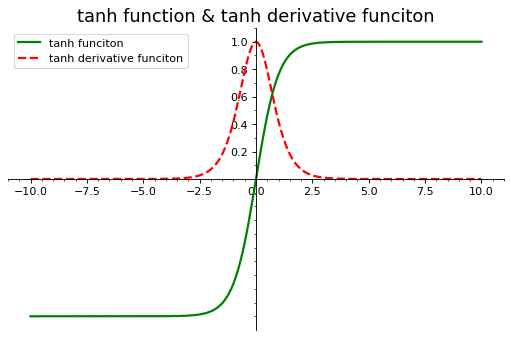
关于原点中心对称, 收敛较好
-
存在梯度消失问题
-
含有幂运算, 相对耗时
ReLU 函数
import numpy as np
import matplotlib.pyplot as plt
from matplotlib.ticker import MultipleLocator, FormatStrFormatter


def relu(x):
    return np.where(x <= 0, 0, x)


def relu_derivative(x):
    return np.where(x <= 0, 0, 1)


plt.figure(figsize=(8, 5), dpi=80)
plt.xlim(-1.5, 1.5)
plt.ylim(0, 1)
ax = plt.subplot(111)
ax.spines['right'].set_color('none')
ax.spines['top'].set_color('none')
ax.xaxis.set_ticks_position('bottom')
ax.spines['bottom'].set_position(('data', 0))
ax.yaxis.set_ticks_position('left')
ax.spines['left'].set_position(('data', 0))
ax.yaxis.set_ticks(np.arange(0, 1.4, 0.2))
ax.xaxis.set_minor_locator(MultipleLocator(0.5))
ax.yaxis.set_minor_locator(MultipleLocator(0.1))

X = np.linspace(-10, 10, 201, endpoint=True)
print("X: ", X)

Y1 = relu(X)
plt.plot(X, Y1, color="green", linewidth=2, label="ReLU funciton")

Y2 = relu_derivative(X)
plt.plot(X, Y2, color="red", linewidth=2, linestyle="dashed", label="ReLU derivative funciton")

ax.set_title("ReLU function & ReLU derivative funciton", fontsize=16)
plt.legend()
plt.show()
X: [-10. -9.9 -9.8 -9.7 -9.6 -9.5 -9.4 -9.3 -9.2 -9.1 -9. -8.9
-8.8 -8.7 -8.6 -8.5 -8.4 -8.3 -8.2 -8.1 -8. -7.9 -7.8 -7.7
-7.6 -7.5 -7.4 -7.3 -7.2 -7.1 -7. -6.9 -6.8 -6.7 -6.6 -6.5
-6.4 -6.3 -6.2 -6.1 -6. -5.9 -5.8 -5.7 -5.6 -5.5 -5.4 -5.3
-5.2 -5.1 -5. -4.9 -4.8 -4.7 -4.6 -4.5 -4.4 -4.3 -4.2 -4.1
-4. -3.9 -3.8 -3.7 -3.6 -3.5 -3.4 -3.3 -3.2 -3.1 -3. -2.9
-2.8 -2.7 -2.6 -2.5 -2.4 -2.3 -2.2 -2.1 -2. -1.9 -1.8 -1.7
-1.6 -1.5 -1.4 -1.3 -1.2 -1.1 -1. -0.9 -0.8 -0.7 -0.6 -0.5
-0.4 -0.3 -0.2 -0.1 0. 0.1 0.2 0.3 0.4 0.5 0.6 0.7
0.8 0.9 1. 1.1 1.2 1.3 1.4 1.5 1.6 1.7 1.8 1.9
2. 2.1 2.2 2.3 2.4 2.5 2.6 2.7 2.8 2.9 3. 3.1
3.2 3.3 3.4 3.5 3.6 3.7 3.8 3.9 4. 4.1 4.2 4.3
4.4 4.5 4.6 4.7 4.8 4.9 5. 5.1 5.2 5.3 5.4 5.5
5.6 5.7 5.8 5.9 6. 6.1 6.2 6.3 6.4 6.5 6.6 6.7
6.8 6.9 7. 7.1 7.2 7.3 7.4 7.5 7.6 7.7 7.8 7.9
8. 8.1 8.2 8.3 8.4 8.5 8.6 8.7 8.8 8.9 9. 9.1
9.2 9.3 9.4 9.5 9.6 9.7 9.8 9.9 10. ]
-
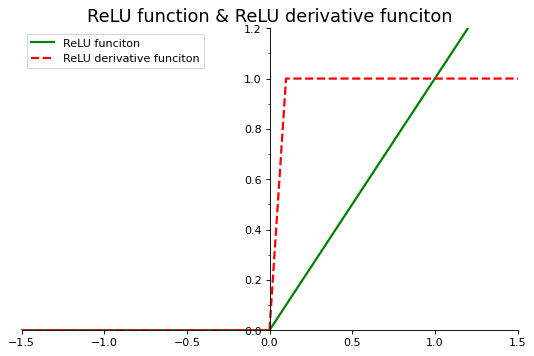
解决梯度消失的问题
-
计算速度快
-
非原点对称, 会影响收敛速度(但是比 Sigmoid 和 tanh 快)
-
输入值小于 0 时, 永远不会被激活
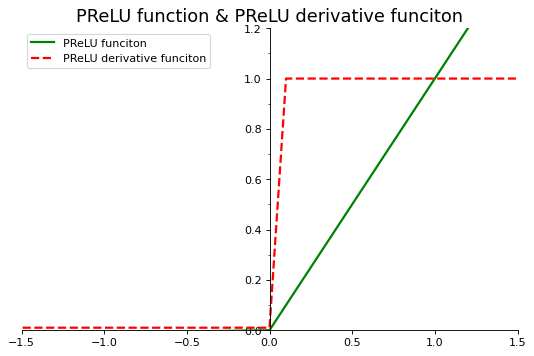
Leaky ReLU (PReLU)
-
解决 ReLU 算法在 x 轴负方向为 0 可能导致部分神经元无法激活的问题
-
理论上具有 ReLU 的所有优点
(通常取 0.01)
import numpy as np
import matplotlib.pyplot as plt
from matplotlib.ticker import MultipleLocator, FormatStrFormatter


def prelu(x):
    return np.where(x <= 0, 0.01 * x, x)


def prelu_derivative(x):
    return np.where(x <= 0, 0.01, 1)


plt.figure(figsize=(8, 5), dpi=80)
plt.xlim(-1.5, 1.5)
plt.ylim(0, 1)
ax = plt.subplot(111)
ax.spines['right'].set_color('none')
ax.spines['top'].set_color('none')
ax.xaxis.set_ticks_position('bottom')
ax.spines['bottom'].set_position(('data', 0))
ax.yaxis.set_ticks_position('left')
ax.spines['left'].set_position(('data', 0))
ax.yaxis.set_ticks(np.arange(0, 1.4, 0.2))
ax.xaxis.set_minor_locator(MultipleLocator(0.5))
ax.yaxis.set_minor_locator(MultipleLocator(0.1))

X = np.linspace(-10, 10, 201, endpoint=True)
print("X: ", X)

Y1 = prelu(X)
plt.plot(X, Y1, color="green", linewidth=2, label="PReLU funciton")

Y2 = prelu_derivative(X)
plt.plot(X, Y2, color="red", linewidth=2, linestyle="dashed", label="PReLU derivative funciton")

ax.set_title("PReLU function & PReLU derivative funciton", fontsize=16)
plt.legend()
plt.show()
X: [-10. -9.9 -9.8 -9.7 -9.6 -9.5 -9.4 -9.3 -9.2 -9.1 -9. -8.9
-8.8 -8.7 -8.6 -8.5 -8.4 -8.3 -8.2 -8.1 -8. -7.9 -7.8 -7.7
-7.6 -7.5 -7.4 -7.3 -7.2 -7.1 -7. -6.9 -6.8 -6.7 -6.6 -6.5
-6.4 -6.3 -6.2 -6.1 -6. -5.9 -5.8 -5.7 -5.6 -5.5 -5.4 -5.3
-5.2 -5.1 -5. -4.9 -4.8 -4.7 -4.6 -4.5 -4.4 -4.3 -4.2 -4.1
-4. -3.9 -3.8 -3.7 -3.6 -3.5 -3.4 -3.3 -3.2 -3.1 -3. -2.9
-2.8 -2.7 -2.6 -2.5 -2.4 -2.3 -2.2 -2.1 -2. -1.9 -1.8 -1.7
-1.6 -1.5 -1.4 -1.3 -1.2 -1.1 -1. -0.9 -0.8 -0.7 -0.6 -0.5
-0.4 -0.3 -0.2 -0.1 0. 0.1 0.2 0.3 0.4 0.5 0.6 0.7
0.8 0.9 1. 1.1 1.2 1.3 1.4 1.5 1.6 1.7 1.8 1.9
2. 2.1 2.2 2.3 2.4 2.5 2.6 2.7 2.8 2.9 3. 3.1
3.2 3.3 3.4 3.5 3.6 3.7 3.8 3.9 4. 4.1 4.2 4.3
4.4 4.5 4.6 4.7 4.8 4.9 5. 5.1 5.2 5.3 5.4 5.5
5.6 5.7 5.8 5.9 6. 6.1 6.2 6.3 6.4 6.5 6.6 6.7
6.8 6.9 7. 7.1 7.2 7.3 7.4 7.5 7.6 7.7 7.8 7.9
8. 8.1 8.2 8.3 8.4 8.5 8.6 8.7 8.8 8.9 9. 9.1
9.2 9.3 9.4 9.5 9.6 9.7 9.8 9.9 10. ]
11.3 综合案例——分类算法中信息熵的应用
用 ID3 分类算法, 按照信息熵的减少幅度来确定分类的方向
import pandas as pd
import numpy as np

data = [np.array(["Sunny", "Hot", "High", "Weak", "No"])]
data.append(np.array(["Sunny", "Hot", "High", "Strong", "No"]))
data.append(np.array(["Overcast", "Hot", "High", "Weak", "Yes"]))
data.append(np.array(["Rain", "Mild", "High", "Weak", "Yes"]))
data.append(np.array(["Rain", "Cool", "Normal", "Weak", "Yes"]))
data.append(np.array(["Rain", "Cool", "Normal", "Strong", "No"]))
data.append(np.array(["Overcast", "Cool", "Normal", "Strong", "Yes"]))
data.append(np.array(["Sunny", "Mild", "High", "Weak", "No"]))
data.append(np.array(["Sunny", "Cool", "Normal", "Weak", "Yes"]))
data.append(np.array(["Rain", "Mild", "Normal", "Weak", "Yes"]))
data.append(np.array(["Sunny", "Mild", "Normal", "Strong", "Yes"]))
data.append(np.array(["Overcast", "Mild", "High", "Strong", "Yes"]))
data.append(np.array(["Overcast", "Hot", "Normal", "Weak", "Yes"]))
data.append(np.array(["Rain", "Mild", "High", "Strong", "No"]))
df = pd.DataFrame(data, columns = ["Outlook", "Temp.",
                                   "Humidity", "Wind", "Decision"], index=range(1, 15))
df.index.name = 'Day'
df| Outlook | Temp. | Humidity | Wind | Decision | |
|---|---|---|---|---|---|
| Day | |||||
| 1 | Sunny | Hot | High | Weak | No |
| 2 | Sunny | Hot | High | Strong | No |
| 3 | Overcast | Hot | High | Weak | Yes |
| 4 | Rain | Mild | High | Weak | Yes |
| 5 | Rain | Cool | Normal | Weak | Yes |
| 6 | Rain | Cool | Normal | Strong | No |
| 7 | Overcast | Cool | Normal | Strong | Yes |
| 8 | Sunny | Mild | High | Weak | No |
| 9 | Sunny | Cool | Normal | Weak | Yes |
| 10 | Rain | Mild | Normal | Weak | Yes |
| 11 | Sunny | Mild | Normal | Strong | Yes |
| 12 | Overcast | Mild | High | Strong | Yes |
| 13 | Overcast | Hot | Normal | Weak | Yes |
| 14 | Rain | Mild | High | Strong | No |
| 名称 | 解释 |
|---|---|
| Day | 日期 |
| OutLook | 阴晴 |
| Temp. | 气温 |
| Humidity | 湿度 |
| Wind | 风力 |
| Decision | 目标列/标识列 |
(1) 数据集的信息熵的计算
D = len(df)
C_yes = len(df[df.Decision == "Yes"])
C_no = len(df[df.Decision == "No"])
H_D = - (C_yes / D) * np.log2(C_yes / D) - (C_no / D) * np.log2(C_no / D)
H_D
0.9402859586706311
(2) 对数据集进行分类之后的信息熵
按照某一属性 A:
针对某一属性 A, 分类后不确定性减少, 由此产生的信息增益:
属性 Wind 的信息熵:
对于 Wind=Strong 的数据集的信息熵:
D_strong = len(df[df.Wind == "Strong"])
C_strong_yes = len(df[(df.Wind == "Strong") & (df.Decision == "Yes")])
C_strong_no = len(df[(df.Wind == "Strong") & (df.Decision == "No")])
H_D_strong = -(C_strong_yes / D_strong) * np.log2(C_strong_yes / D_strong) - \
(C_strong_no / D_strong) * np.log2(C_strong_no / D_strong)
H_D_strong
1.0
D_weak = len(df[df.Wind == "Weak"])
C_weak_yes = len(df[(df.Wind == "Weak") & (df.Decision == "Yes")])
C_weak_no = len(df[(df.Wind == "Weak") & (df.Decision == "No")])
H_D_weak = -(C_weak_yes / D_weak) * np.log2(C_weak_yes / D_weak) - \
(C_weak_no / D_weak) * np.log2(C_weak_no / D_weak)
H_D_weak
0.8112781244591328
H_D_Wind = D_strong / D * H_D_strong + D_weak / D * H_D_weak
H_D_Wind
0.8921589282623617
H_D - H_D_Wind0.04812703040826949
同理,
ID3 算法是一种贪心算法,用来构造决策树。ID3 算法起源于概念学习系统(CLS),以信息熵的下降速度为选取测试属性的标准,即在每个节点选取还尚未被用来划分的具有最高信息增益的属性作为划分标准,然后继续这个过程,直到生成的决策树能完美分类训练样例。ID3 算法_百度百科
pip install graphvizCollecting graphviz
Using cached graphviz-0.20-py3-none-any.whl (46 kB)
Installing collected packages: graphviz
Successfully installed graphviz-0.20
Note: you may need to restart the kernel to use updated packages.
from PIL import Image
import matplotlib.pyplot as plt
from graphviz import Digraph

# 实例化一个 Digraph 对象(有向图),name:生成的图片的图片名,format:生成的图片格式
dot = Digraph(name="test", comment="the test", format="png")

# 生成图片节点,name:这个节点对象的名称,label:节点名,color:画节点的线的颜色
dot.node(name='Outlook', shape="record", label='Outlook')
dot.node(name='Overcast', shape="plaintext", label='Overcast')
dot.node(name='Yes1', shape="plaintext", label='Yes')

dot.node(name='Humidity', shape="record", label='Humidity')
dot.node(name='Yes2', shape="plaintext", label='Yes')
dot.node(name='No1', shape="plaintext", label='No')

dot.node(name='Wind', shape="record", label='Wind')
dot.node(name='Yes3', shape="plaintext", label='Yes')
dot.node(name='No2', shape="plaintext", label='No')

# 在节点之间画线,label:线上显示的文本,color:线的颜色
dot.edge('Outlook', 'Humidity', arrowhead="none", label="Sunny")
dot.edge('Humidity', 'No1', arrowhead="none", label="High")
dot.edge('Humidity', 'Yes2', arrowhead="none", label="Normal")
dot.edge('Outlook', 'Overcast', arrowhead="none")
dot.edge('Overcast', 'Yes1', arrowhead="none")
dot.edge('Outlook', 'Wind', arrowhead="none", label="Rain")
dot.edge('Humidity', 'No2', arrowhead="none", label="Strong")
dot.edge('Humidity', 'Yes3', arrowhead="none", label="Weak")

dot.render(filename='test', view=False)

plt.figure()
img = Image.open("test.png")
plt.imshow(img)
plt.axis('off')
plt.show()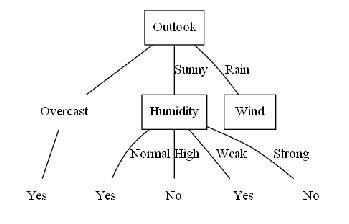
ID3 决策树分类算法的结果
不太会画, 先这样吧....