资源
正文
一、模块与组件、模块化与组件化
053 对组件的理解
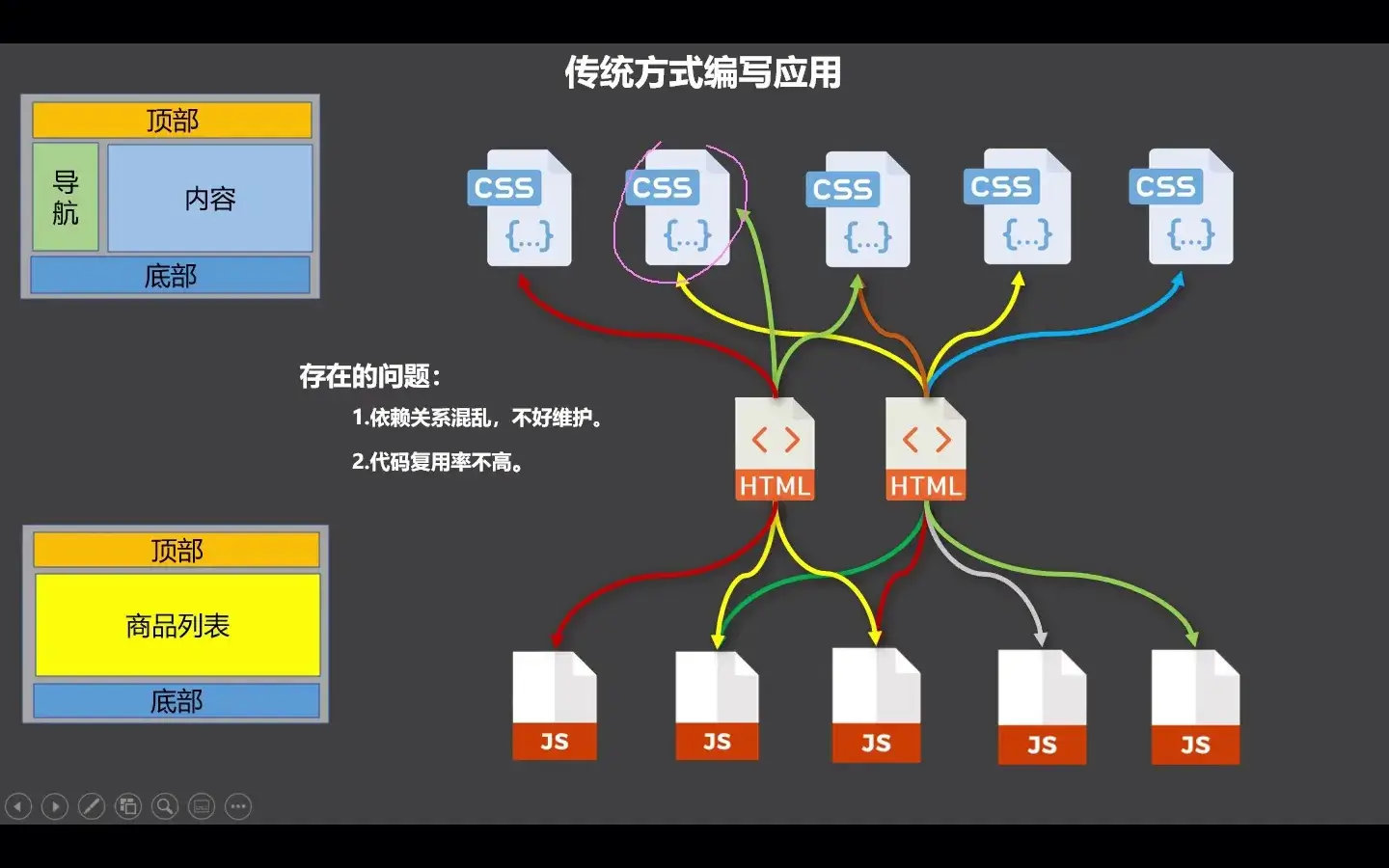
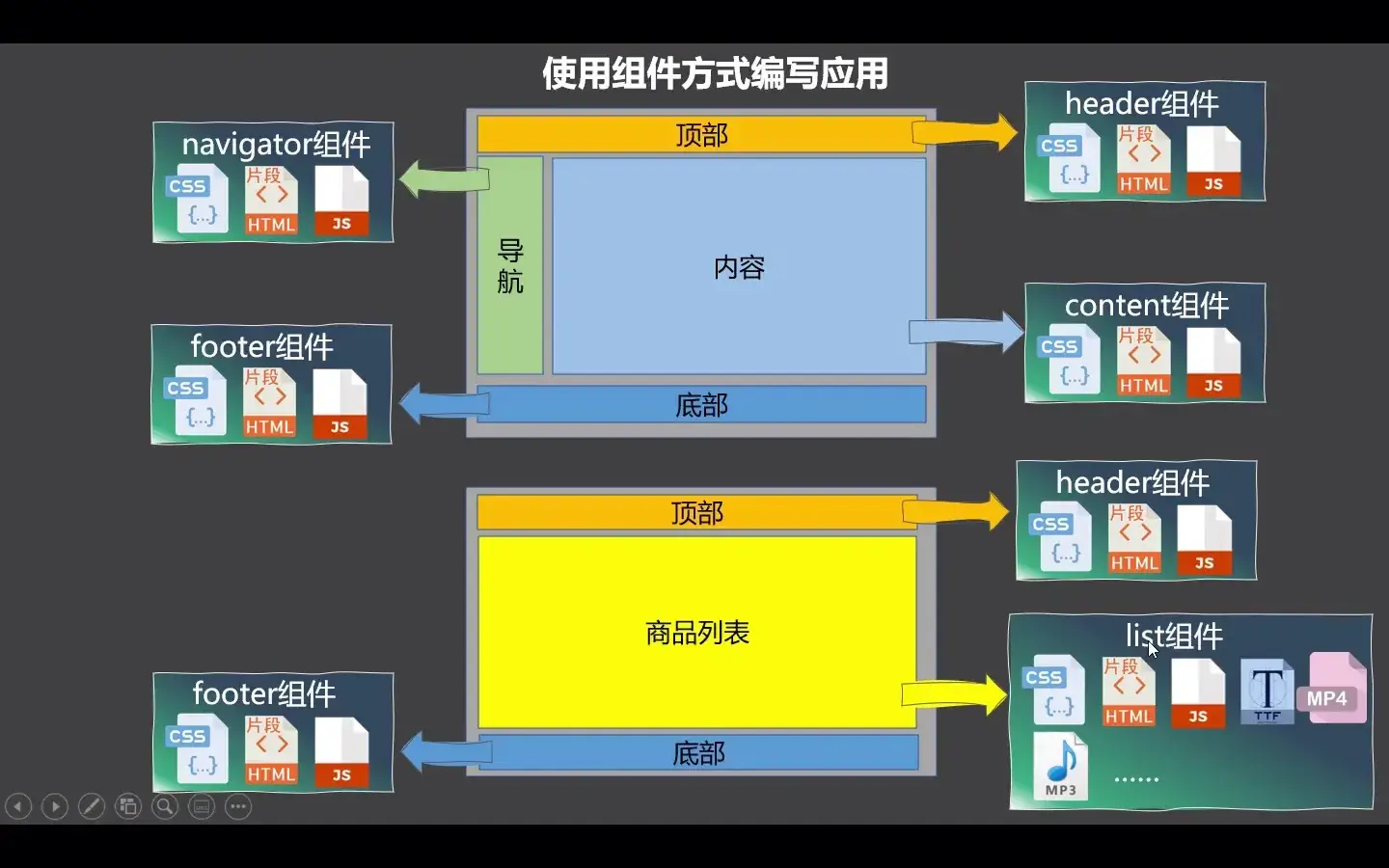
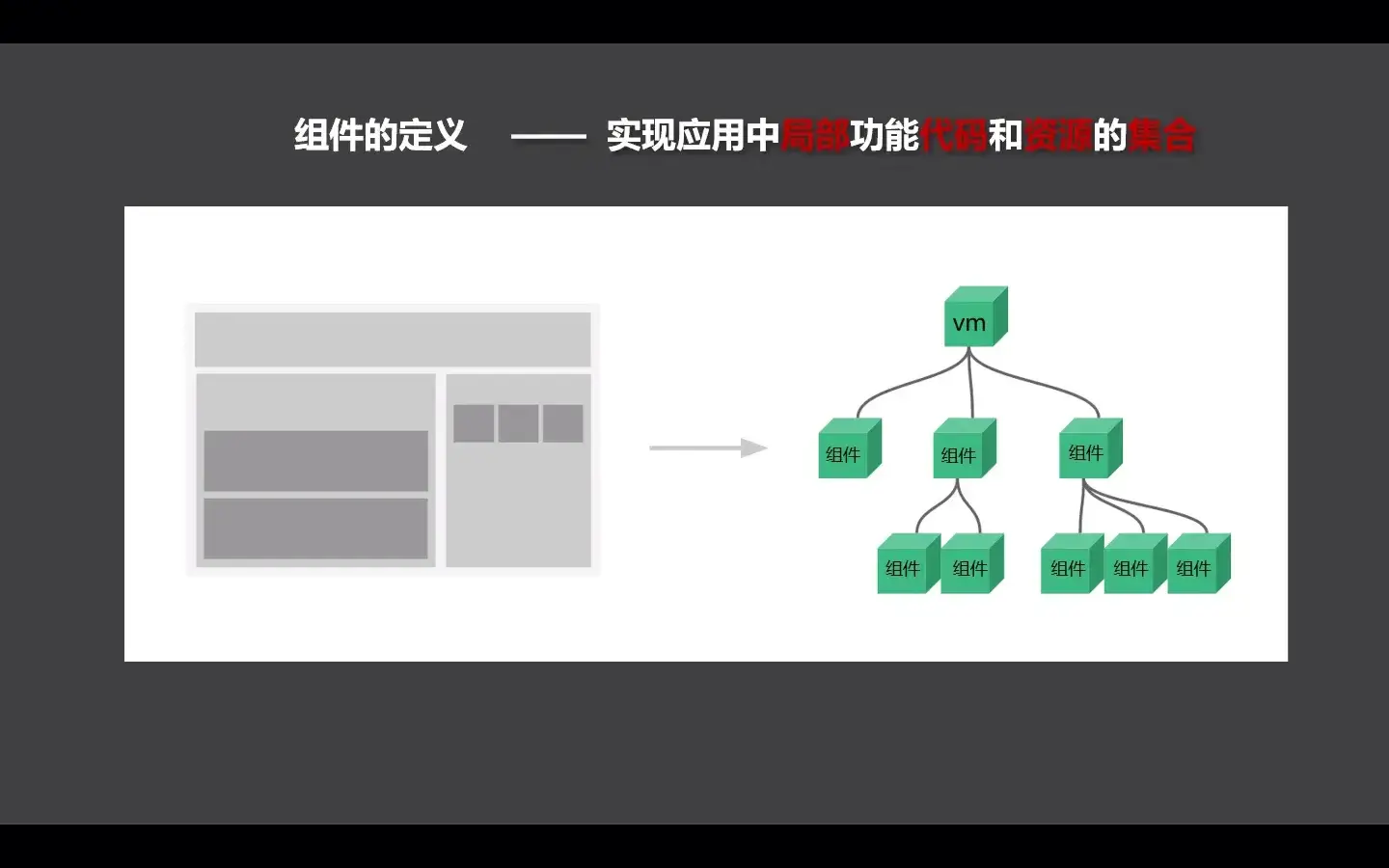
模块
- 理解:向外提供特定功能的 js 程序,一般就是一个 js 文件
- 为什么:js 文件很多很复杂
- 作用:复用 js,简化 js 的编写,提高 js 运行效率
组件
-
理解:用来实现局部(特定)功能效果的代码集合 (html/css/js/image....)
-
为什么:一个界面的功能很复杂
-
作用:复用编码,简化项目编码,提高运行效率
模块化
当应用中的 js 都以模块来编写的,那这个应用就是一个模块化的应用。
组件化
当应用中的功能都是多组件的方式来编写的,那这个应用就是一个组件化的应用。
二、非单文件组件
054 非单文件组件
Vue 中使用组件的三大步骤:
-
定义组件(创建组件)
-
注册组件
-
使用组件(写组件标签)
一、如何定义一个组件?
使用 vue.extend(options) 创建,其中 options 和 new vue(options) 时传入的那个 options 几乎一样,但也有点区别:
区别如下:
el不要写,为什么?- 最终所有的组件都要经过一个
vm的管理,由vm中的el决定服务哪个容器。
- 最终所有的组件都要经过一个
data必须写成函数,为什么?- 避免组件被复用时,数据存在引用关系。
- 备注:使用
template可以配置组件结构。
二、如何注册组件?
- 局部注册:靠
new Vue的时候传入components选项 - 全局注册:
Vue.component('组件名', 组件)
三、编写组件标签:
<school></school>
<div id="root">
    <hello></hello>
    <hr>
    <h1>{{msg}}</h1>
    <school></school>
    <hr>
    <student></student>
</div>
<div id="root2">
    <hello></hello>
</div>
<script>
    Vue.config.productionTip = false  // 阻止 Vue 在启动时生成生产提示。
    // 创建组件
    const school = Vue.extend({
        template: `<div><h1>学校名称:{{name}}</h1><h1>学校地址:{{address}}</h1></div>`,
        data() {
            return {
                name: 'FJNU',
                address: 'Fuzhou'
            }
        }
    })

    const student = Vue.extend({
        template: `<div><h1>学生名称:{{name}}</h1><h1>学生年龄:{{age}}</h1></div>`,
        data() {
            return {
                name: '古尔丹',
                age: 16
            }
        }
    })

    const hello = Vue.extend({
        template: `<h1>你好,旅行者。</h1>`
    })

    Vue.component('hello', hello)  // 全局注册
    // 创建 Vue 实例
    const vm = new Vue({
        el: '#root',
        data: {
            msg: '你好啊朋友!'
        },
        components: {
            school,  // 相当于 school: school
            student
        }
    })
</script>
055 组件的几个注意点
几个注意点:
-
关于组件名:
-
一个单词组成:
第一种写法(首字母小写):
school第二种写法(首字母大写):
School -
多个单词组成:
第一种写法(
kebab-case命名):my-school第二种写法(
CamelCase命名):MySchool(需要 Vue 脚手架支持) -
备注
- 组件名尽可能回避 HTML 中已有的元素名称,例如:
h2、H2都不行。 - 可以使用
name配置项指定组件在开发者工具中呈现的名字。
- 组件名尽可能回避 HTML 中已有的元素名称,例如:
-
-
关于组件标签: 第一种写法:
<school></school>第二种写法:
<school/>备注:不用使用脚手架时,
<school/>会导致后续组件不能染 -
一个简写方式:
const school = Vue.extend(options)可简写为:const school = options
056 组件的嵌套
建立如下的组件结构:
<div id="root"></div>

<script>
    Vue.config.productionTip = false  // 阻止 Vue 在启动时生成生产提示。
    // 创建组件
    const student = Vue.extend({
        template: `<div><h1>学生名称:{{name}}</h1><h1>学生年龄:{{age}}</h1></div>`,
        data() {
            return {
                name: '古尔丹',
                age: 16
            }
        },
    })

    const school = Vue.extend({
        template: `<div>
            <h1>学校名称:{{name}}</h1>
            <h1>学校地址:{{address}}</h1>
            <student></student>
            </div>`,
        data() {
            return {
                name: 'FJNU',
                address: 'Fuzhou'
            }
        },
        components: {
            student
        }
    })

    const hello = Vue.extend({
        template: `<h1>你好,旅行者。</h1>`
    })

    const app = Vue.extend({
        template: `<div><hello/><school/></div>`,
        components: {
            school,
            hello
        }
    })

    // 创建 Vue 实例
    const vm = new Vue({
        el: '#root',
        template: `<app/>`,
        components: {
            app,
        }
    })
</script>
057 VueComponent 构造函数 & 058 Vue 实例与组件实例
关于 VueComponent:
-
school组件本质是一个名为Vuecomponent的构造函数,且不是程序员定义的,是Vue.extend生成的。 -
我们只需要写
<school/>或<school></school>,Vue 解析时会帮我们创建 school 组件的实例对象,即 Vue 帮我们执行的:newVueComponent(options)。 -
特别注意:每次调用
Vue.extend,返回的都是一个全新的Vuecomponent!!! -
关于
this指向:- 组件配置中:
data函数、methods中的函数、watch中的函数、computed中的函数 它们的this均是 Vuecomponent 实例对象 new Vue(options)配置中:data函数、methods中的函数、watch中的函数、computed中的函数 它们的this均是 Vue 实例对象
- 组件配置中:
-
VueComponent的实例对象,以后简称vc(也可称之为:组件实例对象)。Vue 的实例对象,以后简称
vm。
059 一个重要的内置关系
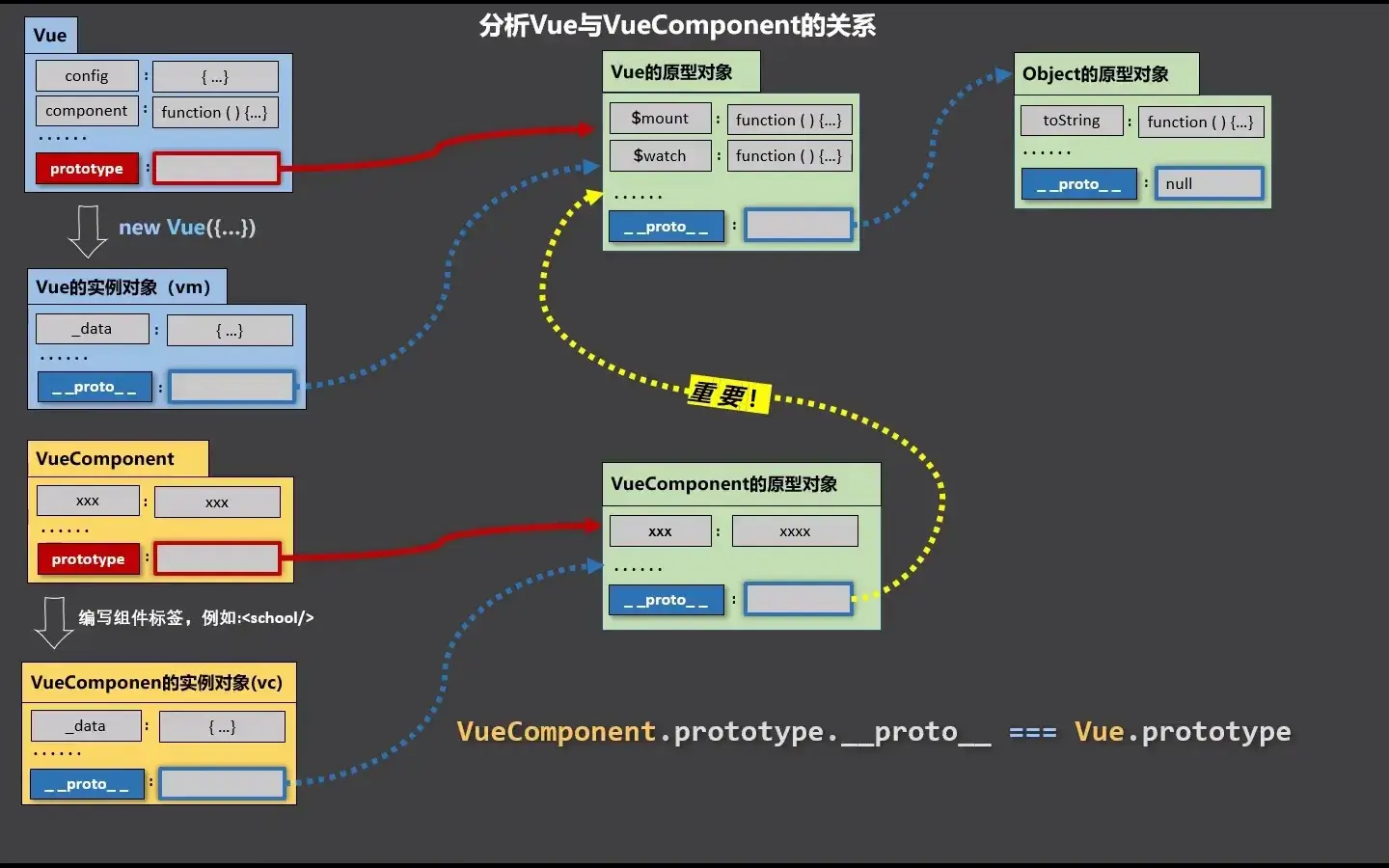
在 JavaScript 中,"显示原型属性"和"隐式原型属性"是两个不同的概念,涉及到对象的继承和原型链的机制。为了更好地理解这些概念,我们需要先了解原型链以及如何通过原型来实现继承。
1. 隐式原型属性(__proto__)
定义:
隐式原型属性指的是每个 JavaScript 对象内部都有一个隐式的 __proto__ 属性。它指向对象的构造函数的原型对象(即该对象的父类)。
特点:
__proto__不是显式声明的,而是 JavaScript 引擎自动添加到每个对象内部的一个隐藏属性。__proto__连接对象与其构造函数的原型对象,是实现原型链继承的基础。- 每个对象都有自己的原型对象,原型对象又有自己的原型,形成原型链。当访问对象的属性或方法时,JavaScript 会沿着原型链查找。
示例:
javascriptCopy Codefunction Person(name) {
  this.name = name;
}

Person.prototype.sayHello = function() {
  console.log('Hello, ' + this.name);
};

const p1 = new Person('John');
console.log(p1.__proto__ === Person.prototype); // true在上面的代码中,p1.__proto__ 是 Person.prototype,即 p1 对象的原型。
2. 显示原型属性(prototype)
定义:
显示原型属性是指构造函数(类)的 prototype 属性。每个函数对象都有一个 prototype 属性,这个属性指向构造函数的原型对象。通过 prototype 属性可以定义构造函数实例共享的属性和方法。
特点:
- 构造函数的
prototype属性用于定义所有实例对象共享的方法或属性。 - 当你通过构造函数创建实例时,实例对象会通过
__proto__指向构造函数的prototype。
示例:
javascriptCopy Codefunction Person(name) {
  this.name = name;
}

Person.prototype.sayHello = function() {
  console.log('Hello, ' + this.name);
};

const p1 = new Person('John');
const p2 = new Person('Jane');
p1.sayHello();  // "Hello, John"
p2.sayHello(); // "Hello, Jane"在这个例子中,Person.prototype 是 Person 函数的原型对象,sayHello 方法定义在该原型对象上,p1 和 p2 实例通过 __proto__ 访问到 Person.prototype,从而能够共享该方法。
总结
- 隐式原型属性(
__proto__):是每个对象自动拥有的属性,指向该对象的构造函数的原型。 - 显示原型属性(
prototype):是每个构造函数自动拥有的属性,指向一个对象,这个对象包含了所有通过该构造函数创建的实例共享的属性和方法。
通过这两种原型属性,JavaScript 实现了基于原型链的继承机制。
三、单文件组件
060 单文件组件 & 061 创建 Vue 脚手架 & 062 分析脚手架结构
Vue 脚手架是 Vue 官方提供的标准化开发工具(开发平台)。
安装:
npm install -g @vue/cli创建一个项目(选择 Vue2):
vue create vue_test启动服务器:
cd vue_test
npm run serve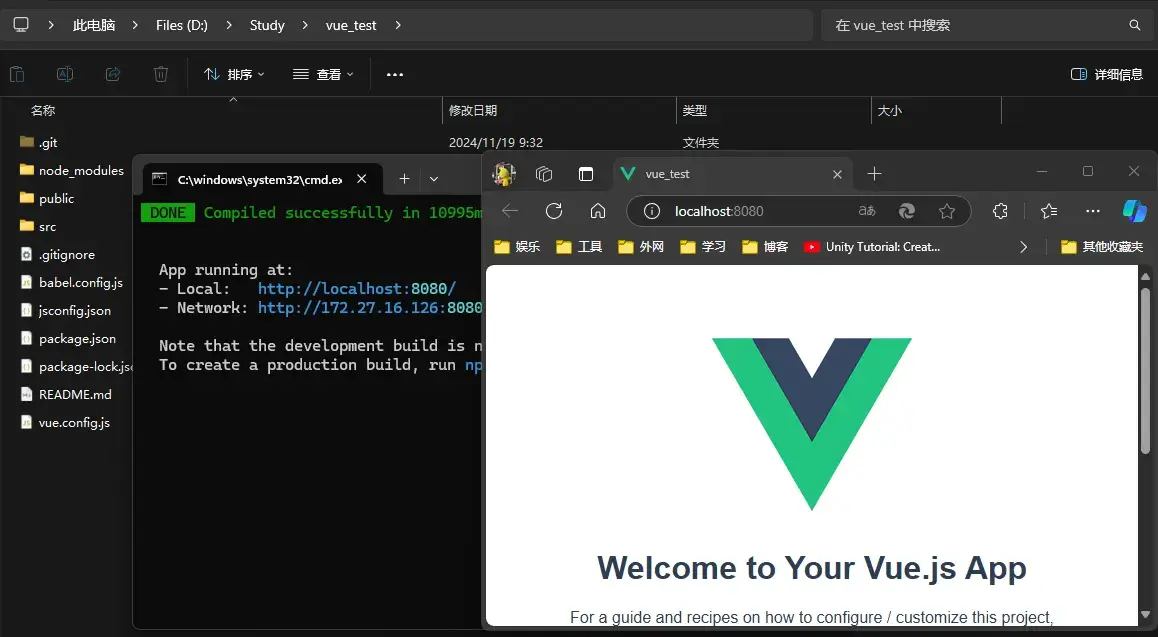
{% tabs Tabs_061 %}
Babel 是一个广泛使用的 JavaScript 编译器,主要用于将现代 JavaScript(ES6+)代码转换为向后兼容的版本,以便可以在旧版本的浏览器或环境中运行。它支持的主要功能包括:
- 语法转换:将新版本的 JavaScript 语法(如箭头函数、模块化等)转换为旧版兼容的语法。
- Polyfills:通过插件(如
@babel/preset-env和core-js),可以添加对新 API(如Promise、Array.prototype.includes等)的支持。 - TypeScript 支持:Babel 可以处理 TypeScript 代码,将其编译为纯 JavaScript。
- React 支持:通过
@babel/preset-react,Babel 可以编译 JSX 语法。 - 自定义插件:支持通过编写插件来扩展 Babel 的功能。
Babel 通常用于构建工具(如 Webpack、Rollup)中,配合其他工具实现现代开发。
ESLint 是一个 JavaScript 的静态代码分析工具,用于查找代码中的问题,并帮助开发者遵循一致的代码风格。它的主要特点包括:
- 发现问题:可以发现语法错误、潜在问题(如未定义的变量)以及最佳实践建议。
- 代码风格:支持检查代码格式(如缩进、引号、分号等),并强制团队遵守一致的代码风格。
- 可定制规则:通过配置文件(如
.eslintrc),开发者可以启用或禁用特定规则。 - 插件扩展:支持社区插件(如 React、Vue 等插件)来检查特定框架的代码。
- 自动修复:ESLint 可以自动修复一些简单的代码问题,例如格式不一致。
- 与编辑器集成:通过插件,可以在编辑器(如 VS Code)中实时查看代码问题。
ESLint 通常与 Babel 或 TypeScript 配合使用,在开发和 CI/CD 流程中确保代码质量。
{% endtabs %}
| 特性 | Babel | ESLint |
|---|---|---|
| 用途 | 转换代码以支持旧环境 | 分析代码并强制执行一致性和质量 |
| 目标 | 编译现代 JavaScript 到兼容版本 | 发现潜在错误和代码风格问题 |
| 执行时机 | 构建时 | 开发时或代码审查阶段 |
| 扩展性 | 插件和预设支持复杂的语法转换 | 插件支持多种框架和编码风格检查 |
总结:
- Babel 是工具链中的“编译器”,确保代码能在目标环境运行。
- ESLint 是工具链中的“检查员”,确保代码高质量并易于维护。
VSCode 中按下 Ctrl + ` 键可以打开终端。
调整项目的文件结构:
- vue_test
- node_modules
- public
- favicon.ico
- index.html
- src
- assets
- logo.png
- components
- School.vue
- Student.vue
- App.vue
- main.js
- assets
- ...
修改文件中的内容:
{% tabs Tabs_062 %}
<!DOCTYPE html>
<html lang="">
  <head>
    <meta charset="utf-8">
    <!-- 针对 IE 浏览器的一个特殊配置,含义是让 IE 浏览器以最高的渲染级别渲染页面 -->
    <meta http-equiv="X-UA-Compatible" content="IE=edge">
    <!-- 开启移动端的理想视口 -->
    <meta name="viewport" content="width=device-width,initial-scale=1.0">
    <!-- 配置页签图标 -->
    <link rel="icon" href="<%= BASE_URL %>favicon.ico">
    <!-- 配置网页标题 -->
    <title><%= htmlWebpackPlugin.options.title %></title>
  </head>
  <body>
    <!-- 当浏览器不支持 js 时,noscript 中的元素就会被渲染 -->
    <noscript>
      <strong>We're sorry but <%= htmlWebpackPlugin.options.title %> doesn't work properly without JavaScript enabled. Please enable it to continue.</strong>
    </noscript>
    <!-- 容器 -->
    <div id="app"></div>
    <!-- built files will be auto injected -->
  </body>
</html><template>
<div class="demo">
<h2>学校名称:{{name}}</h2>
<h2>学校地址:{{address}}</h2>
<button @click="showName">点我提示学校名</button>
</div>
</template>
<script>
/* eslint-disable vue/multi-word-component-names */
export default {
name: 'School',
data() {
return {
name: 'FJNU',
address: 'Fuzhou'
}
},
methods: {
showName() {
alert(this.name)
}
}
}
</script>
<style>
.demo {
background-color: orange;
}
</style><template>
<div>
<h2>学生姓名:{{name}}</h2>
<h2>学生年龄:{{age}}</h2>
</div>
</template>
<script>
/* eslint-disable vue/multi-word-component-names */
export default {
name: 'Student',
data() {
return {
name: '张三',
age: 18
}
}
}
</script><template>
<div>
<img src="./assets/logo.png" alt="logo">
<School></School>
<Student></Student>
</div>
</template>
<script>
import School from './components/School.vue';
import Student from './components/Student.vue';
export default {
name: 'App',
components: {
School,
Student
}
}
</script>// 该文件是整个项目的入口文件
// 引入 Vue
import Vue from 'vue'
// 引入 App 组件,它是所有组件的父组件
import App from './App.vue'
// 关闭 Vue 的生产提示
Vue.config.productionTip = false
// 创建 Vue 实例对象 vm
new Vue({
    el: '#app',
    render: h => h(App),
}){% endtabs %}
执行下列语句编译:
npm run serve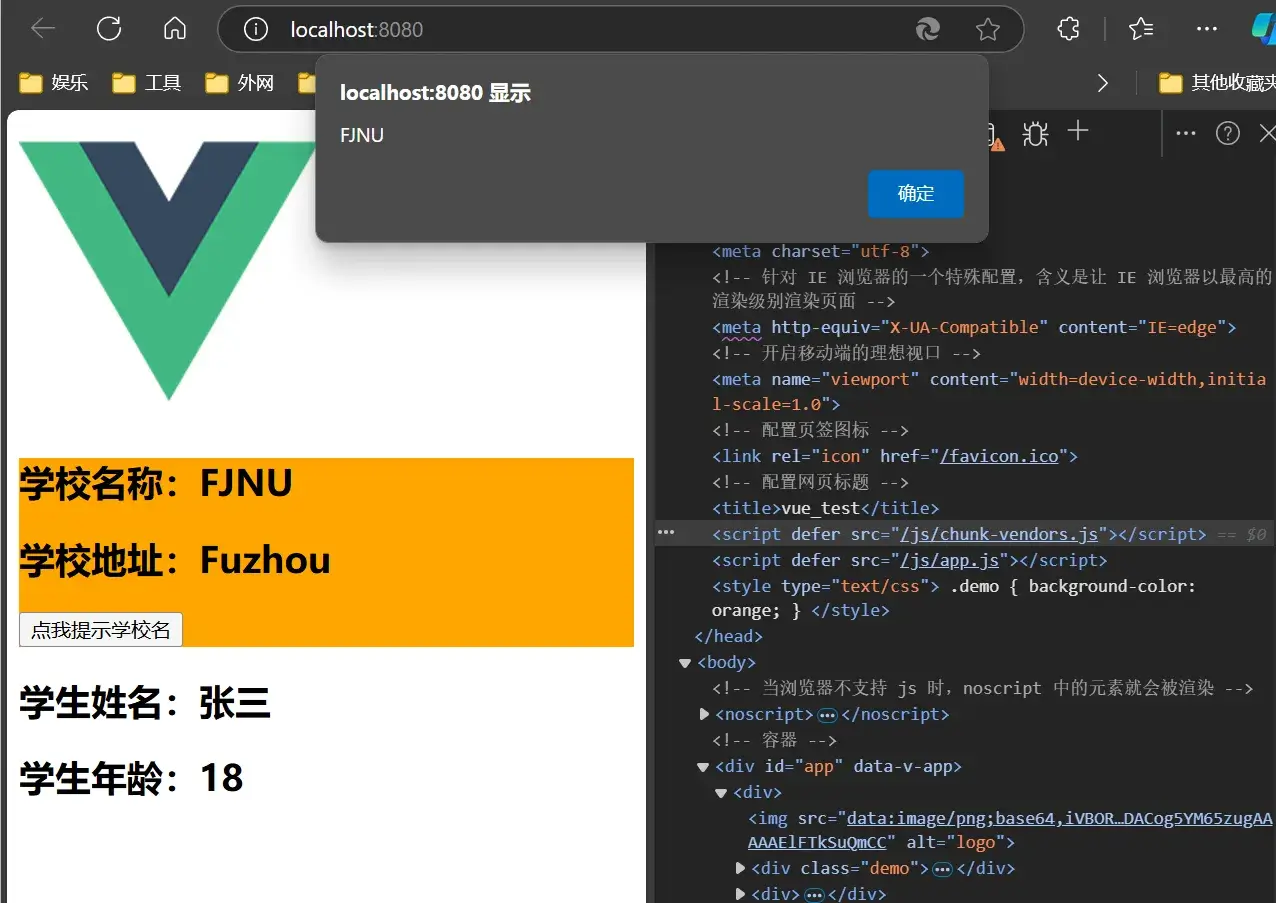
063 render 函数
为什么 main.js 里要用:
// 创建 Vue 实例对象 vm
new Vue({
el: '#app',
render: h => h(App),
})而不是:
new Vue({
    el: '#app',
    template: `<app></app>`
})
?这是因为 main.js 中引用的不是完整版的 Vue。
关于不同版本的 Vue:
vue.js与vue.runtime.xxx.js的区别:vue.js是完整版的 Vue,包含:核心功能 + 模板解析器。vue.runtime.xxx.js是运行版的 Vue,只包含:核心功能;没有模板解析器。
- 因为
vue.runtime.xxx.js没有模板解析器,所以不能使用template配置项,需要使用render函数接收到的createElement函数去指定具体内容。
064 修改默认配置
下列命令输出配置文件:
vue inspect > output.js也可通过 vue.config.js 来修改默认配置:
module.exports = {
    pages: {
        index: {
            // 入口
            entry: 'erc/XXX.js'
        }
    }
}
065 ref 属性
-
被用来给元素或子组件注册引用信息(id 的替代者)
-
应用在 html 标签上获取的是真实 DOM 元素,应用在组件标签上是组件实例对象(vc)
-
使用方式:
打标识:
<h1 ref="xxx">.....</h1>或<School ref="xxx"></School>获取:
this.$refs.xxx
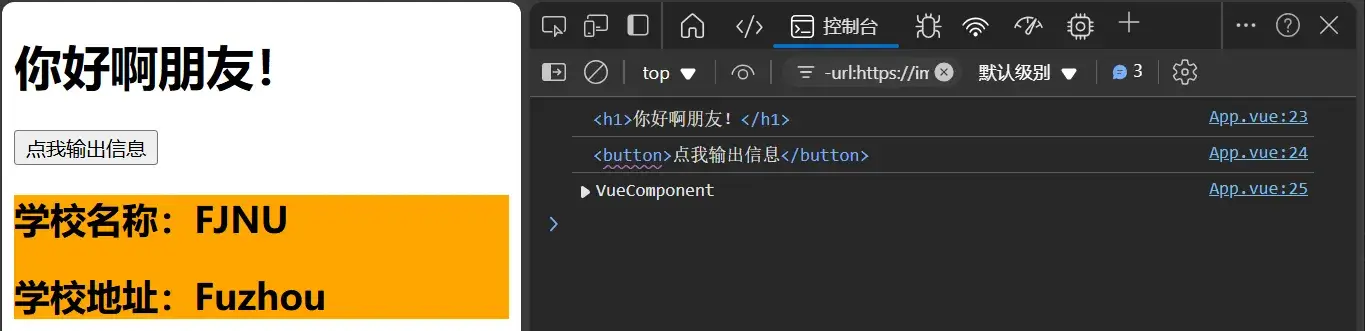
<template>
    <div>
        <h1 v-text="msg" ref="title"></h1>
        <button ref="btn" @click="showDOM">点我输出信息</button>
        <School ref="sch"/>
    </div>
</template>

<script>
// 引入 School 组件
import School from './components/School.vue';

export default {
    name: 'App',
    components: {School},
    data() {
        return {
            msg: '你好啊朋友!'
        }
    },
    methods: {
        showDOM() {
            console.log(this.$refs.title)
            console.log(this.$refs.btn)
            console.log(this.$refs.sch)
        }
    },
}
</script>
066 props 配置
配置项 props:
功能:让组件接收外部传过来的数据
-
传递数据:
vue <Demo name="xxx"/> -
接收数据:
第一种方式(只接收):
javascript props:['name']第二种方式(限制类型):
javascript props: {name: Number}第三种方式(限制类型、限制必要性、指定默认值):
javascript props: { name: { type: String, // 类型 required: true, // 必要性 default: '老王' // 默认值 } }
备注:props 是只读的,Vue 底层会监测你对 props 的修改,如果进行了修改,就会发出警告,若业务需求确实需要修改,那么请复制 props 的内容到 data 中一份,然后去修改 data 中的数据。
{% tabs Tabs_066 %}
<template>
    <div>
        <Student name="吉安娜" sex="女" :age="18"></Student>
        <hr>
        <Student name="古尔丹" sex="女" :age="30"></Student>
    </div>
</template>

<script>
import Student from './components/Student.vue'

export default {
    name: 'App',
    components: {
        Student
    }
}
</script><template>
<div>
<h1>{{ msg }}</h1>
<h2>学生姓名:{{ name }}</h2>
<h2>学生性别:{{ sex }}</h2>
<h2>学生年龄:{{ age }}</h2>
</div>
</template>
<script>
/* eslint-disable vue/multi-word-component-names */
export default {
name: 'Student',
data() {
console.log(this)
return {
msg: '你好,旅行者。'
}
},
props: ['name', 'age', 'sex']
}
</script>{% endtabs %}
067 mixin 混入
如果多个 Vue 组件要共用一个属性,可以使用 mixin 混入,将共用的部分用一个 js 文件存储。
export const hunhe = {
    methods: {
        showName() {
            alert(this.name)
        }
    },
    mounted() {
        console.log('嗬,你好!')
    }
}
局部混入
下面使用在 Student.vue 和 School.vue 文件下混入。
{% tabs Tabs0671 %}
<template>
    <div>
        <Student></Student>
        <hr>
        <School></School>
    </div>
</template>

<script>
import Student from './components/Student.vue'
import School from './components/School.vue'

export default {
    name: 'App',
    components: {
        Student,
        School
    }
}
</script><template>
<div>
<h2 @click="showName">学生名称:{{name}}</h2>
<h2>学生性别:{{sex}}</h2>
</div>
</template>
<script>
import {hunhe} from '../mixin.js'
/* eslint-disable vue/multi-word-component-names */
export default {
name: 'Student',
data() {
return {
name: '古尔丹',
sex: 'Male'
}
},
mixins: [hunhe]
}
</script><template>
<div>
<h2 @click="showName">学校名称:{{name}}</h2>
<h2>学校地址:{{address}}</h2>
</div>
</template>
<script>
import {hunhe} from '../mixin.js'
/* eslint-disable vue/multi-word-component-names */
export default {
name: 'Student',
data() {
return {
name: 'FJNU',
address: 'Fuzhou'
}
},
mixins: [hunhe]
}
</script>{% endtabs %}
全局混入
下面使用在 main.js 文件下混入。
{% tabs Tabs0672 %}
import Vue from 'vue'
import App from './App.vue'
import { hunhe } from './mixin'

Vue.config.productionTip = false
Vue.mixin(hunhe)

new Vue({
  render: h => h(App),
}).$mount('#app')<template>
<div>
<h2 @click="showName">学生名称:{{name}}</h2>
<h2>学生性别:{{sex}}</h2>
</div>
</template>
<script>
/* eslint-disable vue/multi-word-component-names */
export default {
name: 'Student',
data() {
return {
name: '古尔丹',
sex: 'Male'
}
},
mixins: [hunhe]
}
</script><template>
<div>
<h2 @click="showName">学校名称:{{name}}</h2>
<h2>学校地址:{{address}}</h2>
</div>
</template>
<script>
/* eslint-disable vue/multi-word-component-names */
export default {
name: 'Student',
data() {
return {
name: 'FJNU',
address: 'Fuzhou'
}
},
mixins: [hunhe]
}
</script>{% endtabs %}
068 插件
功能:用于增强 Vue。
本质:包含 install 方法的一个对象,install 的第一个参数是 Vue,第二个以后的参数是插件使用者传递的数据。
定义插件:
对象.install = function(Vue, options) {
    // 1.添加全局过滤器(这在 Vue3 中被弃用)
	Vue.filter(....)
	// 2.添加全局指令
	Vue.directive(....)
	// 3.配置全局混入(合)
	Vue.mixin(....)
	// 4.添加实例方法
	Vue.prototype.$myMethod = function(){...}
	Vue.prototype.$myProperty = xxxx
}使用插件:Vue.use()
{% tabs Tabs_068 %}
// 引入 Vue
import Vue from 'vue'
// 引入 App
import App from './App.vue'
// 引入插件
import plugins from './plugins'
// 关闭 Vue 的生产提示
Vue.config.productionTip = false

// 应用(使用)插件
Vue.use(plugins, 1, 2, 3)
// 创建 vm
new Vue({
	el: '#app',
	render: h => h(App)
})export default {
install(Vue, x, y, z) {
console.log(x, y, z)
// 全局过滤器
Vue.filter('mySlice', function (value) {
return value.slice(0, 4)
})
// 定义全局指令
Vue.directive('fbind', {
// 指令与元素成功绑定时(一上来)
bind(element, binding) {
element.value = binding.value
},
// 指令所在元素被插入页面时
inserted(element) {
element.focus()
},
// 指令所在的模板被重新解析时
update(element, binding) {
element.value = binding.value
}
})
// 定义混入
Vue.mixin({
data() {
return {
x: 100,
y: 200
}
},
})
// 给 Vue 原型上添加一个方法(vm 和 vc 就都能用了)
Vue.prototype.hello = () => { alert('你好啊') }
}
}<template>
<div>
<h2>学校名称:{{ name | mySlice }}</h2>
<h2>学校地址:{{ address }}</h2>
<button @click="test">点我测试一个hello方法</button>
</div>
</template>
<script>
/* eslint-disable vue/multi-word-component-names */
export default {
name: 'School',
data() {
return {
name: '尚硅谷atguigu',
address: '北京',
}
},
methods: {
test() {
this.hello()
}
},
}
</script><template>
<div>
<h2>学生姓名:{{ name }}</h2>
<h2>学生性别:{{ sex }}</h2>
<input type="text" v-fbind:value="name">
</div>
</template>
<script>
/* eslint-disable vue/multi-word-component-names */
export default {
name: 'Student',
data() {
return {
name: '张三',
sex: '男'
}
},
}
</script>{% endtabs %}
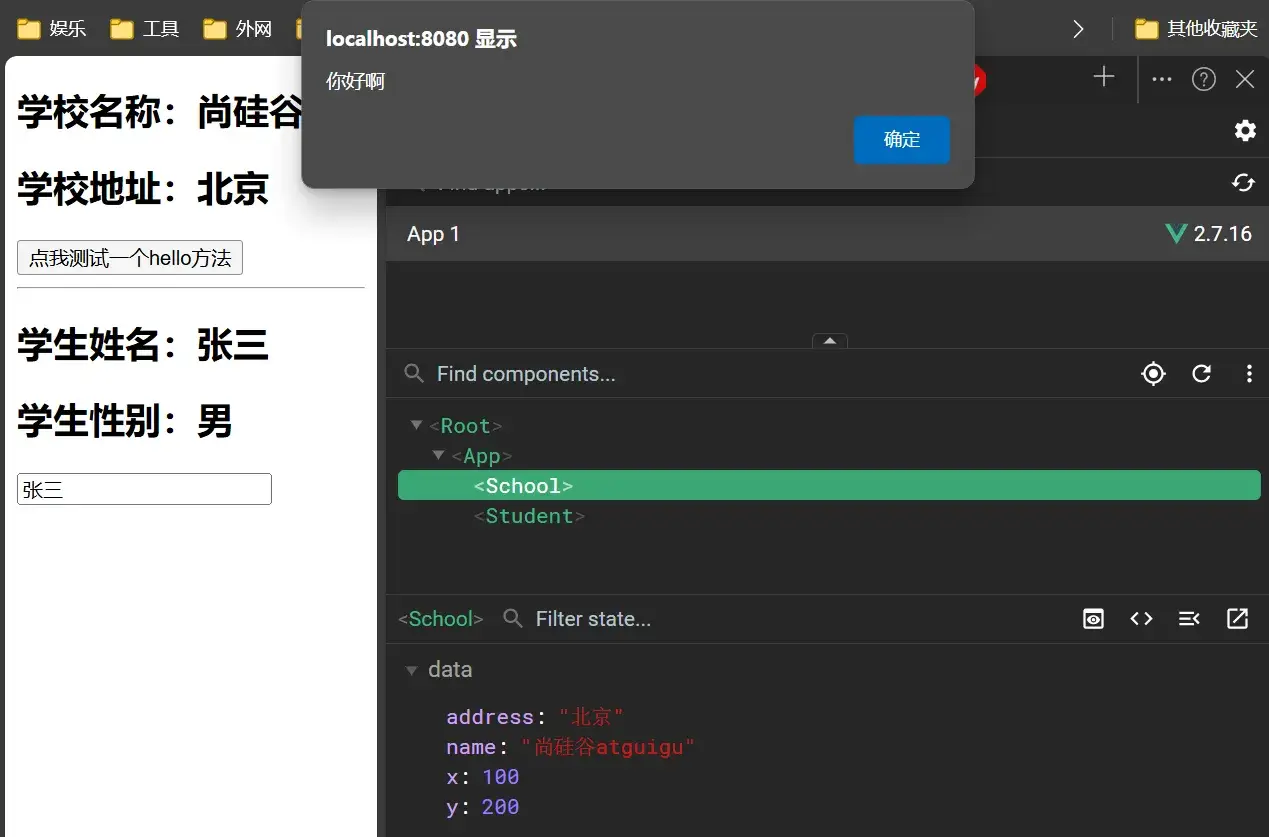
069 scoped 样式
<style lang="less" scoped> 可以设定样式语言为 css,scoped 可以设定样式作用范围在文件内。
{% tabs Tabs_068 %}
// 引入 Vue
import Vue from 'vue'
// 引入 App
import App from './App.vue'
// 关闭 Vue 的生产提示
Vue.config.productionTip = false

// 创建 vm
new Vue({
	el: '#app',
	render: h => h(App)
})<template>
<div class="demo">
<h2 class="school">学校名称:{{ name }}</h2>
<h2>学校地址:{{ address }}</h2>
</div>
</template>
<script>
/* eslint-disable vue/multi-word-component-names */
export default {
name: 'School',
data() {
return {
name: '河百带学',
address: '河北保定',
}
},
}
</script>
<style lang="less" scoped>
.demo {
background-color: orange;
.school {
font-size: larger;
}
}
</style><template>
<div class="demo">
<h2>学生姓名:{{ name }}</h2>
<h2>学生性别:{{ sex }}</h2>
</div>
</template>
<script>
/* eslint-disable vue/multi-word-component-names */
export default {
name: 'Student',
data() {
return {
name: '张三',
sex: '男'
}
},
}
</script>
<style lang="less" scoped>
.demo {
background-color: skyblue;
}
</style>{% endtabs %}
070-077 TodoList 案例
-
组件化编码流程
-
拆分静态组件:组件要按照功能点拆分,命名不要与 html 元素冲突
-
实现动态组件:考虑好数据的存放位置,数据是一个组件在用,还是一些组件在用:
- 一个组件在用:放在组件自身即可。
- 一些组件在用:放在他们共同的父组件上(状态提升)
- 实现交互:从绑定事件开始。
-
-
props 适用于:
- 父组件 ==> 子组件 通信
- 子组件 ==> 父组件 通信(要求父先给子一个函数)
- 使用
v-model时要切记:v-model绑定的值不能是props传过来的值,因为props是不可以修改的! props传过来的若是对象类型的值,修改对象中的属性时 Vue 不会报错,但不推荐这样做。
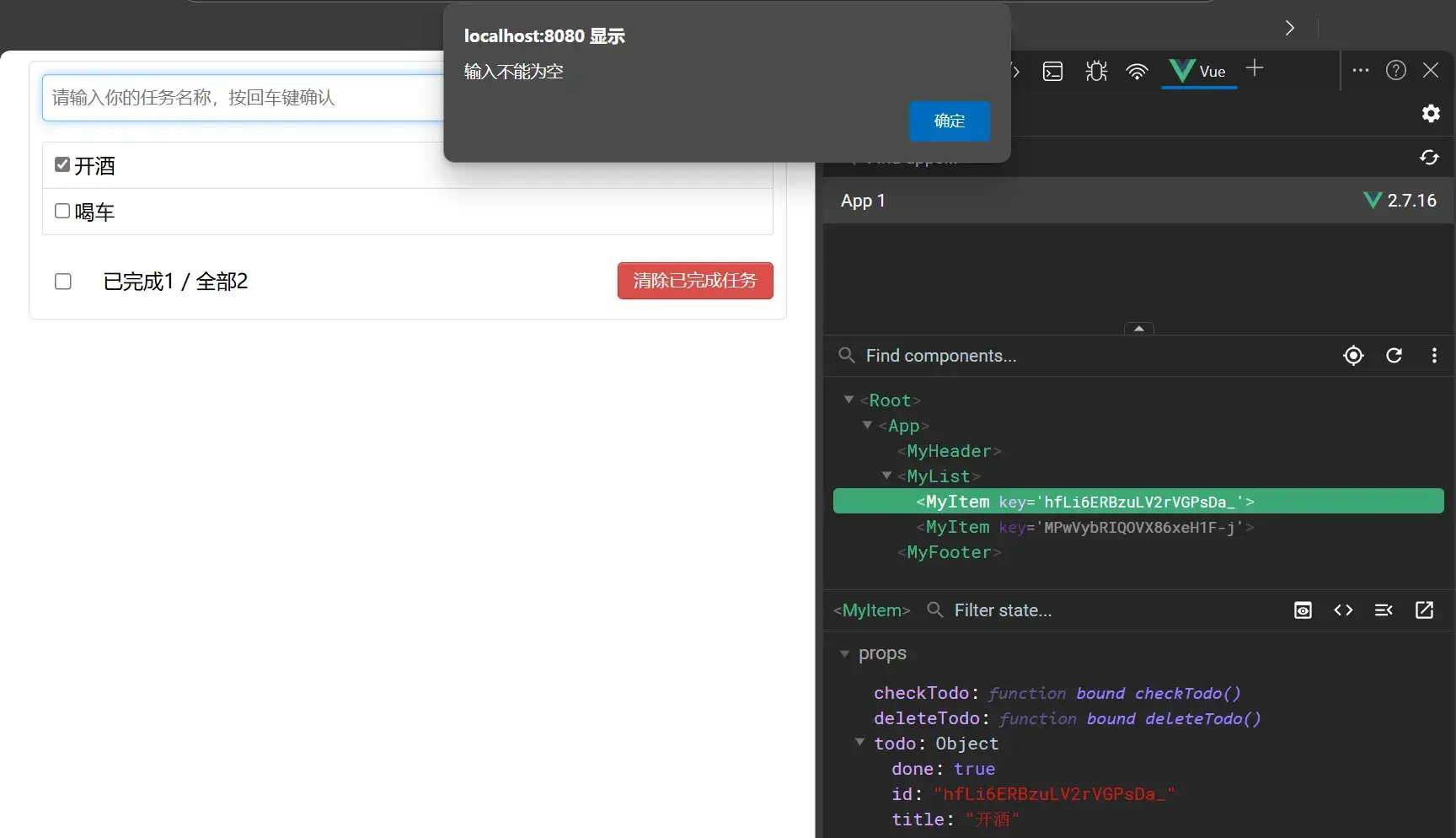
{% tabs Tabs_070 %}
- 父组件组织整个 TodoList 的结构。将所有数据存在
data()中的todos中。 - 处理
todos的相关函数也在整个父组件中。
<template>
	<div id="root">
		<div class="todo-container">
			<div class="todo-wrap">
				<MyHeader :addTodo="addTodo" />
				<MyList :todos="todos" :checkTodo="checkTodo" :deleteTodo="deleteTodo" />
				<MyFooter :todos="todos" :checkAllTodo="checkAllTodo" :clearAllTodo="clearAllTodo" />
			</div>
		</div>
	</div>
</template>

<script>
import MyHeader from './components/MyHeader'
import MyList from './components/MyList'
import MyFooter from './components/MyFooter.vue'

export default {
	name: 'App',
	components: { MyHeader, MyList, MyFooter },
	data() {
		return {
			// 由于 todos 是 MyHeader 组件和 MyFooter 组件都在使用,所以放在 App 中(状态提升)
			todos: [
				{ id: '001', title: '抽烟', done: true },
				{ id: '002', title: '喝酒', done: false },
				{ id: '003', title: '开车', done: true }
			]
		}
	},
	methods: {
		// 添加一个 todo
		addTodo(todoObj) {
			this.todos.unshift(todoObj)
		},
		// 勾选 or 取消勾选一个 todo
		checkTodo(id) {
			this.todos.forEach((todo) => {
				if (todo.id === id) todo.done = !todo.done
			})
		},
		// 删除一个 todo
		deleteTodo(id) {
			this.todos = this.todos.filter(todo => todo.id !== id)
		},
		// 全选 or 取消全选
		checkAllTodo(done) {
			this.todos.forEach((todo) => {
				todo.done = done
			})
		},
		// 清除所有已经完成的 todo
		clearAllTodo() {
			this.todos = this.todos.filter((todo) => {
				return !todo.done
			})
		}
	}
}
</script>

<style>
/*base*/
body {
	background: #fff;
}

.btn {
	display: inline-block;
	padding: 4px 12px;
	margin-bottom: 0;
	font-size: 14px;
	line-height: 20px;
	text-align: center;
	vertical-align: middle;
	cursor: pointer;
	box-shadow: inset 0 1px 0 rgba(255, 255, 255, 0.2), 0 1px 2px rgba(0, 0, 0, 0.05);
	border-radius: 4px;
}

.btn-danger {
	color: #fff;
	background-color: #da4f49;
	border: 1px solid #bd362f;
}

.btn-danger:hover {
	color: #fff;
	background-color: #bd362f;
}

.btn:focus {
	outline: none;
}

.todo-container {
	width: 600px;
	margin: 0 auto;
}

.todo-container .todo-wrap {
	padding: 10px;
	border: 1px solid #ddd;
	border-radius: 5px;
}
</style>-
使用
v-for创建若干todoObj,使得列表中有多个表项。 -
使用
props接收 App 传递过来的数据,实现组件之间的数据传递。
<template>
	<ul class="todo-main">
		<MyItem v-for="todoObj in todos" :key="todoObj.id" :todo="todoObj" :checkTodo="checkTodo"
			:deleteTodo="deleteTodo" />
	</ul>
</template>

<script>
import MyItem from './MyItem'

export default {
	name: 'MyList',
	components: { MyItem },
	// 声明接收 App 传递过来的数据,其中 todos 是自己用的,checkTodo 和 deleteTodo 是给子组件 MyItem 用的
	props: ['todos', 'checkTodo', 'deleteTodo']
}
</script>

<style scoped>
/*main*/
.todo-main {
	margin-left: 0px;
	border: 1px solid #ddd;
	border-radius: 2px;
	padding: 0px;
}

.todo-empty {
	height: 40px;
	line-height: 40px;
	border: 1px solid #ddd;
	border-radius: 2px;
	padding-left: 5px;
	margin-top: 10px;
}
</style><template>
<li>
<label>
<input type="checkbox" :checked="todo.done" @change="handleCheck(todo.id)"/>
<!-- 如下代码也能实现功能,但是不太推荐,因为有点违反原则,因为修改了 props -->
<!-- <input type="checkbox" v-model="todo.done"/> -->
<span>{{todo.title}}</span>
</label>
<button class="btn btn-danger" @click="handleDelete(todo.id)">删除</button>
</li>
</template>
<script>
export default {
name:'MyItem',
// 声明接收 todo、checkTodo、deleteTodo
props:['todo','checkTodo','deleteTodo'],
methods: {
// 勾选 or 取消勾选
handleCheck(id){
//通知 App 组件将对应的 todo 对象的 done 值取反
this.checkTodo(id)
},
// 删除
handleDelete(id){
if(confirm('确定删除吗?')){
// 通知 App 组件将对应的 todo 对象删除
this.deleteTodo(id)
}
}
},
}
</script>
<style scoped>
/*item*/
li {
list-style: none;
height: 36px;
line-height: 36px;
padding: 0 5px;
border-bottom: 1px solid #ddd;
}
li label {
float: left;
cursor: pointer;
}
li label li input {
vertical-align: middle;
margin-right: 6px;
position: relative;
top: -1px;
}
li button {
float: right;
display: none;
margin-top: 3px;
}
li:before {
content: initial;
}
li:last-child {
border-bottom: none;
}
li:hover{
background-color: #ddd;
}
li:hover button{
display: block;
}
</style><template>
<div class="todo-header">
<input type="text" placeholder="请输入你的任务名称,按回车键确认" v-model="title" @keyup.enter="add" />
</div>
</template>
<script>
import { nanoid } from 'nanoid'
export default {
name: 'MyHeader',
// 接收从 App 传递过来的 addTodo
props: ['addTodo'],
data() {
return {
// 收集用户输入的 title
title: ''
}
},
methods: {
add() {
// 校验数据
if (!this.title.trim()) return alert('输入不能为空')
// 将用户的输入包装成一个 todo 对象
const todoObj = { id: nanoid(), title: this.title, done: false }
// 通知 App 组件去添加一个 todo 对象
this.addTodo(todoObj)
// 清空输入
this.title = ''
}
},
}
</script>
<style scoped>
/*header*/
.todo-header input {
width: 560px;
height: 28px;
font-size: 14px;
border: 1px solid #ccc;
border-radius: 4px;
padding: 4px 7px;
}
.todo-header input:focus {
outline: none;
border-color: rgba(82, 168, 236, 0.8);
box-shadow: inset 0 1px 1px rgba(0, 0, 0, 0.075), 0 0 8px rgba(82, 168, 236, 0.6);
}
</style><template>
<div class="todo-footer" v-show="total">
<label>
<!-- <input type="checkbox" :checked="isAll" @change="checkAll"/> -->
<input type="checkbox" v-model="isAll"/>
</label>
<span>
<span>已完成{{doneTotal}}</span> / 全部{{total}}
</span>
<button class="btn btn-danger" @click="clearAll">清除已完成任务</button>
</div>
</template>
<script>
export default {
name:'MyFooter',
props:['todos','checkAllTodo','clearAllTodo'],
computed: {
//总数
total(){
return this.todos.length
},
//已完成数
doneTotal(){
//此处使用reduce方法做条件统计
/* const x = this.todos.reduce((pre,current)=>{
console.log('@',pre,current)
return pre + (current.done ? 1 : 0)
},0) */
//简写
return this.todos.reduce((pre,todo)=> pre + (todo.done ? 1 : 0) ,0)
},
//控制全选框
isAll:{
//全选框是否勾选
get(){
return this.doneTotal === this.total && this.total > 0
},
//isAll被修改时set被调用
set(value){
this.checkAllTodo(value)
}
}
},
methods: {
/* checkAll(e){
this.checkAllTodo(e.target.checked)
} */
//清空所有已完成
clearAll(){
this.clearAllTodo()
}
},
}
</script>
<style scoped>
/*footer*/
.todo-footer {
height: 40px;
line-height: 40px;
padding-left: 6px;
margin-top: 5px;
}
.todo-footer label {
display: inline-block;
margin-right: 20px;
cursor: pointer;
}
.todo-footer label input {
position: relative;
top: -1px;
vertical-align: middle;
margin-right: 5px;
}
.todo-footer button {
float: right;
margin-top: 5px;
}
</style>{% endtabs %}
078 浏览器本地存储
WebStorage 分为 SessionStorage 和 LocalStorage。
-
存储内容大小一般支持 5MB 左右(不同浏览器可能还不一样)
-
浏览器端通过
Window.sessionStorage和Window.localStorage属性来实现本地存储机制。 -
相关 API:
-
xxxxxStorage.setItem("key',"value");该方法接受一个键和值作为参数,会把键值对添加到存储中,如果键名存在,则更新其对应的值。
-
xxxxxStorage.getItem("person');该方法接受一个键名作为参数,返回键名对应的值。
-
xxxxxStorage.removeItem('key");该方法接受一个键名作为参数,并把该键名从存储中删除。
-
xxxxxStorage.clear();该方法会清空存储中的所有数据。
-
-
备注:
SesslonStorage存储的内容会随着浏览器窗口关闭而消失。Localstorage存储的内容,需要手动清除才会消失。xxxxxstorage.getItem(xxx)如果xxx对应的value获取不到,那么getltem的返回值是null。JSON.parse(null)的结果依然是null。
| 方法 | 说明 |
|---|---|
setItem(key, value) | 保存一对键值对数据。值会被转换为字符串存储。 |
getItem(key) | 获取指定键的值。如果键不存在,返回 null。 |
removeItem(key) | 删除指定键的键值对。 |
clear() | 清空存储中的所有数据。 |
key(index) | 根据索引获取存储中的键名。索引从 0 开始。如果索引超出范围,返回 null。 |
length | 返回存储中键值对的数量(作为属性,而非方法)。 |
079 TodoList 本地存储
在 070-077 的 TodoList 案例下的 App.vue,给 todos 修改 data()(读取 localStorage 载入到 todos 中)和 watch(深度监视,修改 todos 的值时同时修改 localStorage 里的值)。
import MyHeader from './components/MyHeader'
import MyList from './components/MyList'
import MyFooter from './components/MyFooter.vue'

export default {
	name: 'App',
	components: { MyHeader, MyList, MyFooter },
	data() {
		return {
			// 由于 todos 是 MyHeader 组件和 MyFooter 组件都在使用,所以放在 App 中(状态提升)
			todos: JSON.parse(localStorage.getItem('todos')) || []
		}
	},
	methods: {
		...
	},
	watch: {
		todos: {
			handler(value) {
				console.log('todos');
				localStorage.setItem('todos', JSON.stringify(value));
			},
			deep: true
		}
	}

}
080-082 组件自定义事件-绑定-解绑-总结
组件的自定义事件:
-
一种组件间通信的方式,适用于:子组件 =>父组件
-
使用场景:A 是父组件,B 是子组件,B 想给 A 传数据,那么就要在 A 中给 B 绑定自定义事件(事件的回调在 A 中)
-
绑定自定义事件:
-
第一种方式,在父组件中:
<Demo @atguigu="test"/>或<Demo v-on:atguigu="test"/> -
第二种方式,在父组件中:
vue <Demo ref="demo"/> ... mounted() { this.$refs.xxx.$on('atguigu',this.test) } -
若想让自定义事件只能触发一次,可以使用
once修饰符,或$once方法。
-
-
触发自定义事件:
this.$emit('atguigu', 数据) -
解绑自定义事件:
this.$off('atguigu') -
组件上也可以绑定原生 DOM 事件,需要使用 native 修饰符
-
注意:通过
this.\$refs.x.\$on('atguigu', 回调)绑定自定义事件时,回调要么配置在 methods 中,要么用箭头函数,否则 this 指向会出问题!
{% tabs Tabs_080 %}
<template>
	<div class="app">
		<h1>{{ msg }},学生姓名是:{{ studentName }}</h1>
		<!-- 通过父组件给子组件传递函数类型的 props 实现:子给父传递数据 -->
		<School :getSchoolName="getSchoolName"/>
		<!-- 通过父组件给子组件绑定一个自定义事件实现:子给父传递数据(第一种写法:使用 @ 或 v-on) -->
		<Student v-on:atguigu="getStudentName" @demo="m1"/>
		<!-- <Student @atguigu="getStudentName"/> -->
		<!-- 通过父组件给子组件绑定一个自定义事件实现:子给父传递数据(第二种写法:使用 ref) -->
		<!-- <Student ref="student"/> -->
	</div>
</template>

<script>
import School from './components/School.vue';
import Student from './components/Student.vue';

export default {
	name: 'App',
	components: { School, Student },
	data() {
		return {
			msg: '你好。',
			studentName: ''
		}
	},
	methods: {
		getSchoolName(name) {
			console.log('App 收到学校名:', name)
		},
		getStudentName(name, ...params) {
			this.studentName = name
			console.log('getStudentName() 被调用了!', name, params)
		},
		m1() {
			console.log('demo 事件被触发了!')
		}
	},
	mounted() {
		// 绑定自定义事件
		// this.$refs.student.$on('atguigu', this.getStudentName)
		// 绑定自定义事件(一次性)
		// this.$refs.student.$once('atguigu', this.getStudentName)
	}
}
</script>

<style>
.app {
	padding: 5px;
	background-color: gray;
}
</style><template>
<div class="school">
<h2>学校名称:{{ name }}</h2>
<h2>学校地址:{{ address }}</h2>
<button @click="sendSchoolName">把学校名给 App</button>
</div>
</template>
<script>
/* eslint-disable vue/multi-word-component-names */
export default {
name: 'School',
props: ['getSchoolName'],
data() {
return {
name: 'FJNU',
address: 'Fuzhou'
}
},
methods: {
sendSchoolName() {
this.getSchoolName(this.name)
}
}
}
</script>
<style scoped>
.school {
padding: 5px;
background-color: skyblue;
}
</style><template>
<div class="student">
<h2>学生姓名:{{ name }}</h2>
<h2>学生性别:{{ sex }}</h2>
<h2>当前求和为:{{ number }}</h2>
<button @click="add">点我 number++</button>
<button @click="sendStudentName">把学生名给 App</button>
<button @click="unbind">解绑 atguigu 事件</button>
<button @click="death">销毁当前 Student 组件的实例(vc)</button>
</div>
</template>
<script>
/* eslint-disable vue/multi-word-component-names */
export default {
name: 'Student',
data() {
return {
name: '张三',
sex: '男',
number: 0
}
},
methods: {
add() {
console.log('add() 被调用了!')
this.number++
},
sendStudentName() {
// 触发 Student 组件实例上的 atguigu 事件
this.$emit('atguigu', this.name, 123, 456, 789)
this.$emit('demo')
},
unbind() {
// 解绑一个自定义事件
// this.$off('atguigu')
// 解绑多个自定义事件
// this.$off(['atguigu', 'demo'])
// 解绑所有自定义事件
this.$off()
},
death() {
// 销毁了当前 Student 组件的实例,销毁后所有 Student 实例的自定义事件全都不奏效。
this.$destroy()
}
}
}
</script>
<style lang="less" scoped>
.student {
padding: 5px;
margin-top: 20px;
background-color: pink;
}
</style>{% endtabs %}
083 TodoList 案例-自定义事件
对于子对象向父对象通过调用函数传递数据,不再使用 props,而是使用 this.$emit()(以触发自定义事件)。
父对象不再写成 :checkAllTodo="checkAllTodo" 的形式,而是改为 @checkAllTodo="checkAllTodo"(以绑定自定义事件)。
{% tabs Tabs_083 %}
<template>
	<div id="root">
		<div class="todo-container">
			<div class="todo-wrap">
				<MyHeader @addTodo="addTodo" />
				<MyList :todos="todos" :checkTodo="checkTodo" :deleteTodo="deleteTodo" />
				<MyFooter :todos="todos" @checkAllTodo="checkAllTodo" @clearAllTodo="clearAllTodo" />
			</div>
		</div>
	</div>
</template>

<script>
import MyHeader from './components/MyHeader'
import MyList from './components/MyList'
import MyFooter from './components/MyFooter.vue'

export default {
	name: 'App',
	components: { MyHeader, MyList, MyFooter },
	data() {
		return {
			// 由于 todos 是 MyHeader 组件和 MyFooter 组件都在使用,所以放在 App 中(状态提升)
			todos: [
				{ id: '001', title: '抽烟', done: true },
				{ id: '002', title: '喝酒', done: false },
				{ id: '003', title: '开车', done: true }
			]
		}
	},
	methods: {
		// 添加一个 todo
		addTodo(todoObj) {
			this.todos.unshift(todoObj)
		},
		// 勾选 or 取消勾选一个 todo
		checkTodo(id) {
			this.todos.forEach((todo) => {
				if (todo.id === id) todo.done = !todo.done
			})
		},
		// 删除一个 todo
		deleteTodo(id) {
			this.todos = this.todos.filter(todo => todo.id !== id)
		},
		// 全选 or 取消全选
		checkAllTodo(done) {
			this.todos.forEach((todo) => {
				todo.done = done
			})
		},
		// 清除所有已经完成的 todo
		clearAllTodo() {
			this.todos = this.todos.filter((todo) => {
				return !todo.done
			})
		}
	}
}
</script>

<style>
/*base*/
body {
	background: #fff;
}

.btn {
	display: inline-block;
	padding: 4px 12px;
	margin-bottom: 0;
	font-size: 14px;
	line-height: 20px;
	text-align: center;
	vertical-align: middle;
	cursor: pointer;
	box-shadow: inset 0 1px 0 rgba(255, 255, 255, 0.2), 0 1px 2px rgba(0, 0, 0, 0.05);
	border-radius: 4px;
}

.btn-danger {
	color: #fff;
	background-color: #da4f49;
	border: 1px solid #bd362f;
}

.btn-danger:hover {
	color: #fff;
	background-color: #bd362f;
}

.btn:focus {
	outline: none;
}

.todo-container {
	width: 600px;
	margin: 0 auto;
}

.todo-container .todo-wrap {
	padding: 10px;
	border: 1px solid #ddd;
	border-radius: 5px;
}
</style><template>
<div class="todo-header">
<input type="text" placeholder="请输入你的任务名称,按回车键确认" v-model="title" @keyup.enter="add" />
</div>
</template>
<script>
import { nanoid } from 'nanoid'
export default {
name: 'MyHeader',
data() {
return {
// 收集用户输入的 title
title: ''
}
},
methods: {
add() {
// 校验数据
if (!this.title.trim()) return alert('输入不能为空')
// 将用户的输入包装成一个 todo 对象
const todoObj = { id: nanoid(), title: this.title, done: false }
// 通知 App 组件去添加一个 todo 对象
this.$emit('addTodo', todoObj)
// this.addTodo(todoObj)
// 清空输入
this.title = ''
}
},
}
</script>
<style scoped>
/*header*/
.todo-header input {
width: 560px;
height: 28px;
font-size: 14px;
border: 1px solid #ccc;
border-radius: 4px;
padding: 4px 7px;
}
.todo-header input:focus {
outline: none;
border-color: rgba(82, 168, 236, 0.8);
box-shadow: inset 0 1px 1px rgba(0, 0, 0, 0.075), 0 0 8px rgba(82, 168, 236, 0.6);
}
</style><template>
<div class="todo-footer" v-show="total">
<label>
<!-- <input type="checkbox" :checked="isAll" @change="checkAll"/> -->
<input type="checkbox" v-model="isAll"/>
</label>
<span>
<span>已完成{{doneTotal}}</span> / 全部{{total}}
</span>
<button class="btn btn-danger" @click="clearAll">清除已完成任务</button>
</div>
</template>
<script>
export default {
name:'MyFooter',
props:['todos','checkAllTodo','clearAllTodo'],
computed: {
//总数
total(){
return this.todos.length
},
//已完成数
doneTotal(){
//此处使用reduce方法做条件统计
/* const x = this.todos.reduce((pre,current)=>{
console.log('@',pre,current)
return pre + (current.done ? 1 : 0)
},0) */
//简写
return this.todos.reduce((pre,todo)=> pre + (todo.done ? 1 : 0) ,0)
},
//控制全选框
isAll:{
//全选框是否勾选
get(){
return this.doneTotal === this.total && this.total > 0
},
//isAll被修改时set被调用
set(value){
// this.checkAllTodo(value)
this.$emit('checkAllTodo', value)
}
}
},
methods: {
/* checkAll(e){
this.checkAllTodo(e.target.checked)
} */
//清空所有已完成
clearAll(){
// this.clearAllTodo()
this.$emit('clearAllTodo')
}
},
}
</script>
<style scoped>
/*footer*/
.todo-footer {
height: 40px;
line-height: 40px;
padding-left: 6px;
margin-top: 5px;
}
.todo-footer label {
display: inline-block;
margin-right: 20px;
cursor: pointer;
}
.todo-footer label input {
position: relative;
top: -1px;
vertical-align: middle;
margin-right: 5px;
}
.todo-footer button {
float: right;
margin-top: 5px;
}
</style><template>
<ul class="todo-main">
<MyItem v-for="todoObj in todos" :key="todoObj.id" :todo="todoObj" :checkTodo="checkTodo"
:deleteTodo="deleteTodo" />
</ul>
</template>
<script>
import MyItem from './MyItem'
export default {
name: 'MyList',
components: { MyItem },
// 声明接收 App 传递过来的数据,其中 todos 是自己用的,checkTodo 和 deleteTodo 是给子组件 MyItem 用的
props: ['todos', 'checkTodo', 'deleteTodo']
}
</script>
<style scoped>
/*main*/
.todo-main {
margin-left: 0px;
border: 1px solid #ddd;
border-radius: 2px;
padding: 0px;
}
.todo-empty {
height: 40px;
line-height: 40px;
border: 1px solid #ddd;
border-radius: 2px;
padding-left: 5px;
margin-top: 10px;
}
</style><template>
<li>
<label>
<input type="checkbox" :checked="todo.done" @change="handleCheck(todo.id)"/>
<!-- 如下代码也能实现功能,但是不太推荐,因为有点违反原则,因为修改了 props -->
<!-- <input type="checkbox" v-model="todo.done"/> -->
<span>{{todo.title}}</span>
</label>
<button class="btn btn-danger" @click="handleDelete(todo.id)">删除</button>
</li>
</template>
<script>
export default {
name:'MyItem',
// 声明接收 todo、checkTodo、deleteTodo
props:['todo','checkTodo','deleteTodo'],
methods: {
// 勾选 or 取消勾选
handleCheck(id){
//通知 App 组件将对应的 todo 对象的 done 值取反
this.checkTodo(id)
},
// 删除
handleDelete(id){
if(confirm('确定删除吗?')){
// 通知 App 组件将对应的 todo 对象删除
this.deleteTodo(id)
}
}
},
}
</script>
<style scoped>
/*item*/
li {
list-style: none;
height: 36px;
line-height: 36px;
padding: 0 5px;
border-bottom: 1px solid #ddd;
}
li label {
float: left;
cursor: pointer;
}
li label li input {
vertical-align: middle;
margin-right: 6px;
position: relative;
top: -1px;
}
li button {
float: right;
display: none;
margin-top: 3px;
}
li:before {
content: initial;
}
li:last-child {
border-bottom: none;
}
li:hover{
background-color: #ddd;
}
li:hover button{
display: block;
}
</style>{% endtabs %}
084-085 全局事件总线
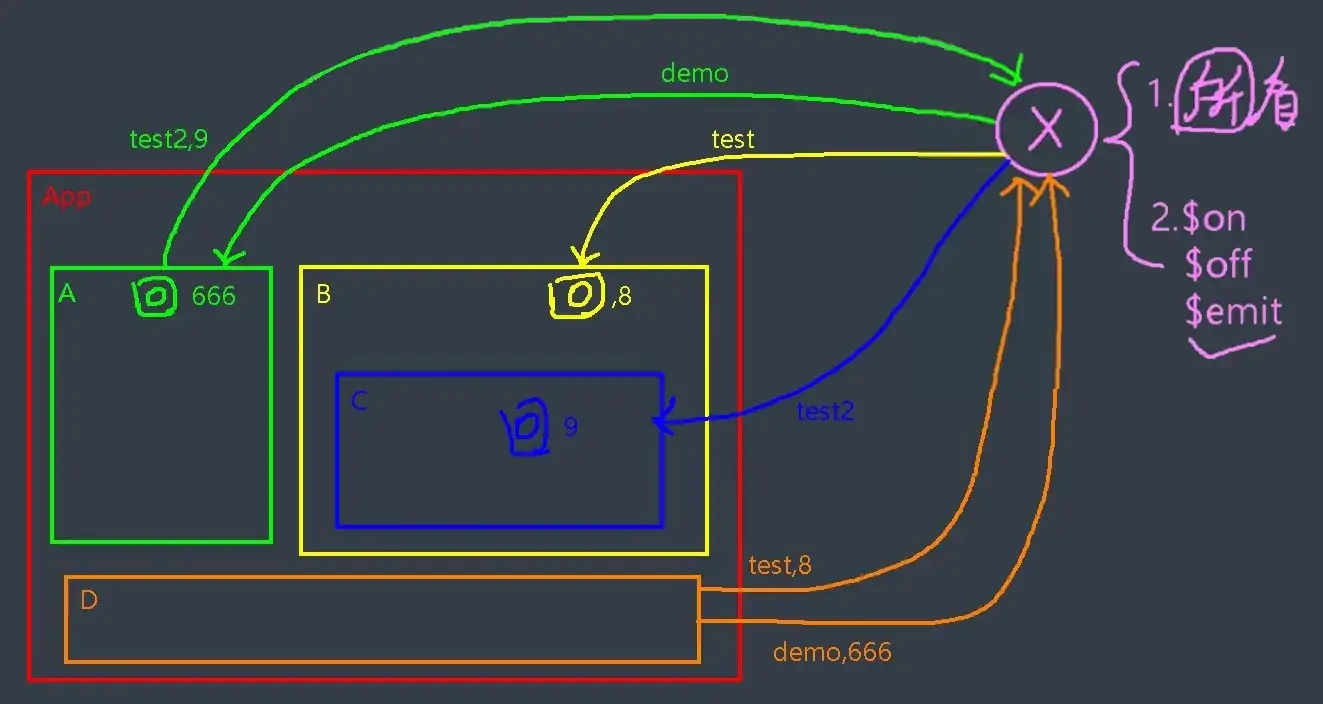
上图展示了全局事件总线(X)的示意图,从而实现各个组件间相互通信。X 应满足:
- 所有组件都能访问到
- 支持:
$on、$off、$emit
{% tabs Tabs_084 %}
// 引入 Vue
import Vue from 'vue'
// 引入 App
import App from './App.vue'
// 关闭 Vue 的生产提示
Vue.config.productionTip = false

// 创建 vm
new Vue({
	el: '#app',
	render: h => h(App),
	beforeCreate() {
		Vue.prototype.$bus = this;  // 安装全局事件总线
	}
})<template>
<div>
<Student></Student>
<hr>
<School></School>
</div>
</template>
<script>
import Student from './components/Student.vue'
import School from './components/School.vue'
export default {
name: 'App',
components: {
Student,
School
}
}
</script><template>
<div class="demo">
<h2 class="school">学校名称:{{ name }}</h2>
<h2>学校地址:{{ address }}</h2>
</div>
</template>
<script>
/* eslint-disable vue/multi-word-component-names */
export default {
name: 'School',
data() {
return {
name: '河百带学',
address: '河北保定',
}
},
mounted() {
//通过$on监听父组件发送的数据
this.$bus.$on('getStudentName', (name) => {
console.log(`我是 School 组件,收到了数据 ${name}`)
})
}
}
</script>
<style lang="less" scoped>
.demo {
background-color: orange;
.school {
font-size: larger;
}
}
</style><template>
<div class="demo">
<h2>学生姓名:{{ name }}</h2>
<h2>学生性别:{{ sex }}</h2>
<button @click="sendStudentName">把学生名给 School 组件</button>
</div>
</template>
<script>
/* eslint-disable vue/multi-word-component-names */
export default {
name: 'Student',
data() {
return {
name: '张三',
sex: '男'
}
},
methods: {
sendStudentName() {
//通过 this.$emit 向父组件发送数据
this.$bus.$emit('getStudentName', this.name)
}
}
}
</script>
<style lang="less" scoped>
.demo {
background-color: skyblue;
}
</style>{% endtabs %}
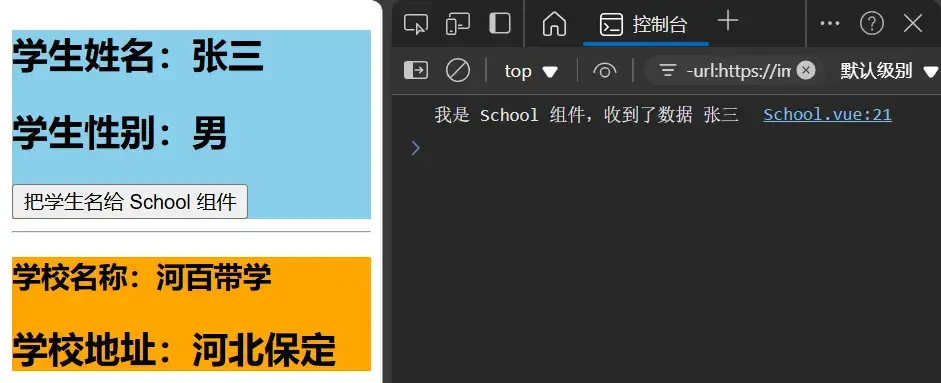
全局事件总线(GlobalEventBus)
-
一种组件间通信的方式,适用于任意组件间通信。
-
安装全局事件总线:
javascript new Vue({ ..... beforeCreate(){ Vue.prototype.$bus=this //安装全局事件总线,$bus 就是当前应用的 vm }, ...... }) -
使用事件总线:
-
接收数据:A 组件想接收数据,则在 A 组件中给
$bus绑定自定义事件,事件的回调留在 A 组件自身。javascript methods() { demo(data){......} } mounted() { this.$bus.$on('xxxx',this.demo) } -
提供数据:
this.$bus.$emit('xxxx', 数据)
-
-
最好在
beforeDestroy()钩子中,用$off去解绑当前组件所用到的事件。
086 TodoList 案例-事件总线
对于父传子:props,对于子传父:自定义事件。其余情况,可使用全局事件总线。
这里将 TodoList 案例添加事件总线,实现 App.vue 和 MyItem.vue 间的消息传递。
{% tabs Tabs_086 %}
// 引入 Vue
import Vue from 'vue'
// 引入 App
import App from './App.vue'
// 关闭 Vue 的生产提示
Vue.config.productionTip = false

// 创建 vm
new Vue({
	el: '#app',
	render: h => h(App),
	beforeCreate() {
		Vue.prototype.$bus = this;  // 安装全局事件总线
	}
})<template>
<div id="root">
<div class="todo-container">
<div class="todo-wrap">
<MyHeader @addTodo="addTodo" />
<MyList :todos="todos" :checkTodo="checkTodo" :deleteTodo="deleteTodo" />
<MyFooter :todos="todos" @checkAllTodo="checkAllTodo" @clearAllTodo="clearAllTodo" />
</div>
</div>
</div>
</template>
<script>
import MyHeader from './components/MyHeader'
import MyList from './components/MyList'
import MyFooter from './components/MyFooter.vue'
export default {
name: 'App',
components: { MyHeader, MyList, MyFooter },
data() {
mounted() {
this.$bus.$on('checkTodo', this.checkTodo)
this.$bus.$on('deleteTodo', this.deleteTodo)
},
beforeDestroy() {
this.$bus.$off('checkTodo', this.checkTodo)
this.$bus.$off('deleteTodo', this.deleteTodo)
}
...
}
...<template>
<li>
<label>
<input type="checkbox" :checked="todo.done" @change="handleCheck(todo.id)"/>
<!-- 如下代码也能实现功能,但是不太推荐,因为有点违反原则,因为修改了 props -->
<!-- <input type="checkbox" v-model="todo.done"/> -->
<span>{{todo.title}}</span>
</label>
<button class="btn btn-danger" @click="handleDelete(todo.id)">删除</button>
</li>
</template>
<script>
export default {
name:'MyItem',
// 声明接收 todo
props:['todo'],
methods: {
// 勾选 or 取消勾选
handleCheck(id){
//通知 App 组件将对应的 todo 对象的 done 值取反
// this.checkTodo(id)
this.$bus.$emit('checkTodo', id)
},
// 删除
handleDelete(id){
if(confirm('确定删除吗?')){
// 通知 App 组件将对应的 todo 对象删除
// this.deleteTodo(id)
this.$bus.$emit('deleteTodo', id)
}
}
},
}
</script>
...{% endtabs %}
087 消息订阅与发布-pubsub
与现实生活类比:
{% div subfields %}
{% div subfield %}
消息订阅与发布
- 订阅消息:消息名
- 发布消息:消息内容
{% enddiv %}
{% div subfield %}
报纸订阅与发布
- 订阅报纸:住址
- 邮递员送报纸:报纸
{% enddiv %}
{% enddiv %}
这一设计思想是原生 JS 所没有的,需要借助第三方库 pubsub-js。
npm install pubsub-js{% tabs Tabs_087 %}
<template>
	<div class="demo">
		<h2 class="school">学校名称:{{ name }}</h2>
		<h2>学校地址:{{ address }}</h2>
	</div>
</template>

<script>
import pubsub from 'pubsub-js'
/* eslint-disable vue/multi-word-component-names */
export default {
	name: 'School',
	data() {
		return {
			name: '河百带学',
			address: '河北保定',
		}
	},
    methods: {
        demo(msgName, data) {
            console.log(msgName, data)
        }
    },
    mounted() {
        this.pubId = pubsub.subscribe('hello', this.demo)
    },
    beforeDestroy() {
        pubsub.unsubscribe(this.pubId)
    }
}
</script>

<style lang="less" scoped>
	.demo {
		background-color: orange;
		.school {
			font-size: larger;
		}
	}
</style><template>
<div class="demo">
<h2>学生姓名:{{ name }}</h2>
<h2>学生性别:{{ sex }}</h2>
<button @click="sendStudentName">把学生名给 School 组件</button>
</div>
</template>
<script>
import pubsub from 'pubsub-js'
/* eslint-disable vue/multi-word-component-names */
export default {
name: 'Student',
data() {
return {
name: '张三',
sex: '男'
}
},
methods: {
sendStudentName() {
pubsub.publish('hello', this.name)
}
}
}
</script>
<style lang="less" scoped>
.demo {
background-color: skyblue;
}
</style>{% endtabs %}
原课程说全局事件总线更好(同样能够实现任意组件间通信),因为 Vue 自带。
消息订阅与发布(pubsub)
-
一种组件间通信的方式,适用于任意组件间通信。
-
使用步骤:
- 安装
pubsub:npm i pubsub-js - 引入:
import pubsub from 'pubsub-js'
- 安装
-
接收数据(需要数据的地方订阅数据):A 组件想接收数据,则在 A 组件中订阅消息,订阅的回调留在 A 组件自身。
javascript methods() { fdemo(data){......} } ...... mounted() { this.pid = pubsub.subscribe('xxx',this.demo) // 订阅消息 } -
提供数据:
pubsub.publish('xxx', 数据) -
最好在
beforeDestroy钩子中,用pubsub.unsubscribe(pid)去取消订阅。
088 TodoList 案例-pubsub
{% tabs Tabs_088 %}
<script>
import pubsub from 'pubsub-js'
import MyHeader from './components/MyHeader'
import MyList from './components/MyList'
import MyFooter from './components/MyFooter.vue'

export default {
	name: 'App',
	components: { MyHeader, MyList, MyFooter },
	data() {
		return {
			// 由于 todos 是 MyHeader 组件和 MyFooter 组件都在使用,所以放在 App 中(状态提升)
			todos: [
				{ id: '001', title: '抽烟', done: true },
				{ id: '002', title: '喝酒', done: false },
				{ id: '003', title: '开车', done: true }
			]
		}
	},
	methods: {
		// 添加一个 todo
		addTodo(todoObj) {
			this.todos.unshift(todoObj)
		},
		// 勾选 or 取消勾选一个 todo
		checkTodo(id) {
			this.todos.forEach((todo) => {
				if (todo.id === id) todo.done = !todo.done
			})
		},
		// 删除一个 todo
		deleteTodo(_, id) {
			this.todos = this.todos.filter(todo => todo.id !== id)
		},
		// 全选 or 取消全选
		checkAllTodo(done) {
			this.todos.forEach((todo) => {
				todo.done = done
			})
		},
		// 清除所有已经完成的 todo
		clearAllTodo() {
			this.todos = this.todos.filter((todo) => {
				return !todo.done
			})
		}
	},
	mounted() {
		this.$bus.$on('checkTodo', this.checkTodo)
		this.pid = pubsub.subscribe('deleteTodo', this.deleteTodo)
	},
	beforeDestroy() {
		this.$bus.$off('checkTodo', this.checkTodo)
		pubsub.unsubscribe(this.pid)
	}
}
</script><script>
import pubsub from 'pubsub-js'
export default {
name: 'MyItem',
// 声明接收 todo
props: ['todo'],
methods: {
// 勾选 or 取消勾选
handleCheck(id) {
//通知 App 组件将对应的 todo 对象的 done 值取反
// this.checkTodo(id)
this.$bus.$emit('checkTodo', id)
},
// 删除
handleDelete(id) {
if (confirm('确定删除吗?')) {
// 通知 App 组件将对应的 todo 对象删除
// this.deleteTodo(id)
// this.$bus.$emit('deleteTodo', id)
pubsub.publish('deleteTodo', id)
}
}
},
}
</script>{% endtabs %}
089 TodoList 案例-编辑
{% tabs Tabs_089 %}
<template>
	<div id="root">
		<div class="todo-container">
			<div class="todo-wrap">
				<MyHeader @addTodo="addTodo" />
				<MyList :todos="todos" :checkTodo="checkTodo" :deleteTodo="deleteTodo" />
				<MyFooter :todos="todos" @checkAllTodo="checkAllTodo" @clearAllTodo="clearAllTodo" />
			</div>
		</div>
	</div>
</template>

<script>
import pubsub from 'pubsub-js'
import MyHeader from './components/MyHeader'
import MyList from './components/MyList'
import MyFooter from './components/MyFooter.vue'

export default {
	name: 'App',
	components: { MyHeader, MyList, MyFooter },
	data() {
		return {
			// 由于 todos 是 MyHeader 组件和 MyFooter 组件都在使用,所以放在 App 中(状态提升)
			todos: [
				{ id: '001', title: '抽烟', done: true },
				{ id: '002', title: '喝酒', done: false },
				{ id: '003', title: '开车', done: true }
			]
		}
	},
	methods: {
		// 添加一个 todo
		addTodo(todoObj) {
			this.todos.unshift(todoObj)
		},
		// 勾选 or 取消勾选一个 todo
		checkTodo(id) {
			this.todos.forEach((todo) => {
				if (todo.id === id) todo.done = !todo.done
			})
		},
		// 删除一个 todo
		deleteTodo(_, id) {
			this.todos = this.todos.filter(todo => todo.id !== id)
		},
		// 编辑
		updateTodo(id, title) {
			this.todos.forEach((todo) => {
				if (todo.id === id) todo.title = title
			})
		},
		// 全选 or 取消全选
		checkAllTodo(done) {
			this.todos.forEach((todo) => {
				todo.done = done
			})
		},
		// 清除所有已经完成的 todo
		clearAllTodo() {
			this.todos = this.todos.filter((todo) => {
				return !todo.done
			})
		}
	},
	mounted() {
		this.$bus.$on('checkTodo', this.checkTodo)
		this.$bus.$on('updateTodo', this.updateTodo)
		this.pid = pubsub.subscribe('deleteTodo', this.deleteTodo)
	},
	beforeDestroy() {
		this.$bus.$off('checkTodo', this.checkTodo)
		this.$bus.$off('updateTodo', this.updateTodo)
		pubsub.unsubscribe(this.pid)
	}
}
</script>

<style>
/*base*/
body {
	background: #fff;
}

.btn {
	display: inline-block;
	padding: 4px 12px;
	margin-bottom: 0;
	font-size: 14px;
	line-height: 20px;
	text-align: center;
	vertical-align: middle;
	cursor: pointer;
	box-shadow: inset 0 1px 0 rgba(255, 255, 255, 0.2), 0 1px 2px rgba(0, 0, 0, 0.05);
	border-radius: 4px;
}

.btn-danger {
	color: #fff;
	background-color: #da4f49;
	border: 1px solid #bd362f;
}

.btn-edit {
	color: #fff;
	background-color: skyblue;
	border: 1px solid rgb(103, 159, 180);
	margin-right: 5px;
}

.btn-danger:hover {
	color: #fff;
	background-color: #bd362f;
}

.btn:focus {
	outline: none;
}

.todo-container {
	width: 600px;
	margin: 0 auto;
}

.todo-container .todo-wrap {
	padding: 10px;
	border: 1px solid #ddd;
	border-radius: 5px;
}
</style><template>
<li>
<label>
<input type="checkbox" :checked="todo.done" @change="handleCheck(todo.id)" />
<span v-show="!todo.isEdit">{{ todo.title }}</span>
<input type="text" v-show="todo.isEdit" :value="todo.title" @blur="handleBlur($event, todo)">
</label>
<button class="btn btn-danger" @click="handleDelete(todo.id)">删除</button>
<button v-show="!todo.isEdit" class="btn btn-edit" @click="handleEdit(todo)">编辑</button>
</li>
</template>
<script>
import pubsub from 'pubsub-js'
export default {
name: 'MyItem',
props: ['todo'],
methods: {
handleCheck(id) {
this.$bus.$emit('checkTodo', id)
},
handleDelete(id) {
if (confirm('确定删除吗?')) {
pubsub.publish('deleteTodo', id)
}
},
handleEdit(todo) {
if (todo.hasOwnProperty.call('isEdit')) {
todo.isEdit = true
} else {
this.$set(todo, 'isEdit', true)
}
},
handleBlur(e, todo) {
todo.isEdit = false
this.$bus.$emit('updateTodo', todo.id, e.target.value)
}
}
}
</script>
<style scoped>
/*item*/
li {
list-style: none;
height: 36px;
line-height: 36px;
padding: 0 5px;
border-bottom: 1px solid #ddd;
}
li label {
float: left;
cursor: pointer;
}
li label li input {
vertical-align: middle;
margin-right: 6px;
position: relative;
top: -1px;
}
li button {
float: right;
display: none;
margin-top: 3px;
}
li:before {
content: initial;
}
li:last-child {
border-bottom: none;
}
li:hover {
background-color: #ddd;
}
li:hover button {
display: block;
}
</style>{% endtabs %}
执行后点击编辑按钮并不会立即获取焦点,这会导致必须获取焦点后才可以关闭输入框,这个问题留到下一节去解决。
090 $nextTick
- 语法:
this.$nextTick(回调函数) - 作用:在下一次 DOM 更新结束后执行其指定的回调。
- 什么时候用:当改变数据后,要基于更新后的新 DOM 进行某些操作时,要在 nextTick 所指定的回调函数中执行。
MyItem.vue 下,使用 ref 获取输入框并更改焦点:
<template>
	<li>
		<label>
			<input type="checkbox" :checked="todo.done" @change="handleCheck(todo.id)" />
			<span v-show="!todo.isEdit">{{ todo.title }}</span>
			<input type="text" v-show="todo.isEdit" :value="todo.title" @blur="handleBlur($event, todo)"
				ref="inputTitle">
		</label>
		<button class="btn btn-danger" @click="handleDelete(todo.id)">删除</button>
		<button v-show="!todo.isEdit" class="btn btn-edit" @click="handleEdit(todo)">编辑</button>
	</li>
</template>

<script>
import pubsub from 'pubsub-js'

export default {
	name: 'MyItem',
	props: ['todo'],
	methods: {
		handleCheck(id) {
			this.$bus.$emit('checkTodo', id)
		},
		handleDelete(id) {
			if (confirm('确定删除吗?')) {
				pubsub.publish('deleteTodo', id)
			}
		},
		handleEdit(todo) {
			if (todo.hasOwnProperty.call('isEdit')) {
				todo.isEdit = true
			} else {
				this.$set(todo, 'isEdit', true)
			}
			this.$nextTick(function () {
				this.$refs.inputTitle.focus()
			})
			// 也可使用不官方的解决方法:
			// setTimeout(function () {
			// 	this.$refs.inputTitle.focus()
			// })
		},
		handleBlur(e, todo) {
			todo.isEdit = false
			this.$bus.$emit('updateTodo', todo.id, e.target.value)
		}
	}
}
</script>
091 动画效果
<template>
    <div>
        <button @click="isShow = !isShow">显示/隐藏</button>
        <transition name="hello" :appear="true">
            <h1 v-show="isShow" class="go">你好,旅行者。</h1>
        </transition>
    </div>
</template>

<script>
/* eslint-disable vue/multi-word-component-names */
export default {
    name: 'Test',
    data() {
        return {
            isShow: true
        }
    }
}
</script>

<style scoped>
    h1 {
        background-color: orange;
    }

    .hello-enter-active {
        animation: animation 0.5s linear;
    }
    .hello-leave-active {
        animation: animation 0.5s linear reverse;
    }

    @keyframes animation {
        from {
            transform: translateX(-100%);
        }
        to {
            transform: translateX(0);
        }
    }
</style>
092 过渡效果
<template>
    <div>
        <button @click="isShow = !isShow">显示/隐藏</button>
        <transition name="hello" :appear="true">
            <h1 v-show="isShow" class="go">你好,旅行者。</h1>
        </transition>
    </div>
</template>

<script>
/* eslint-disable vue/multi-word-component-names */
export default {
    name: 'Test',
    data() {
        return {
            isShow: true
        }
    }
}
</script>

<style scoped>
    h1 {
        background-color: orange;
    }
    /* 进入的起点、离开的终点 */
    .hello-enter, .hello-leave-to {
        transform: translateX(-100%);
    }
    .hello-enter-active, .hello-leave-active {
        transition: 0.5s linear;
    }
    /* 离开的起点、进入的终点 */
    .hello-leave, .hello-enter-to {
        transform: translateX(0);
    }
</style>
093 多个元素过渡
<template>
    <div>
        <button @click="isShow = !isShow">显示/隐藏</button>
        <transition-group name="hello" :appear="true">
            <h1 v-show="isShow" class="go" key="1">你好,旅行者。</h1>
            <h1 v-show="!isShow" class="go" key="2">你好,旅行者。</h1>
        </transition-group>
    </div>
</template>

<script>
/* eslint-disable vue/multi-word-component-names */
export default {
    name: 'Test',
    data() {
        return {
            isShow: true
        }
    }
}
</script>

<style scoped>
    h1 {
        background-color: orange;
    }
    /* 进入的起点、离开的终点 */
    .hello-enter, .hello-leave-to {
        transform: translateX(-100%);
    }
    .hello-enter-active, .hello-leave-active {
        transition: 0.5s linear;
    }
    /* 离开的起点、进入的终点 */
    .hello-leave, .hello-enter-to {
        transform: translateX(0);
    }
</style>
094 集成第三方动画
-
Animate.css | A cross-browser library of CSS animations.
这个第三方库集成了一些有趣的 CSS 动画,安装它!
npm install animate.css使用它!
<template>
    <div>
        <button @click="isShow = !isShow">显示/隐藏</button>
        <transition-group appear name="animate__animated animate__bounce" enter-active-class="animate__bounceInRight"
            leave-active-class="animate__bounceOutRight">
            <h1 v-show="isShow" key="1">你好,旅行者。</h1>
            <h1 v-show="!isShow" key="2">你好,旅行者。</h1>
        </transition-group>
    </div>
</template>

<script>
import 'animate.css'
/* eslint-disable vue/multi-word-component-names */
export default {
    name: 'Test2',
    data() {
        return {
            isShow: true
        }
    }
}
</script>

<style scoped>
h1 {
    background-color: orange;
}
</style>
095 总结过渡与动画
-
作用:在插入、更新或移除 DOM 元素时,在合适的时候给元素添加样式类名。
-
图示:
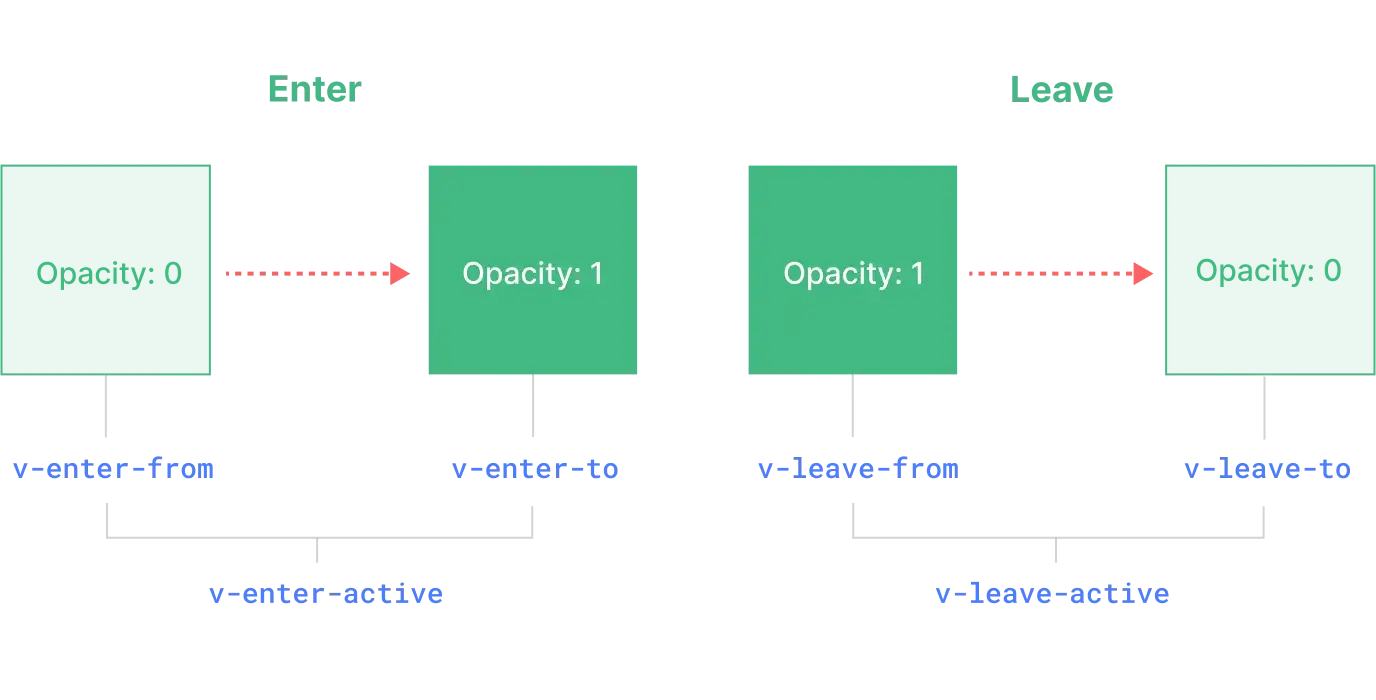
-
写法:
-
准备好样式:
- 元素进入的样式:
v-enter:进入的起点v-enter-active:进入过程中v-enter-to:进入的终点
- 元素离开的样式:
v-leave:离开的起点v-leave-active:离开过程中v-leave-to:离开的终点
- 元素进入的样式:
-
使用
<transition>包裹要过度的元素,并配置name属性:vue <transition name="hello"> <h1 v-show="isshow">你好啊!</h1> </transition>
-
-
备注:若有多个元素需要过度,则需要使用:
<transition-group>,且每个元素都要指定key值。