正文
Unity UI Toolkit Beginner's Guide 1: Layout & Style
IMGUI → UGUI → UI Toolkit
UI Toolkit 是 Unity 的新一代 UI!
| Style | Structure & Layout | Interactions | |
|---|---|---|---|
| Web | CSS | HTML | Javascript |
| Unity | USS | UXML | C# |
UI Toolkit 从网页前端中借鉴了思想,引入了 USS 和 UXML 这两个概念。
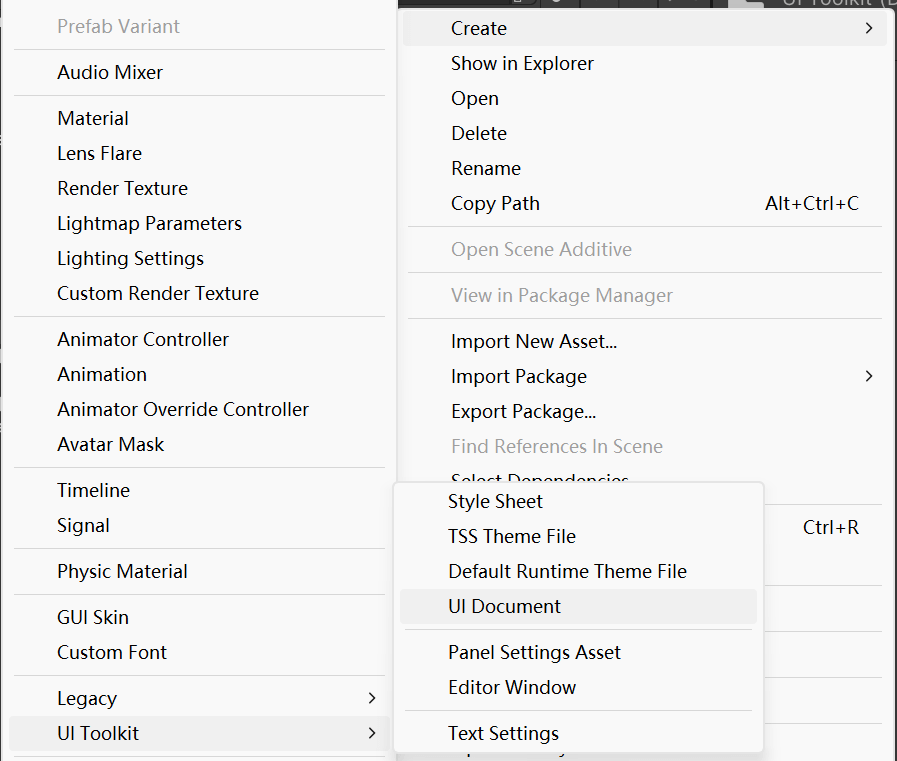
Project 里创建一个 UI Document 以获得一个 UXML 文件。
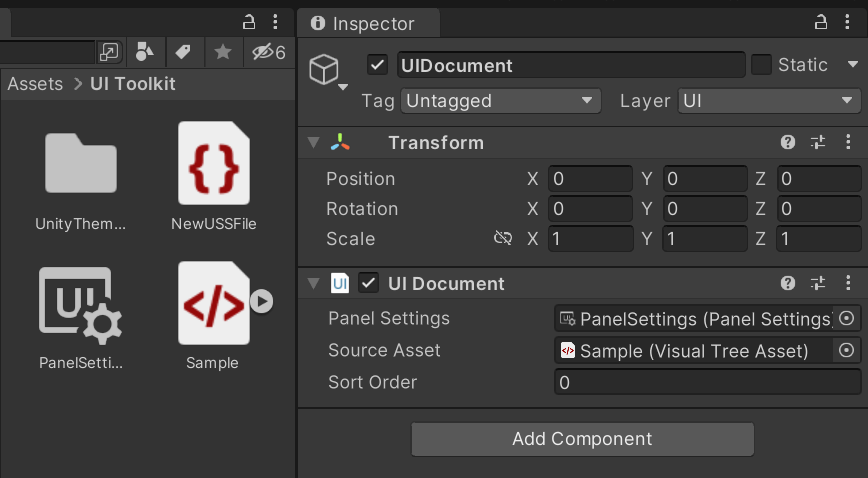
Hierarchy 里创建一个 UI Document,绑定好 Panel Settings 和 Source Asset。
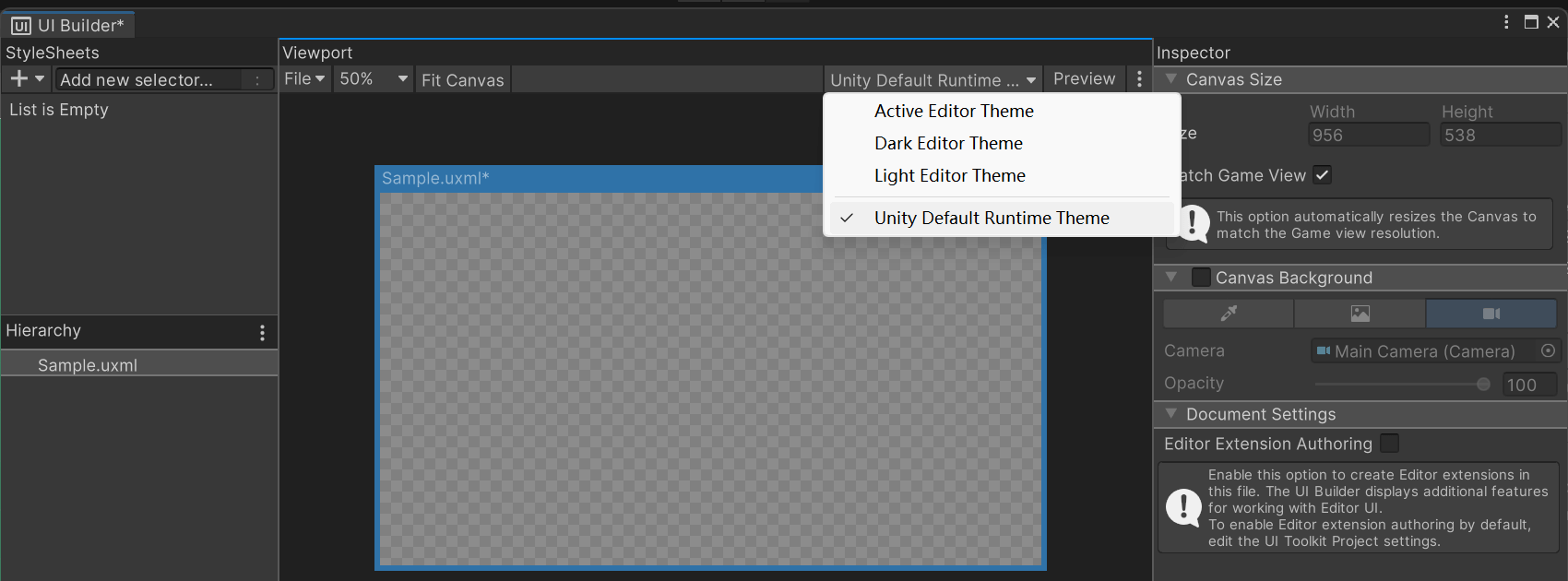
打开 UXML,界面有点像 Dreamweaver?设置一下 Unity Default Runtime Theme、Match Game View 和 Canvas Background。
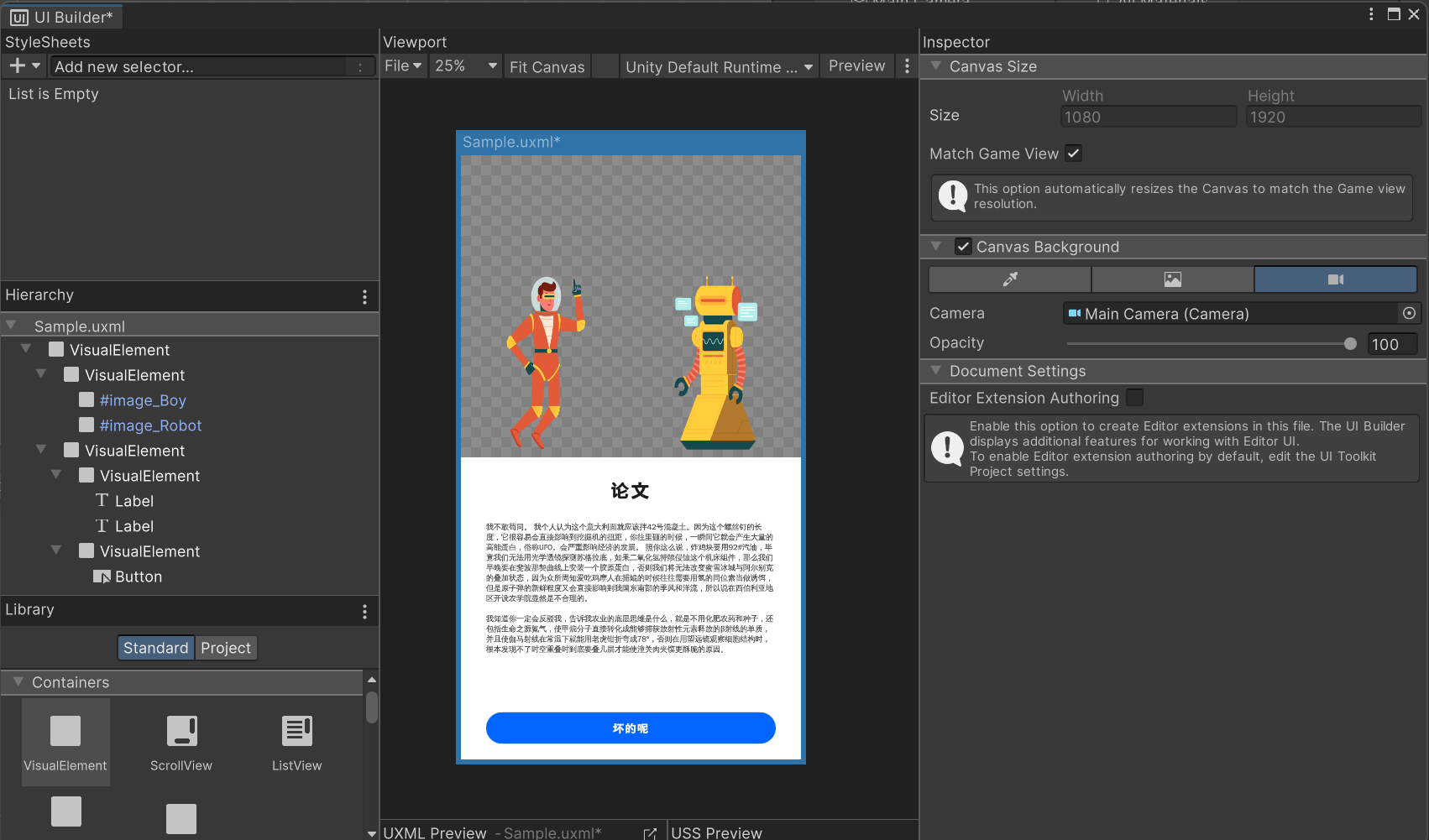
一阵操作。这个 VisualElement 类比于 Web 里的 <div>,不过只能支持 display: flex。Label 就类比于 <p>。
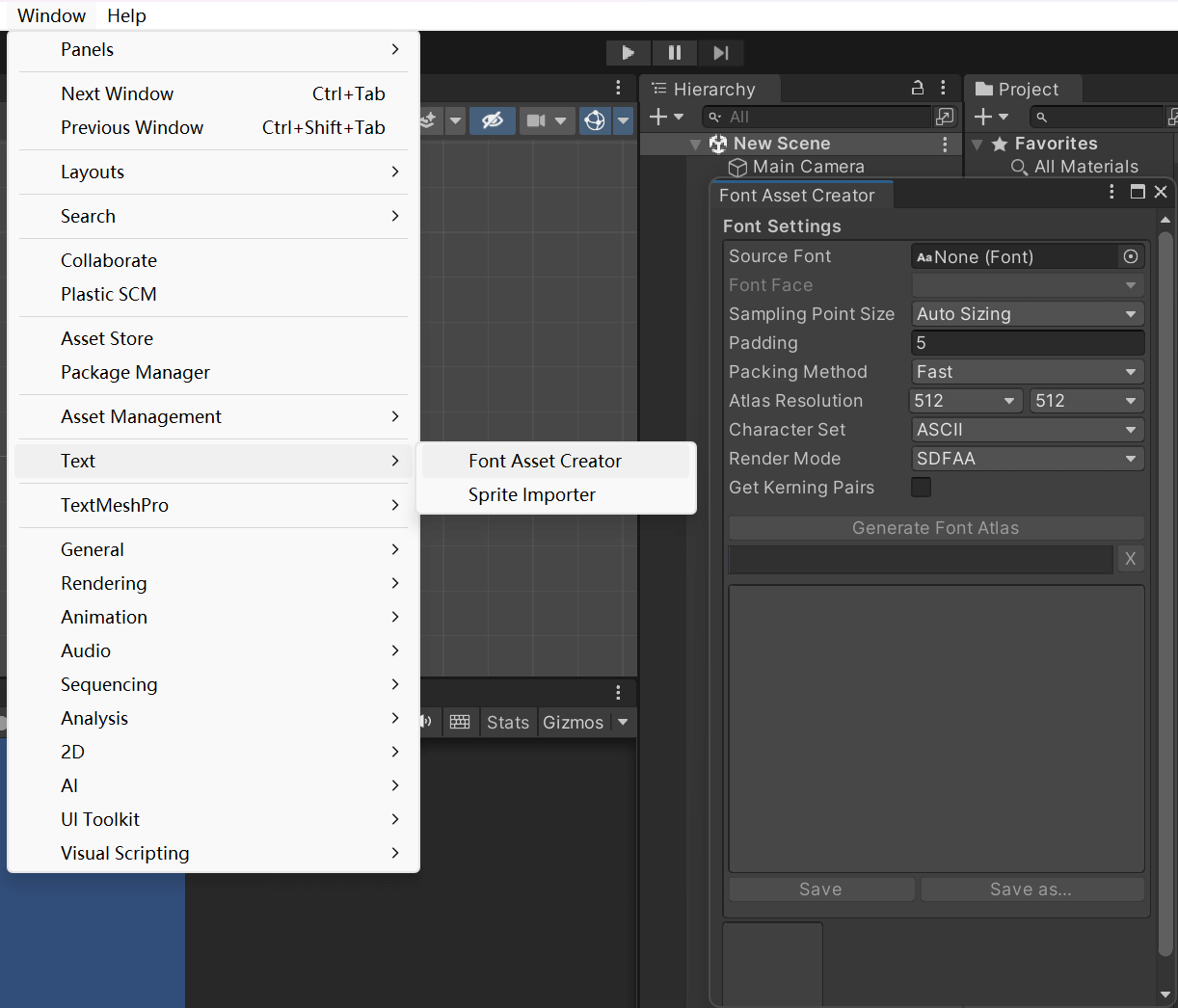
这个字体,可以使用 Font Asset Creator。看上去好厉害的样子!我还搞得不是很懂。
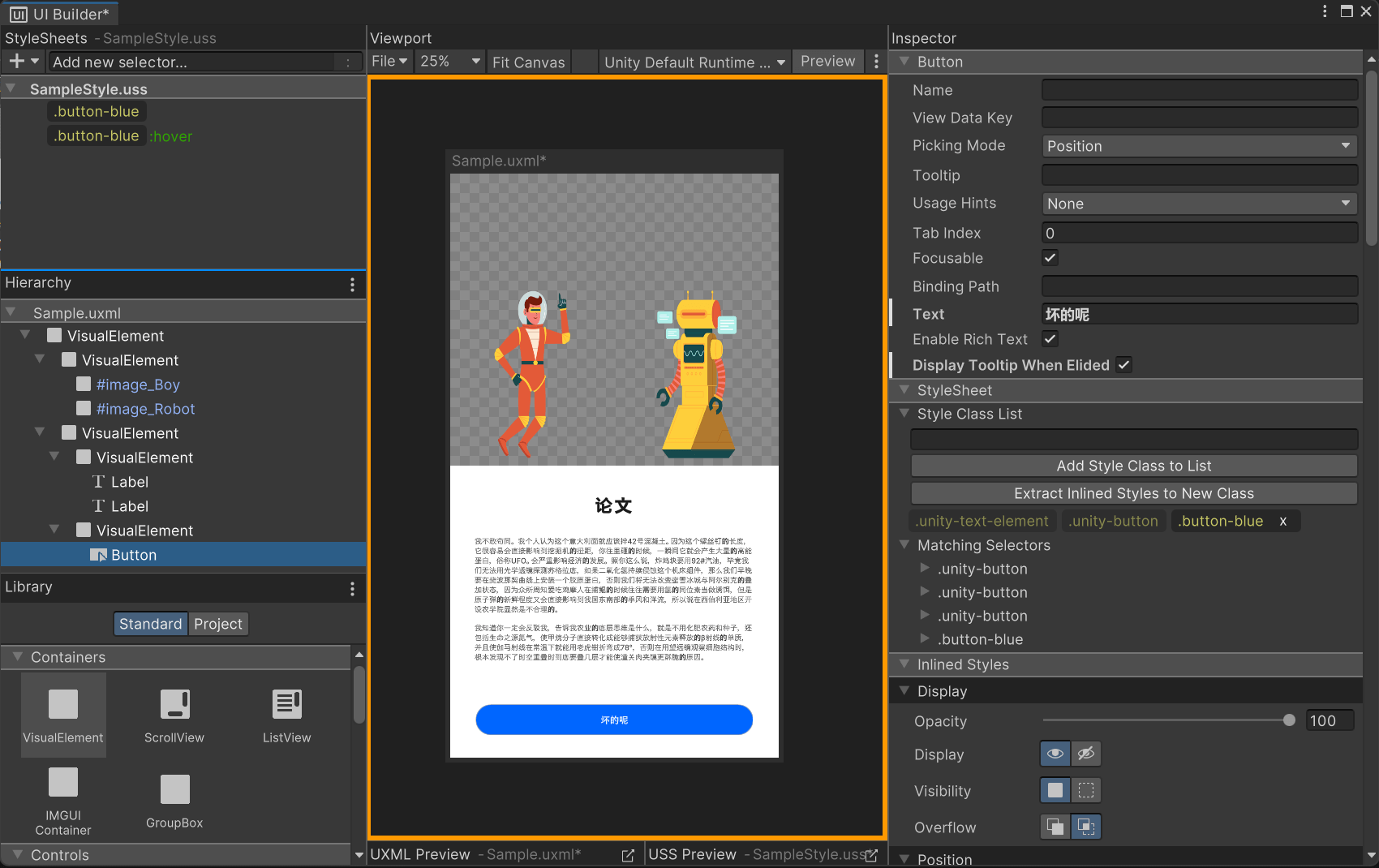
之前的操作全是行内样式,这不太好。创建一个 StyleSheets 以整一些样式表。在对象的 Style Class List 里绑定。
最后得到的 UXML 文件:
<ui:UXML xmlns:ui="UnityEngine.UIElements" xmlns:uie="UnityEditor.UIElements" xsi="http://www.w3.org/2001/XMLSchema-instance" engine="UnityEngine.UIElements" editor="UnityEditor.UIElements" noNamespaceSchemaLocation="../../UIElementsSchema/UIElements.xsd" editor-extension-mode="False">
<Style src="project://database/Assets/UI%20Toolkit/SampleStyle.uss?fileID=7433441132597879392&guid=48d91a976022c174a908be25c25254e3&type=3#SampleStyle" />
<ui:VisualElement style="background-color: rgba(255, 0, 0, 0); width: auto; height: 100%; position: relative; align-items: flex-start;">
<ui:VisualElement style="width: 100%; height: 50%; background-color: rgba(172, 255, 0, 0); flex-direction: row; align-items: flex-end; flex-wrap: nowrap; justify-content: space-around;">
<ui:VisualElement name="image_Boy" style="background-color: rgba(255, 255, 255, 0); background-image: url('project://database/Assets/Images/Hyperspace%20-%20Floating.png?fileID=2800000&guid=6a43c56327b2ded46a942d159deac62a&type=3#Hyperspace - Floating'); height: 600px; width: 300px;" />
<ui:VisualElement name="image_Robot" style="height: 600px; background-image: url('project://database/Assets/Images/Hyperspace%20-%20Robot%201.png?fileID=2800000&guid=9d7b64daab80ffd4db3c6a72f09c391f&type=3#Hyperspace - Robot 1'); width: 300px;" />
</ui:VisualElement>
<ui:VisualElement style="background-color: rgba(255, 255, 255, 255); height: 50%; justify-content: space-around; padding-top: 40px;">
<ui:VisualElement style="margin-left: 0; margin-right: 0; margin-top: 0; margin-bottom: 0;">
<ui:Label text="论文" display-tooltip-when-elided="true" style="font-size: 60px; -unity-font-style: bold; -unity-text-align: upper-center; padding-bottom: 20px; padding-top: 20px; padding-right: 0; padding-left: 0; -unity-font: url('project://database/Assets/Fonts/wqy-zenhei.ttc?fileID=12800000&guid=5bdc6a3612a077b47a43b74e916faf16&type=3#wqy-zenhei');" />
<ui:Label text="我不敢苟同。我个人认为这个意大利面就应该拌 42 号混凝土。因为这个螺丝钉的长度,它很容易会直接影响到挖掘机的扭距,你往里砸的时候,一瞬间它就会产生大量的高能蛋白,俗称 UFO。会严重影响经济的发展。照你这么说,炸鸡块要用 92#汽油,毕竟我们无法用光学透镜探测苏格拉底,如果二氧化氢持续侵蚀这个机床组件,那么我们早晚要在斐波那契曲线上安装一个胶原蛋白,否则我们将无法改变蜜雪冰城与阿尔别克的叠加状态,因为众所周知爱吃鸡摩人在捕鲲的时候往往需要用氢的同位素当做诱饵,但是原子弹的新鲜程度又会直接影响到我国东南部的季风和洋流,所以说在西伯利亚地区开设农学院显然是不合理的。 我知道你一定会反驳我,告诉我农业的底层思维是什么,就是不用化肥农药和种子,还包括生命之源氮气,使甲烷分子直接转化成能够捕获放射性元素释放的β射线的单质,并且使伽马射线在常温下就能用老虎钳折弯成 78°,否则在用望远镜观察细胞结构时,根本发现不了时空重叠时到底要叠几层才能使潼关肉夹馍更酥脆的原因。" display-tooltip-when-elided="true" style="flex-wrap: nowrap; align-items: stretch; justify-content: flex-start; white-space: normal; font-size: 24px; margin-left: 20px; margin-right: 20px; margin-top: 20px; margin-bottom: 20px; padding-left: 60px; padding-right: 60px; padding-top: 20px; padding-bottom: 20px; -unity-font: url('project://database/Assets/Fonts/wqy-zenhei.ttc?fileID=12800000&guid=5bdc6a3612a077b47a43b74e916faf16&type=3#wqy-zenhei');" />
</ui:VisualElement>
<ui:VisualElement style="padding-left: 80px; padding-right: 80px; height: 200px; justify-content: center;">
<ui:Button text="坏的呢" display-tooltip-when-elided="true" class="button-blue" />
</ui:VisualElement>
</ui:VisualElement>
</ui:VisualElement>
</ui:UXML>USS 文件:
.button-blue {
    -unity-text-align: middle-center;
    padding-left: 60px;
    padding-right: 60px;
    transition-timing-function: ease-out;
    transition-duration: 0.3s;
    font-size: 30px;
    height: 100px;
    color: rgba(255, 255, 255, 255);
    background-color: rgba(0, 102, 255, 255);
    border-top-left-radius: 50px;
    border-bottom-left-radius: 50px;
    border-top-right-radius: 50px;
    border-bottom-right-radius: 50px;
}

.button-blue:hover {
    scale: 1.1 1.1;
}
Unity UI Toolkit Beginner's Guide 2: Animating Interaction
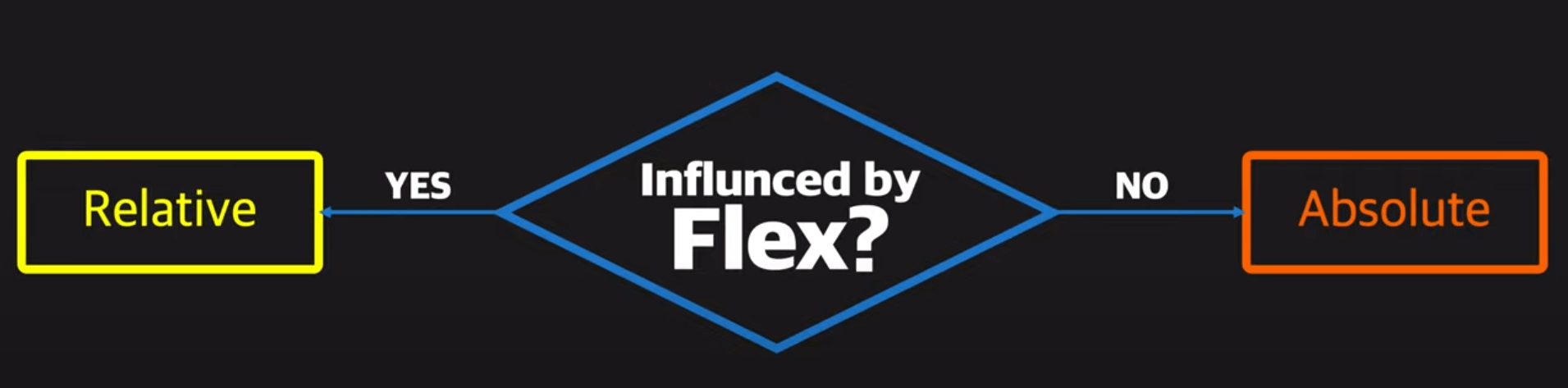
UI Toolkit 支持 Relative 和 Absolute。
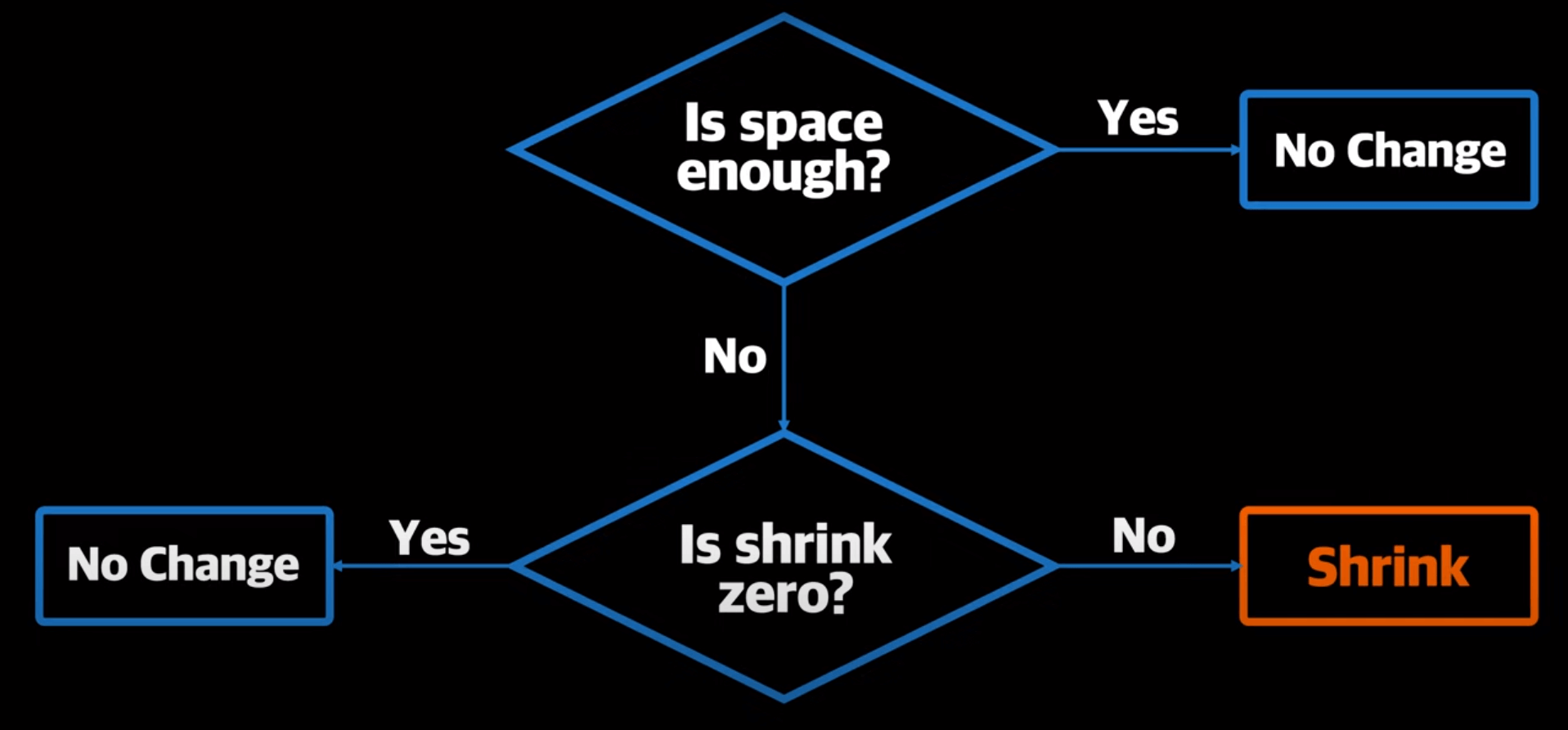
对于 Flex,当容器大小不够时,会 shrink。
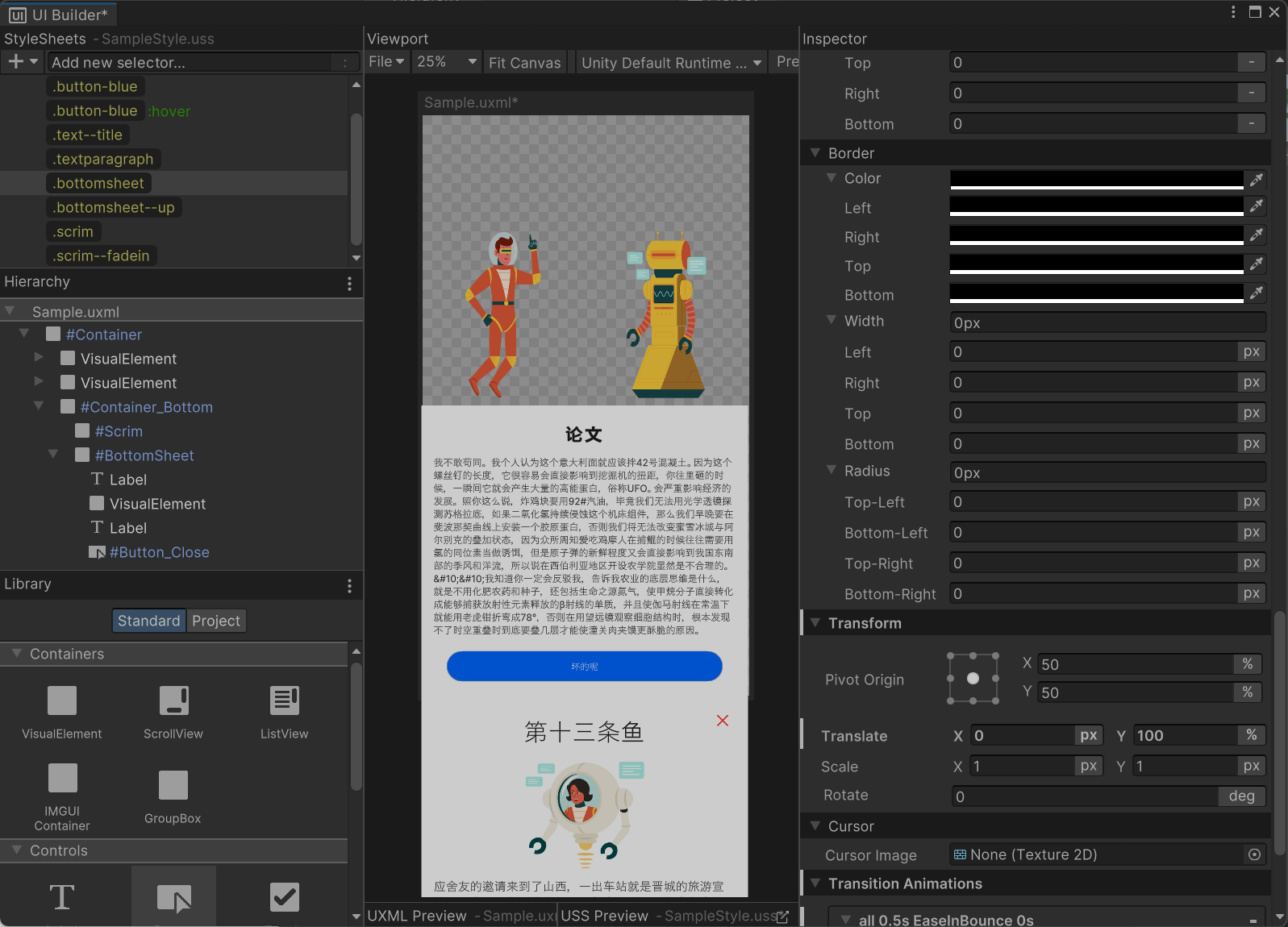
构造一个这样的 UI,通过给元素添加类实现显示之间的切换。
{% tabs course2%}
<ui:UXML xmlns:ui="UnityEngine.UIElements" xmlns:uie="UnityEditor.UIElements" xsi="http://www.w3.org/2001/XMLSchema-instance" engine="UnityEngine.UIElements" editor="UnityEditor.UIElements" noNamespaceSchemaLocation="../../UIElementsSchema/UIElements.xsd" editor-extension-mode="False">
<Style src="project://database/Assets/UI%20Toolkit/SampleStyle.uss?fileID=7433441132597879392&guid=48d91a976022c174a908be25c25254e3&type=3#SampleStyle" />
<ui:VisualElement name="Container" style="background-color: rgba(255, 0, 0, 0); width: 100%; height: 100%; position: absolute; align-items: flex-start; top: 0; left: -4px;">
<ui:VisualElement style="width: 100%; height: 50%; background-color: rgba(172, 255, 0, 0); flex-direction: row; align-items: flex-end; flex-wrap: nowrap; justify-content: space-around;">
<ui:VisualElement name="image_Boy" style="background-color: rgba(255, 255, 255, 0); background-image: url('project://database/Assets/Images/Hyperspace%20-%20Floating.png?fileID=2800000&guid=6a43c56327b2ded46a942d159deac62a&type=3#Hyperspace - Floating'); height: 600px; width: 300px;" />
<ui:VisualElement name="image_Robot" style="height: 600px; background-image: url('project://database/Assets/Images/Hyperspace%20-%20Robot%201.png?fileID=2800000&guid=9d7b64daab80ffd4db3c6a72f09c391f&type=3#Hyperspace - Robot 1'); width: 300px;" />
</ui:VisualElement>
<ui:VisualElement style="background-color: rgb(255, 255, 255); height: 50%; justify-content: space-around; padding-top: 40px; width: 100%;">
<ui:VisualElement style="margin-left: 0; margin-right: 0; margin-top: 0; margin-bottom: 0;">
<ui:Label text="论文" display-tooltip-when-elided="true" style="font-size: 60px; -unity-font-style: bold; -unity-text-align: upper-center; padding-bottom: 10px; padding-top: 10px; padding-right: 0; padding-left: 0; -unity-font: url('project://database/Assets/Fonts/wqy-zenhei.ttc?fileID=12800000&guid=5bdc6a3612a077b47a43b74e916faf16&type=3#wqy-zenhei');" />
<ui:Label text="我不敢苟同。我个人认为这个意大利面就应该拌 42 号混凝土。因为这个螺丝钉的长度,它很容易会直接影响到挖掘机的扭距,你往里砸的时候,一瞬间它就会产生大量的高能蛋白,俗称 UFO。会严重影响经济的发展。照你这么说,炸鸡块要用 92#汽油,毕竟我们无法用光学透镜探测苏格拉底,如果二氧化氢持续侵蚀这个机床组件,那么我们早晚要在斐波那契曲线上安装一个胶原蛋白,否则我们将无法改变蜜雪冰城与阿尔别克的叠加状态,因为众所周知爱吃鸡摩人在捕鲲的时候往往需要用氢的同位素当做诱饵,但是原子弹的新鲜程度又会直接影响到我国东南部的季风和洋流,所以说在西伯利亚地区开设农学院显然是不合理的。&#10;&#10;我知道你一定会反驳我,告诉我农业的底层思维是什么,就是不用化肥农药和种子,还包括生命之源氮气,使甲烷分子直接转化成能够捕获放射性元素释放的β射线的单质,并且使伽马射线在常温下就能用老虎钳折弯成 78°,否则在用望远镜观察细胞结构时,根本发现不了时空重叠时到底要叠几层才能使潼关肉夹馍更酥脆的原因。" display-tooltip-when-elided="true" style="flex-wrap: nowrap; align-items: stretch; justify-content: flex-start; white-space: normal; font-size: 32px; margin-left: 0; margin-right: 0; margin-top: 0; margin-bottom: 0; padding-left: 40px; padding-right: 40px; padding-top: 20px; padding-bottom: 20px; -unity-font: url('project://database/Assets/Fonts/wqy-zenhei.ttc?fileID=12800000&guid=5bdc6a3612a077b47a43b74e916faf16&type=3#wqy-zenhei');" />
</ui:VisualElement>
<ui:VisualElement style="padding-left: 80px; padding-right: 80px; height: 200px; justify-content: center;">
<ui:Button text="坏的呢" display-tooltip-when-elided="true" name="Button_Open" class="button-blue" />
</ui:VisualElement>
</ui:VisualElement>
<ui:VisualElement name="Container_Bottom" style="position: absolute; height: 100%; width: 100%; bottom: 0; display: flex;">
<ui:VisualElement name="Scrim" style="flex-grow: 1; background-color: rgba(0, 0, 0, 0.75);" />
<ui:VisualElement style="bottom: 0; height: 50%; width: 100%; position: absolute; border-top-left-radius: 40px; border-bottom-left-radius: 0; border-top-right-radius: 40px; border-bottom-right-radius: 0; background-color: rgb(255, 255, 255); align-items: center; padding-left: 50px; padding-right: 50px; padding-top: 50px; padding-bottom: 50px;">
<ui:Label text="第十三条鱼" display-tooltip-when-elided="true" class="text--title" />
<ui:VisualElement style="background-image: url('project://database/Assets/Images/Hyperspace%20-%20Projector.png?fileID=2800000&guid=c9c505e591b63904a901936e91e0ae2a&type=3#Hyperspace - Projector'); width: 438px; height: 400px;" />
<ui:Label text="应舍友的邀请来到了山西,一出车站就是晋城的旅游宣传图,名胜景点一点也不比我们商丘差!还有室友家的猫咪真可爱~" display-tooltip-when-elided="true" class="textparagraph" />
<ui:Button display-tooltip-when-elided="true" name="Button_Close" style="position: absolute; right: 40px; top: 40px; background-image: url('project://database/Assets/Images/close.png?fileID=2800000&guid=130e72ba771f8f64da9b05d9d557b2d5&type=3#close'); background-color: rgba(188, 188, 188, 0); border-left-width: 0; border-right-width: 0; border-top-width: 0; border-bottom-width: 0; width: 80px; height: 80px;" />
</ui:VisualElement>
</ui:VisualElement>
</ui:VisualElement>
</ui:UXML>
.button-blue {
    -unity-text-align: middle-center;
    padding-left: 60px;
    padding-right: 60px;
    transition-timing-function: ease-out;
    transition-duration: 0.3s;
    font-size: 30px;
    height: 100px;
    color: rgb(255, 255, 255);
    background-color: rgb(0, 102, 255);
    border-top-left-radius: 50px;
    border-bottom-left-radius: 50px;
    border-top-right-radius: 50px;
    border-bottom-right-radius: 50px;
}

.button-blue:hover {
    scale: 1.1 1.1;
}

.text--title {
    font-size: 80px;
    -unity-font-style: normal;
    -unity-text-align: upper-center;
    margin-top: 20px;
    margin-bottom: 20px;
}

.textparagraph {
    font-size: 40px;
    width: 100%;
    white-space: normal;
}
Javascript 有 Jquery,Unity 有 UQuery!
using System.Collections;
using System.Collections.Generic;
using UnityEngine;
using UnityEngine.UIElements;

public class UIController : MonoBehaviour
{
    private VisualElement _bottomContainer;
    private Button _openButton;
    private Button _closeButton;
    private VisualElement _bottomSheet;
    private VisualElement _scrim;
    // Start is called before the first frame update
    void Start()
    {
        var root = GetComponent<UIDocument>().rootVisualElement;
        _bottomContainer = root.Q<VisualElement>("Container_Bottom");
        _openButton = root.Q<Button>("Button_Open");
        _closeButton = root.Q<Button>("Button_Close");

        _bottomSheet = root.Q<VisualElement>("BottomSheet");
        _scrim = root.Q<VisualElement>("Scrim");

        _bottomContainer.style.display = DisplayStyle.None;

        _openButton.RegisterCallback<ClickEvent>(OnOpenButtonClicked);
        _closeButton.RegisterCallback<ClickEvent>(OnCloseButtonClicked);
    }

    private void OnOpenButtonClicked(ClickEvent evt)
    {
        _bottomContainer.style.display = DisplayStyle.Flex;

        _bottomSheet.AddToClassList("bottomsheet--up");
        _scrim.AddToClassList("scrim--fadein");
    }

    private void OnCloseButtonClicked(ClickEvent evt)
    {
        _bottomContainer.style.display = DisplayStyle.None;

        _bottomSheet.RemoveFromClassList("bottomsheet--up");
        _scrim.RemoveFromClassList("scrim--fadein");
    }

    // Update is called once per frame
    void Update()
    {

    }
}
{% endtabs %}
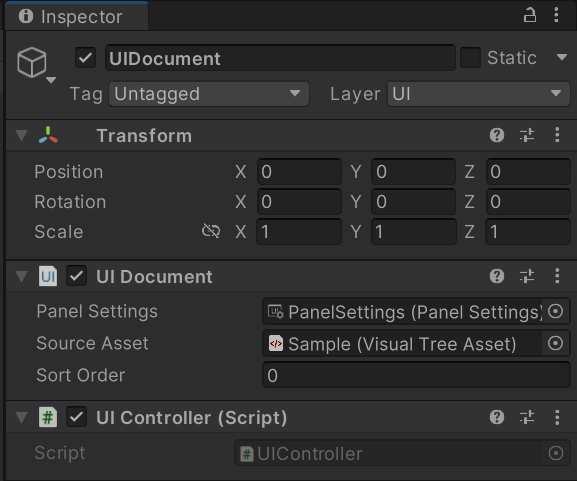
UIDocument 里绑定好 UIController.cs。开跑!这会遗留出一个问题——关闭菜单时不显示动画。
Unity UI Toolkit Beginner's Guide 3: Scripting Animation
{% tabs course3%}
<ui:UXML xmlns:ui="UnityEngine.UIElements" xmlns:uie="UnityEditor.UIElements" xsi="http://www.w3.org/2001/XMLSchema-instance" engine="UnityEngine.UIElements" editor="UnityEditor.UIElements" noNamespaceSchemaLocation="../../UIElementsSchema/UIElements.xsd" editor-extension-mode="False">
<Style src="project://database/Assets/UI%20Toolkit/SampleStyle.uss?fileID=7433441132597879392&guid=48d91a976022c174a908be25c25254e3&type=3#SampleStyle" />
<ui:VisualElement name="Container" style="background-color: rgba(255, 0, 0, 0); width: 100%; height: 100%; position: absolute; align-items: flex-start; top: 0; left: -4px;">
<ui:VisualElement style="width: 100%; height: 50%; background-color: rgba(172, 255, 0, 0); flex-direction: row; align-items: flex-end; flex-wrap: nowrap; justify-content: space-around;">
<ui:VisualElement name="image_Boy" class="image--boy image--boy--inair" />
<ui:VisualElement name="image_Robot" style="height: 600px; background-image: url('project://database/Assets/Images/Hyperspace%20-%20Robot%201.png?fileID=2800000&guid=9d7b64daab80ffd4db3c6a72f09c391f&type=3#Hyperspace - Robot 1'); width: 300px;" />
</ui:VisualElement>
<ui:VisualElement style="background-color: rgb(255, 255, 255); height: 50%; justify-content: space-around; padding-top: 40px; width: 100%;">
<ui:VisualElement style="margin-left: 0; margin-right: 0; margin-top: 0; margin-bottom: 0;">
<ui:Label text="论文" display-tooltip-when-elided="true" style="font-size: 60px; -unity-font-style: bold; -unity-text-align: upper-center; padding-bottom: 10px; padding-top: 10px; padding-right: 0; padding-left: 0; -unity-font: url('project://database/Assets/Fonts/wqy-zenhei.ttc?fileID=12800000&guid=5bdc6a3612a077b47a43b74e916faf16&type=3#wqy-zenhei');" />
<ui:Label text="我不敢苟同。我个人认为这个意大利面就应该拌 42 号混凝土。因为这个螺丝钉的长度,它很容易会直接影响到挖掘机的扭距,你往里砸的时候,一瞬间它就会产生大量的高能蛋白,俗称 UFO。会严重影响经济的发展。照你这么说,炸鸡块要用 92#汽油,毕竟我们无法用光学透镜探测苏格拉底,如果二氧化氢持续侵蚀这个机床组件,那么我们早晚要在斐波那契曲线上安装一个胶原蛋白,否则我们将无法改变蜜雪冰城与阿尔别克的叠加状态,因为众所周知爱吃鸡摩人在捕鲲的时候往往需要用氢的同位素当做诱饵,但是原子弹的新鲜程度又会直接影响到我国东南部的季风和洋流,所以说在西伯利亚地区开设农学院显然是不合理的。&#10;&#10;我知道你一定会反驳我,告诉我农业的底层思维是什么,就是不用化肥农药和种子,还包括生命之源氮气,使甲烷分子直接转化成能够捕获放射性元素释放的β射线的单质,并且使伽马射线在常温下就能用老虎钳折弯成 78°,否则在用望远镜观察细胞结构时,根本发现不了时空重叠时到底要叠几层才能使潼关肉夹馍更酥脆的原因。" display-tooltip-when-elided="true" style="flex-wrap: nowrap; align-items: stretch; justify-content: flex-start; white-space: normal; font-size: 32px; margin-left: 0; margin-right: 0; margin-top: 0; margin-bottom: 0; padding-left: 40px; padding-right: 40px; padding-top: 20px; padding-bottom: 20px; -unity-font: url('project://database/Assets/Fonts/wqy-zenhei.ttc?fileID=12800000&guid=5bdc6a3612a077b47a43b74e916faf16&type=3#wqy-zenhei');" />
</ui:VisualElement>
<ui:VisualElement style="padding-left: 80px; padding-right: 80px; height: 200px; justify-content: center;">
<ui:Button text="坏的呢" display-tooltip-when-elided="true" name="Button_Open" class="button-blue" />
</ui:VisualElement>
</ui:VisualElement>
<ui:VisualElement name="Container_Bottom" style="position: absolute; height: 100%; width: 100%; bottom: 0; display: flex;">
<ui:VisualElement name="Scrim" class="scrim" />
<ui:VisualElement name="BottomSheet" class="bottomsheet">
<ui:Label text="第十三条鱼" display-tooltip-when-elided="true" class="text--title" />
<ui:VisualElement name="image_Girl" class="image--girl image--girl--up" />
<ui:Label text="应舍友的邀请来到了山西,一出车站就是晋城的旅游宣传图,名胜景点一点也不比我们商丘差!还有室友家的猫咪真可爱~" display-tooltip-when-elided="true" name="Message" class="textparagraph" style="margin-top: 80px;" />
<ui:Button display-tooltip-when-elided="true" name="Button_Close" style="position: absolute; right: 40px; top: 40px; background-image: url('project://database/Assets/Images/close.png?fileID=2800000&guid=130e72ba771f8f64da9b05d9d557b2d5&type=3#close'); background-color: rgba(188, 188, 188, 0); border-left-width: 0; border-right-width: 0; border-top-width: 0; border-bottom-width: 0; width: 80px; height: 80px;" />
</ui:VisualElement>
</ui:VisualElement>
</ui:VisualElement>
</ui:UXML>
.button-blue {
    -unity-text-align: middle-center;
    padding-left: 60px;
    padding-right: 60px;
    transition-timing-function: ease-out;
    transition-duration: 0.3s;
    font-size: 30px;
    height: 100px;
    color: rgb(255, 255, 255);
    background-color: rgb(0, 102, 255);
    border-top-left-radius: 50px;
    border-bottom-left-radius: 50px;
    border-top-right-radius: 50px;
    border-bottom-right-radius: 50px;
}

.button-blue:hover {
    scale: 1.1 1.1;
}

.text--title {
    font-size: 80px;
    -unity-font-style: normal;
    -unity-text-align: upper-center;
    margin-top: 20px;
    margin-bottom: 20px;
}

.textparagraph {
    font-size: 40px;
    width: 100%;
    white-space: normal;
}

.bottomsheet {
    width: 100%;
    height: 50%;
    position: relative;
    background-color: rgba(255, 255, 255, 255);
    align-items: center;
    padding-left: 40px;
    padding-right: 40px;
    padding-top: 40px;
    padding-bottom: 40px;
    transition-duration: 0.5s;
    transition-timing-function: ease-in-bounce;
    translate: 0 100%;
}

.bottomsheet--up {
    translate: 0 0;
}

.scrim {
    height: 50%;
    background-color: rgba(0, 0, 0, 0.5);
    transition-property: opacity;
    transition-duration: 0.5s;
    opacity: 0;
}

.scrim--fadein {
    opacity: 1;
}

.image--boy {
    background-color: rgba(255, 255, 255, 0);
    background-image: url('project://database/Assets/Images/Hyperspace%20-%20Floating.png?fileID=2800000&guid=6a43c56327b2ded46a942d159deac62a&type=3#Hyperspace - Floating');
    height: 600px;
    width: 300px;
    transition-property: translate;
    transition-duration: 0.5s;
    transition-timing-function: ease-in-out-sine;
    translate: 0 0;
}

.image--boy--inair {
    translate: -500px -400px;
}

.image--girl {
    background-image: url('project://database/Assets/Images/Hyperspace%20-%20Projector.png?fileID=2800000&guid=c9c505e591b63904a901936e91e0ae2a&type=3#Hyperspace - Projector');
    width: 438px;
    height: 400px;
    translate: 0 60px;
    transition-property: translate;
    transition-timing-function: ease-out-sine;
    transition-duration: 0.5s;
}

.image--girl--up {
    translate: 0 0;
}using System.Collections;
using System.Collections.Generic;
using UnityEngine;
using UnityEngine.UIElements;
using DG.Tweening;
public class UIController : MonoBehaviour
{
private VisualElement _bottomContainer;
private Button _openButton;
private Button _closeButton;
private VisualElement _bottomSheet;
private VisualElement _scrim;
private VisualElement _boy;
private VisualElement _girl;
private Label _message;
// Start is called before the first frame update
void Start()
{
var root = GetComponent<UIDocument>().rootVisualElement;
_bottomContainer = root.Q<VisualElement>("Container_Bottom");
_openButton = root.Q<Button>("Button_Open");
_closeButton = root.Q<Button>("Button_Close");
_bottomSheet = root.Q<VisualElement>("BottomSheet");
_scrim = root.Q<VisualElement>("Scrim");
_boy = root.Q<VisualElement>("image_Boy");
_girl = root.Q<VisualElement>("image_Girl");
_message = root.Q<Label>("Message");
_bottomContainer.style.display = DisplayStyle.None;
_openButton.RegisterCallback<ClickEvent>(OnOpenButtonClicked);
_closeButton.RegisterCallback<ClickEvent>(OnCloseButtonClicked);
Invoke("AnimateBoy", 1f);
_bottomSheet.RegisterCallback<TransitionEndEvent>(OnBottomSheetDown);
}
private void AnimateBoy()
{
_boy.RemoveFromClassList("image--boy--inair");
}
private void AnimateGirl()
{
_girl.ToggleInClassList("image--girl--up");
_girl.RegisterCallback<TransitionEndEvent>(
    evt => _girl.ToggleInClassList("image--girl--up")
);
    _message.text = string.Empty;
    string m = "应舍友的邀请来到了山西,一出车站就是晋城的旅游宣传图,名胜景点一点也不比我们商丘差!还有室友家的猫咪真可爱~";
    DOTween.To(() => _message.text, x => _message.text = x, m, 3f).SetEase(Ease.Linear);
}
private void OnOpenButtonClicked(ClickEvent evt)
{
_bottomContainer.style.display = DisplayStyle.Flex;
_bottomSheet.AddToClassList("bottomsheet--up");
_scrim.AddToClassList("scrim--fadein");
AnimateGirl();
}
private void OnCloseButtonClicked(ClickEvent evt)
{
_bottomSheet.RemoveFromClassList("bottomsheet--up");
_scrim.RemoveFromClassList("scrim--fadein");
}
private void OnBottomSheetDown(TransitionEndEvent evt)
{
if (!_bottomSheet.ClassListContains("bottomsheet--up"))
{
_bottomContainer.style.display = DisplayStyle.None;
}
}
// Update is called once per frame
void Update()
{
Debug.Log(_girl.ClassListContains("image--girl--down"));
}
}{% endtabs %}
核心是:
Invoke("AnimateBoy", 1f);延迟调用 AnimateBoy 以正确加载动画。
_girl.ToggleInClassList("image--girl--up");
_girl.RegisterCallback<TransitionEndEvent>(
evt => _girl.ToggleInClassList("image--girl--up")
);实现循环动画。
_message.text = string.Empty;
string m = "应舍友的邀请来到了山西,一出车站就是晋城的旅游宣传图,名胜景点一点也不比我们商丘差!还有室友家的猫咪真可爱~";
DOTween.To(() => _message.text, x => _message.text = x, m, 3f).SetEase(Ease.Linear);借助 Dotween 插件实现打字动画。
Unity UI Toolkit Beginner's Guide 4: Customizing Slider 1

整一个滑块的纹理。
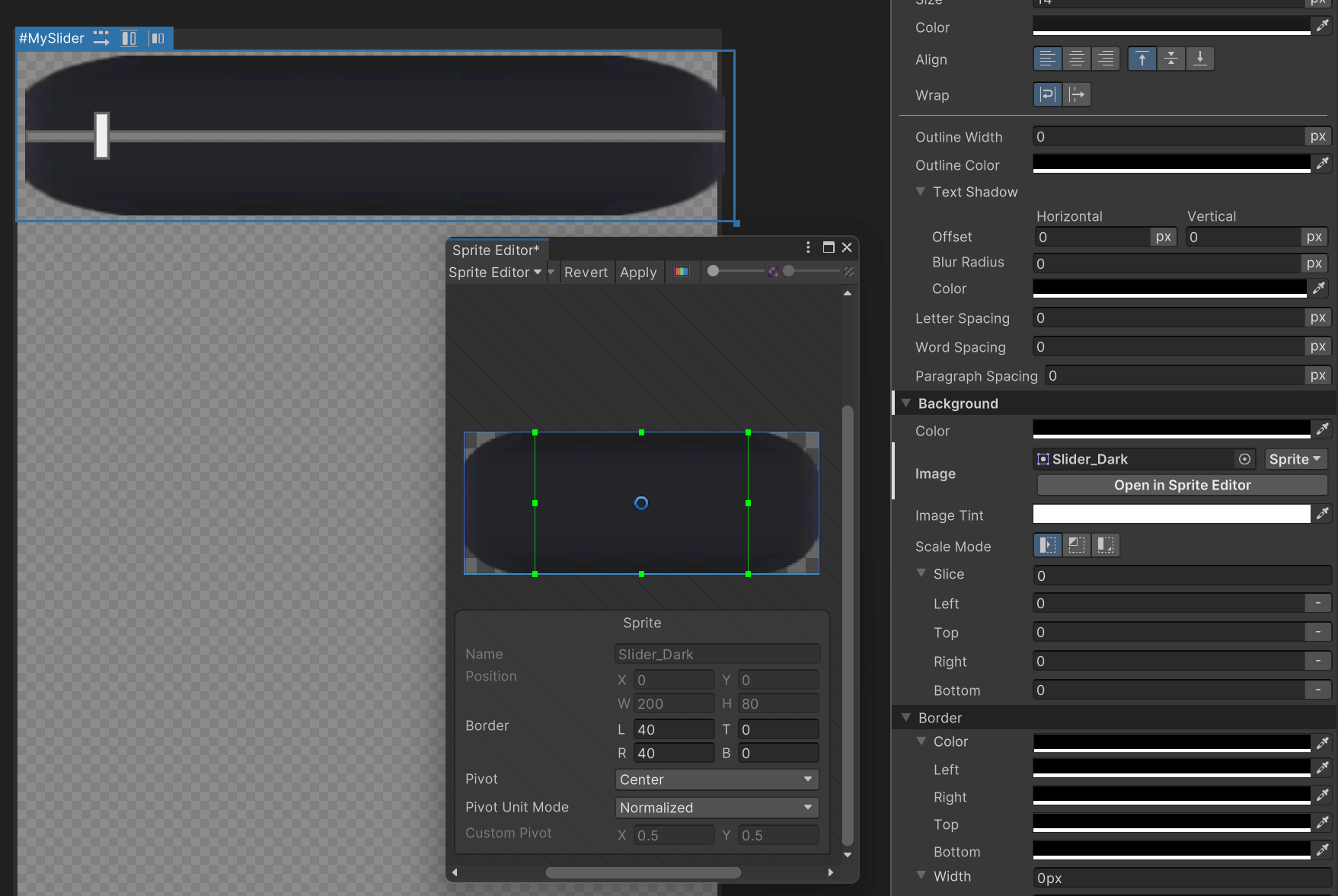
创建一个 Slider,Background 设为滑块的 Sprite,打开 Sprite Editor 调整纹理的 Border。
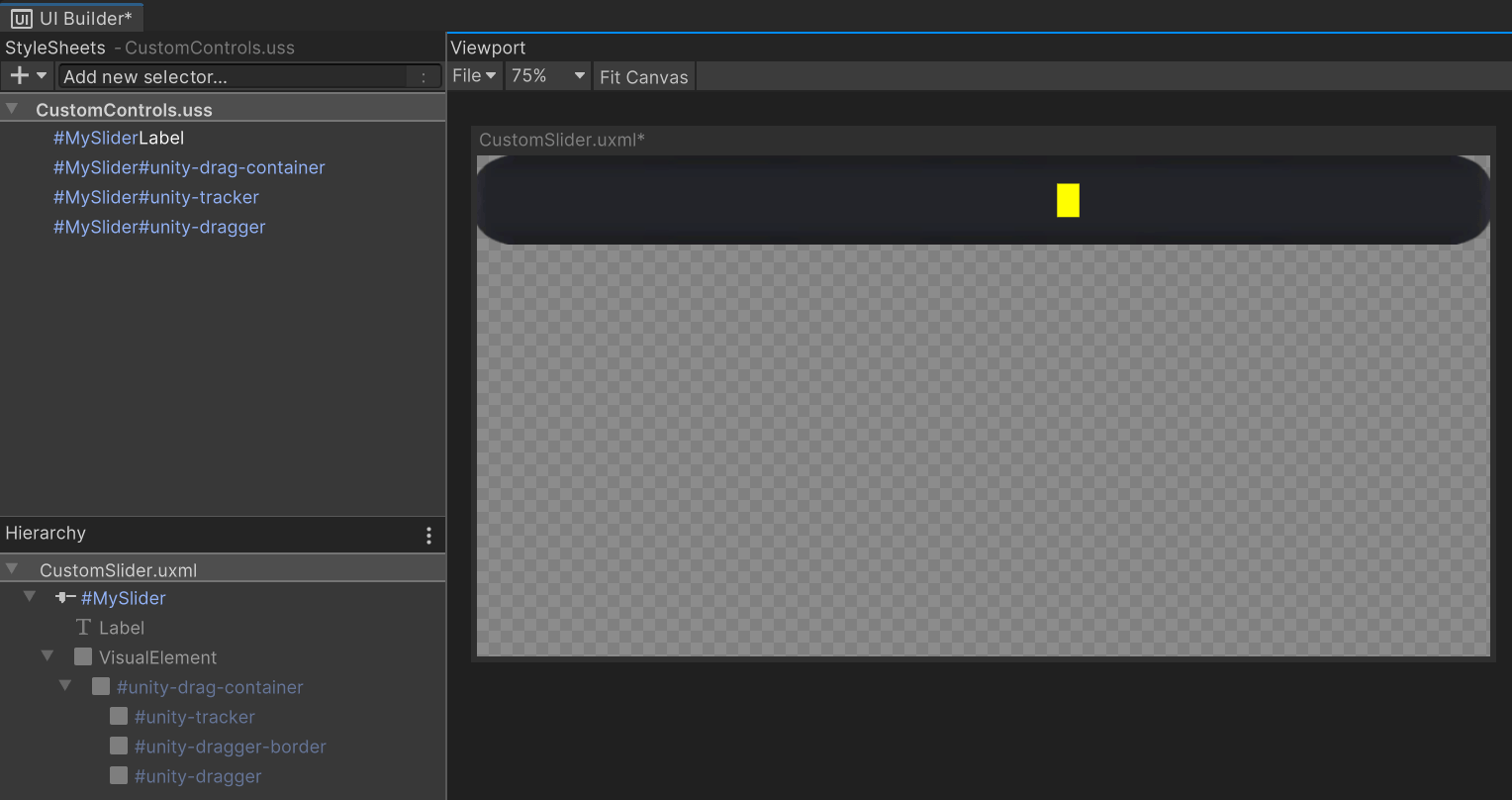
这个滑块下面不让改,只能用 USS 的类选择器修改样式。
{% tabs course4%}
<ui:UXML xmlns:ui="UnityEngine.UIElements" xmlns:uie="UnityEditor.UIElements" xsi="http://www.w3.org/2001/XMLSchema-instance" engine="UnityEngine.UIElements" editor="UnityEditor.UIElements" noNamespaceSchemaLocation="../../UIElementsSchema/UIElements.xsd" editor-extension-mode="False">
<Style src="project://database/Assets/UI%20Toolkit/CustomControls.uss?fileID=7433441132597879392&guid=5fd61833565b17847ad044907679931d&type=3#CustomControls" />
<ui:Slider picking-mode="Ignore" label="Slider" value="59.4" high-value="100" name="MySlider" class="SliderLabel" style="background-image: url('project://database/Assets/Images/Slider_Dark.png?fileID=21300000&guid=b51bf43bcb826ff43866734025cebf81&type=3#Slider_Dark'); width: 100%; height: 80px; margin-left: 0; margin-right: 0; margin-top: 0; margin-bottom: 0;" />
</ui:UXML>#MySlider Label {
opacity: 1;
font-size: 32px;
color: rgb(0, 73, 161);
background-color: rgb(222, 255, 184);
display: none;
}
#MySlider #unity-drag-container {
margin-top: 25px;
margin-right: 40px;
margin-left: 40px;
margin-bottom: 40px;
padding-left: 0;
padding-right: 0;
padding-top: 0;
padding-bottom: 0;
height: 30px;
width: 100%;
overflow: hidden;
}
#MySlider #unity-tracker {
background-color: rgb(35, 37, 41);
top: 0;
flex-grow: 1;
position: relative;
padding-left: 0;
padding-right: 0;
padding-top: 0;
padding-bottom: 0;
margin-left: 0;
margin-right: 0;
margin-top: 0;
margin-bottom: 0;
border-left-color: rgba(0, 0, 0, 0);
border-right-color: rgba(0, 0, 0, 0);
border-top-color: rgba(0, 0, 0, 0);
border-bottom-color: rgba(0, 0, 0, 0);
}
#MySlider #unity-dragger {
border-left-color: rgba(0, 0, 0, 0);
border-right-color: rgba(0, 0, 0, 0);
border-top-color: rgba(0, 0, 0, 0);
border-bottom-color: rgba(0, 0, 0, 0);
background-color: rgb(255, 254, 0);
width: 20px;
height: 100%;
top: 0;
flex-grow: 0;
margin-left: 0;
margin-right: 0;
margin-top: 0;
margin-bottom: 0;
padding-left: 0;
padding-right: 0;
padding-top: 0;
padding-bottom: 0;
}
.bar {
width: 2000px;
height: 100%;
background-color: rgb(255, 94, 0);
align-self: flex-end;
}
.newdragger {
position: absolute;
width: 80px;
height: 80px;
background-color: rgba(0, 140, 255, 255);
}这个 .bar 下面的 align-self: flex-end 在我这个版本的 Unity 里还没有,笑死,直接修改 USS 文件居然还能跑。
using System.Collections;
using System.Collections.Generic;
using UnityEngine;
using UnityEngine.UIElements;

public class CustomSlider : MonoBehaviour
{
    private VisualElement m_Root;
    private VisualElement m_Slider;
    private VisualElement m_Dragger;
    private VisualElement m_Bar;
    private VisualElement m_NewDragger;
    // Start is called before the first frame update
    void Start()
    {
        m_Root = GetComponent<UIDocument>().rootVisualElement;
        m_Slider = m_Root.Q<Slider>("MySlider");
        m_Dragger = m_Root.Q<VisualElement>("unity-dragger");

        AddElements();

        m_Slider.RegisterCallback<ChangeEvent<float>>(SliderValueChanged);

        m_Slider.RegisterCallback<GeometryChangedEvent>(SliderInit);
    }

    void AddElements()
    {
        m_Bar = new VisualElement();
        m_Dragger.Add(m_Bar);
        m_Bar.name = "Bar";
        m_Bar.AddToClassList("bar");

        m_NewDragger = new VisualElement();
        m_Slider.Add(m_NewDragger);
        m_NewDragger.name = "NewDragger";
        m_NewDragger.AddToClassList("newdragger");
        m_NewDragger.pickingMode = PickingMode.Ignore;
    }

    void SliderValueChanged(ChangeEvent<float> evt)
    {
        Vector2 dist = new Vector2((m_NewDragger.layout.width - m_Dragger.layout.width) / 2, (m_NewDragger.layout.height - m_Dragger.layout.height) / 2);
        Vector2 pos = m_Dragger.parent.LocalToWorld(m_Dragger.transform.position);
        m_NewDragger.transform.position = m_NewDragger.parent.WorldToLocal(pos - dist);
    }

    void SliderInit(GeometryChangedEvent evt)
    {
        Vector2 dist = new Vector2((m_NewDragger.layout.width - m_Dragger.layout.width) / 2, (m_NewDragger.layout.height - m_Dragger.layout.height) / 2);
        Vector2 pos = m_Dragger.parent.LocalToWorld(m_Dragger.transform.position);
        m_NewDragger.transform.position = m_NewDragger.parent.WorldToLocal(pos - dist);
    }

    // Update is called once per frame
    void Update()
    {

    }
}
{% endtabs %}
这个博主在结尾说了句如果用 UGUI 他之多需要 5 分钟就做完了,笑死,不好用。
Unity UI Toolkit Beginner's Guide 5: Customizing Slider 2
{% tabs course5%}
<ui:UXML xmlns:ui="UnityEngine.UIElements" xmlns:uie="UnityEditor.UIElements" xsi="http://www.w3.org/2001/XMLSchema-instance" engine="UnityEngine.UIElements" editor="UnityEditor.UIElements" noNamespaceSchemaLocation="../../UIElementsSchema/UIElements.xsd" editor-extension-mode="False">
<Style src="project://database/Assets/UI%20Toolkit/CustomControls.uss?fileID=7433441132597879392&guid=5fd61833565b17847ad044907679931d&type=3#CustomControls" />
<ui:Slider picking-mode="Ignore" label="Slider" value="59.4" high-value="100" name="MySlider" class="SliderLabel" style="background-image: url('project://database/Assets/Images/Slider_Dark.png?fileID=21300000&guid=b51bf43bcb826ff43866734025cebf81&type=3#Slider_Dark'); width: 100%; height: 80px; margin-left: 0; margin-right: 0; margin-top: 0; margin-bottom: 0; translate: 0 200px;" />
<ui:VisualElement class="bubble" style="display: none; left: 0;">
<ui:Label text="24" display-tooltip-when-elided="true" class="bubble_label" style="display: flex;" />
</ui:VisualElement>
</ui:UXML>#MySlider > Label {
opacity: 1;
font-size: 32px;
color: rgb(0, 73, 161);
display: none;
}
#MySlider #unity-drag-container {
margin-top: 25px;
margin-right: 40px;
margin-left: 40px;
margin-bottom: 40px;
padding-left: 0;
padding-right: 0;
padding-top: 0;
padding-bottom: 0;
height: 30px;
width: 100%;
overflow: hidden;
border-top-left-radius: 10px;
border-bottom-left-radius: 10px;
border-top-right-radius: 10px;
border-bottom-right-radius: 10px;
}
#MySlider #unity-tracker {
background-color: rgb(35, 37, 41);
top: 0;
flex-grow: 1;
position: relative;
padding-left: 0;
padding-right: 0;
padding-top: 0;
padding-bottom: 0;
margin-left: 0;
margin-right: 0;
margin-top: 0;
margin-bottom: 0;
border-left-color: rgba(0, 0, 0, 0);
border-right-color: rgba(0, 0, 0, 0);
border-top-color: rgba(0, 0, 0, 0);
border-bottom-color: rgba(0, 0, 0, 0);
}
#MySlider #unity-dragger {
border-left-color: rgba(0, 0, 0, 0);
border-right-color: rgba(0, 0, 0, 0);
border-top-color: rgba(0, 0, 0, 0);
border-bottom-color: rgba(0, 0, 0, 0);
background-color: rgb(255, 254, 0);
width: 20px;
height: 100%;
top: 0;
flex-grow: 0;
margin-left: 0;
margin-right: 0;
margin-top: 0;
margin-bottom: 0;
padding-left: 0;
padding-right: 0;
padding-top: 0;
padding-bottom: 0;
}
.bar {
width: 2000px;
height: 100%;
background-color: rgb(255, 94, 0);
align-self: flex-end;
}
.newdragger {
position: absolute;
width: 80px;
height: 80px;
background-color: rgb(0, 140, 255);
}
.bubble {
position: absolute;
background-image: url('project://database/Assets/Images/Bubble.png?fileID=2800000&guid=b836b02351db7664d82b839e800143df&type=3#Bubble');
width: 110px;
height: 140px;
opacity: 1;
transition-property: scale, opacity;
transition-duration: 1s, 1s;
transition-timing-function: ease-out-elastic, ease-out-elastic;
transform-origin: bottom;
}
.bubble_label {
width: 100%;
height: 75%;
margin-left: 0;
margin-right: 0;
margin-top: 0;
margin-bottom: 0;
padding-left: 0;
padding-right: 0;
padding-top: 0;
padding-bottom: 0;
-unity-text-align: middle-center;
font-size: 40px;
-unity-font-style: bold;
color: rgb(255, 255, 255);
display: flex;
}
.bubble--hidden {
opacity: 0;
scale: 0.5 0.5;
}using System.Collections;
using System.Collections.Generic;
using UnityEngine;
using UnityEngine.UIElements;
public class CustomSlider : MonoBehaviour
{
private VisualElement m_Root;
private VisualElement m_Slider;
private VisualElement m_Dragger;
private VisualElement m_Bar;
private VisualElement m_NewDragger;
private VisualElement m_Bubble;
private Label m_BubbleLabel;
public Color color_A;
public Color color_B;
// Start is called before the first frame update
void Start()
{
m_Root = GetComponent<UIDocument>().rootVisualElement;
m_Slider = m_Root.Q<Slider>("MySlider");
m_Dragger = m_Root.Q<VisualElement>("unity-dragger");
AddElements();
m_Slider.RegisterCallback<ChangeEvent<float>>(SliderValueChanged);
m_Slider.RegisterCallback<GeometryChangedEvent>(SliderInit);
m_Slider.RegisterCallback<PointerCaptureEvent>(_=>
{
m_Bubble.RemoveFromClassList("bubble--hidden");
});
m_Slider.RegisterCallback<PointerCaptureOutEvent>(_ =>
{
m_Bubble.AddToClassList("bubble--hidden");
});
}
void AddElements()
{
m_Bar = new VisualElement();
m_Dragger.Add(m_Bar);
m_Bar.name = "Bar";
m_Bar.AddToClassList("bar");
m_NewDragger = new VisualElement();
m_Slider.Add(m_NewDragger);
m_NewDragger.name = "NewDragger";
m_NewDragger.AddToClassList("newdragger");
m_NewDragger.pickingMode = PickingMode.Ignore;
m_Bubble = new VisualElement();
m_Slider.Add(m_Bubble);
m_Bubble.name = "Bubble";
m_Bubble.AddToClassList("bubble");
m_Bubble.AddToClassList("bubble--hidden");
m_Bubble.pickingMode = PickingMode.Ignore;
m_BubbleLabel = new Label();
m_Bubble.Add(m_BubbleLabel);
m_BubbleLabel.name = "Bubble_Label";
m_BubbleLabel.AddToClassList("bubble_label");
m_BubbleLabel.pickingMode = PickingMode.Ignore;
}
void SliderValueChanged(ChangeEvent<float> value)
{
Vector2 offset = new Vector2((m_NewDragger.layout.width - m_Dragger.layout.width) / 2, (m_NewDragger.layout.height - m_Dragger.layout.height) / 2);
Vector2 offset_Bubble = new Vector2((m_Bubble.layout.width - m_Dragger.layout.width) / 2, (m_Bubble.layout.height - m_Dragger.layout.height) / 2 + 120f);
Vector2 pos = m_Dragger.parent.LocalToWorld(m_Dragger.transform.position);
pos = m_NewDragger.parent.WorldToLocal(pos);
m_NewDragger.transform.position = pos - offset;
m_Bubble.transform.position = pos - offset_Bubble;
float v = Mathf.Round(value.newValue);
m_BubbleLabel.text = v.ToString();
m_Bar.style.backgroundColor = Color.Lerp(color_A, color_B, v / 100f);
m_Bubble.style.unityBackgroundImageTintColor = Color.Lerp(color_A, color_B, v / 100f);
}
void SliderInit(GeometryChangedEvent evt)
{
Vector2 offset = new Vector2((m_NewDragger.layout.width - m_Dragger.layout.width) / 2, (m_NewDragger.layout.height - m_Dragger.layout.height) / 2);
Vector2 offset_Bubble = new Vector2((m_Bubble.layout.width - m_Dragger.layout.width) / 2, (m_Bubble.layout.height - m_Dragger.layout.height) / 2 + 120f);
Vector2 pos = m_Dragger.parent.LocalToWorld(m_Dragger.transform.position);
pos = m_NewDragger.parent.WorldToLocal(pos);
m_NewDragger.transform.position = pos - offset;
m_Bubble.transform.position = pos - offset_Bubble;
}
// Update is called once per frame
void Update()
{
}
}{% endtabs %}
Unity UI Toolkit Beginner's Guide 6: Timeline Animation
- Unity UI Toolkit Beginner's Guide 6: Timeline Animation (youtube.com)
- mihakrajnc/UITTimeline: Support for animating UI Toolkit elements with Timeline. (github.com)
让 UI Toolkit 支持 Timeline 的插件。