资源
正文
096 配置代理_方式一
注意
在前端开发中,从服务端获取数据的方式有多种常用的方法,主要包括以下几种:
- AJAX(Asynchronous JavaScript and XML)
- 原生 JavaScript XMLHttpRequest:使用
XMLHttpRequest对象发起请求,处理服务器响应。 - jQuery AJAX:通过
$.ajax()或$.get()等方法发起请求。
- 原生 JavaScript XMLHttpRequest:使用
- Fetch API:基于 Promises 进行处理。
- Axios
- WebSocket
- Server-Sent Events (SSE)
- GraphQL
跨域请求(Cross-Origin Request)是指在浏览器中,网页从一个域(源)向另一个域发起请求的情况。由于浏览器的同源策略(Same-Origin Policy),不同域之间的请求默认是被禁止的,为了实现跨域请求,需要遵循一定的规则和技术。
解决方案有:
- CORS(跨源资源共享):前端后端都要配置
- JSONP(JSON with Padding):利用
<script>标签没有跨域限制的特点,服务器返回一个包装的 JavaScript 函数 - 代理(Proxy):前端请求可以先发送到同源的代理服务器,再由代理服务器转发请求到目标服务器。这种方式可以解决跨域问题,但需要额外的服务器配置。
- iframe + postMessage
- WebSocket
从资料中开启一个服务器:
D:\XXXS\Vue技术全家桶\尚硅谷Vue2教程(天禹老师主讲)\资料(含课件)\05_其他\test_proxy_server>node server1
服务器1启动成功了,请求学生信息地址为:http://localhost:5000/students
服务器代码如下,当请求到 http://localhost:5000/students 后,便会返回 JSON 字符串:
const express = require('express')
const app = express()

app.use((request,response,next)=>{
	console.log('有人请求服务器1了');
	// console.log('请求来自于',request.get('Host'));
	// console.log('请求的地址',request.url);
	next()
})

app.get('/students',(request,response)=>{
	const students = [
		{id:'001',name:'tom',age:18},
		{id:'002',name:'jerry',age:19},
		{id:'003',name:'tony',age:120},
	]
	response.send(students)
})

app.listen(5000,(err)=>{
	if(!err) console.log('服务器1启动成功了,请求学生信息地址为:http://localhost:5000/students');
})跨域请求必须保持三个一致(同源策略):协议名、主机名、端口号。
目前:
| 源 | 服务端 | 前端 |
|---|---|---|
| 协议名 | http | http |
| 主机名 | localhost | localhost |
| 端口号 | 5000 | 8080 |
因此,我们需要配置一个代理服务器以实现跨域请求,vue 脚手架中提供了配置代理服务器的一个简便方法。
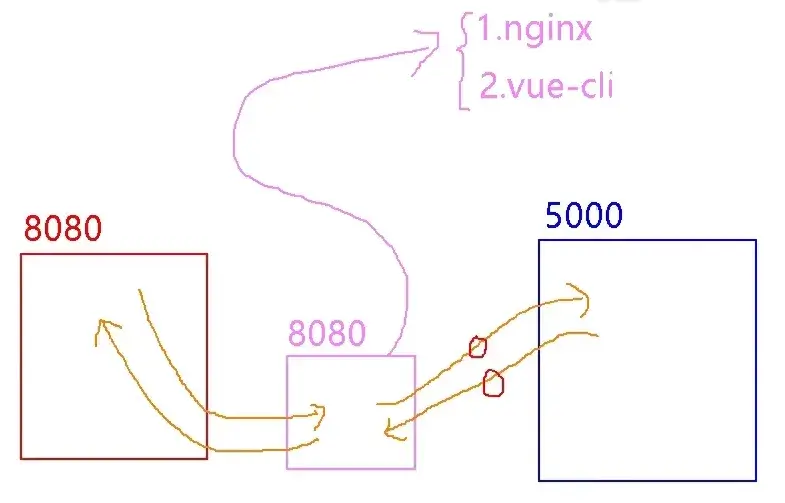
代理服务器(粉)端口号为 8080,从 5000 端口获取数据并转发回前端,就实现了跨域请求。
在前端项目中,配置 vue.config.js:
module.exports = {
  pages: {
    index: {
      entry: 'src/main.js',
    },
  },
  devServer: {
    proxy: 'http://localhost:5000',
  },
}
App.vue 下:
<template>
	<div id="root">
		<button @click="getStudents">获取学生信息</button>
	</div>
</template>

<script>
import axios from 'axios';
export default {
	name: 'App',
	methods: {
		getStudents() {
			axios.get('http://localhost:8080/students')  // 使用代理服务器后,修改端口号
				.then(response => {
					console.log('请求成功了:', response.data);
				})
				.catch(error => {
					console.log(error);
				});
		}
	},
}
</script>
097 配置代理_方式二
通过如下方式可以配置多个代理服务器:
{% tabs Tabs_097 %}
module.exports = {
    pages: {
        index: {
            entry: 'src/main.js',
        },
    },
    devServer: {
        proxy: {
            '/Student': {
                target: 'http://localhost:5000',
                changeOrigin: true,
                pathRewrite: {
                    '^/Student': '',
                },
            },
            '/Car': {
                target: 'http://localhost:5001',
                changeOrigin: true,
                pathRewrite: {
                    '^/Car': '',
                },
            },
        }
    },
}<template>
<div id="root">
<button @click="getStudents">获取学生信息</button>
<button @click="getCars">获取车辆信息</button>
</div>
</template>
<script>
import axios from 'axios';
export default {
name: 'App',
methods: {
getStudents() {
axios.get('http://localhost:8080/Student/students')
.then(response => {
console.log('请求成功了:', response.data);
})
.catch(error => {
console.log(error);
});
},
getCars() {
axios.get('http://localhost:8080/Car/cars')
.then(response => {
console.log('请求成功了:', response.data);
})
.catch(error => {
console.log(error);
});
}
},
}
</script>{% endtabs %}
098 github 案例_静态组件
构建项目如下:
由于 bootstrap.css 是第三方库,直接引入在 App.vue 中会因为缺失字体导致编译失败,改为引入到 index.html 中。
List.vue 和 Search.vue 由给的资源分析结构得到:
<!DOCTYPE html>
<html lang="en">
<head>
<meta charset="UTF-8">
<title>Title</title>
<link rel="stylesheet" href="./bootstrap.css">
<link rel="stylesheet" href="./index.css">
</head>
<body>
<div id="app">
<div class="container">
<section class="jumbotron">
<h3 class="jumbotron-heading">Search Github Users</h3>
<div>
<input type="text" placeholder="enter the name you search"/> <button>Search</button>
</div>
</section>
<div class="row">
<div class="card">
<a href="https://github.com/xxxxxx" target="_blank">
<img src="https://cn.vuejs.org/images/logo.svg" style='width: 100px'/>
</a>
<p class="card-text">xxxxxx</p>
</div>
<div class="card">
<a href="https://github.com/xxxxxx" target="_blank">
<img src="https://cn.vuejs.org/images/logo.svg" style='width: 100px'/>
</a>
<p class="card-text">xxxxxx</p>
</div>
<div class="card">
<a href="https://github.com/xxxxxx" target="_blank">
<img src="https://cn.vuejs.org/images/logo.svg" style='width: 100px'/>
</a>
<p class="card-text">xxxxxx</p>
</div>
<div class="card">
<a href="https://github.com/xxxxxx" target="_blank">
<img src="https://cn.vuejs.org/images/logo.svg" style='width: 100px'/>
</a>
<p class="card-text">xxxxxx</p>
</div>
<div class="card">
<a href="https://github.com/xxxxxx" target="_blank">
<img src="https://cn.vuejs.org/images/logo.svg" style='width: 100px'/>
</a>
<p class="card-text">xxxxxx</p>
</div>
</div>
</div>
</div>
</body>
</html>099 github 案例_列表展示
借助 github 官方提供的 API:https://api.github.com/search/users?q=XXX,通过 get 请求可以查找 github 的用户,返回一串 JSON。基于此,在 Search.vue 接收数据,并通过数据总线将数据传递给 List.vue。
<template>
<section class="jumbotron">
<h3 class="jumbotron-heading">Search Github Users</h3>
<div>
<input type="text" placeholder="enter the name you search" v-model="keyword" />
<button @click="searchUsers">Search</button>
</div>
</section>
</template>
<script>
/* eslint-disable vue/multi-word-component-names */
import axios from 'axios';
export default {
name: 'Test',
data() {
return {
keyword: ""
}
},
methods: {
searchUsers() {
axios.get(`https://api.github.com/search/users?q=${this.keyword}`)
.then((response) => {
console.log(response.data);
this.$bus.$emit('gerUsers', response.data.items);
})
.catch((error) => {
console.log(error);
});
}
}
}
</script>
<style></style>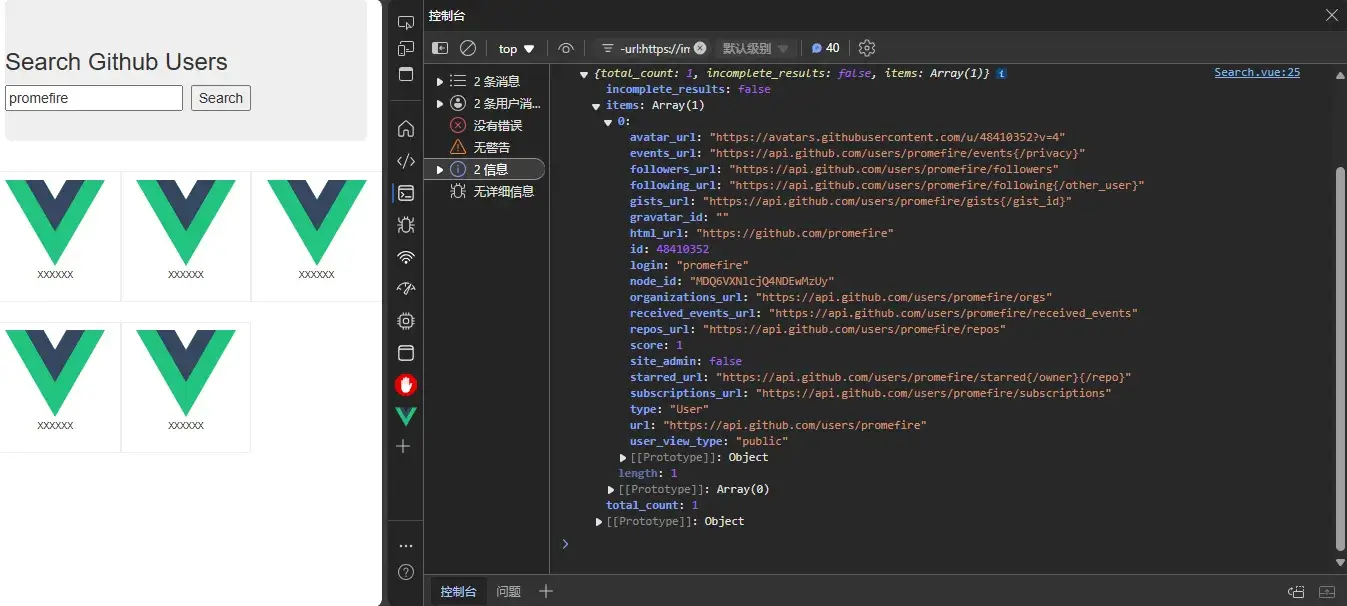
分析收到的 JSON 结构,在 List.vue 中接收并展示数据:
<template>
    <div class="row">
        <div class="card" v-for="user in users" :key="user.login">
            <a :href="user.html_url" target="_blank">
                <img :src="user.avatar_url" style='width: 100px'/>
            </a>
            <p class="card-text">{{user.login}}</p>
        </div>
    </div>
</template>

<script>
/* eslint-disable vue/multi-word-component-names */
export default {
    name: 'Test',
    data() {
        return {
            users: []
        }
    },
    mounted() {
        this.$bus.$on('gerUsers', (users) => {
            console.log('我是 List 组件,收到数据:', users);
            this.users = users;
        })
    }
}
</script>

<style lnag="css" scoped>
.album {
    min-height: 50rem;
    /* Can be removed; just added for demo purposes */
    padding-top: 3rem;
    padding-bottom: 3rem;
    background-color: #f7f7f7;
}

.card {
    float: left;
    width: 33.333%;
    padding: .75rem;
    margin-bottom: 2rem;
    border: 1px solid #efefef;
    text-align: center;
}

.card>img {
    margin-bottom: .75rem;
    border-radius: 100px;
}

.card-text {
    font-size: 85%;
}
</style>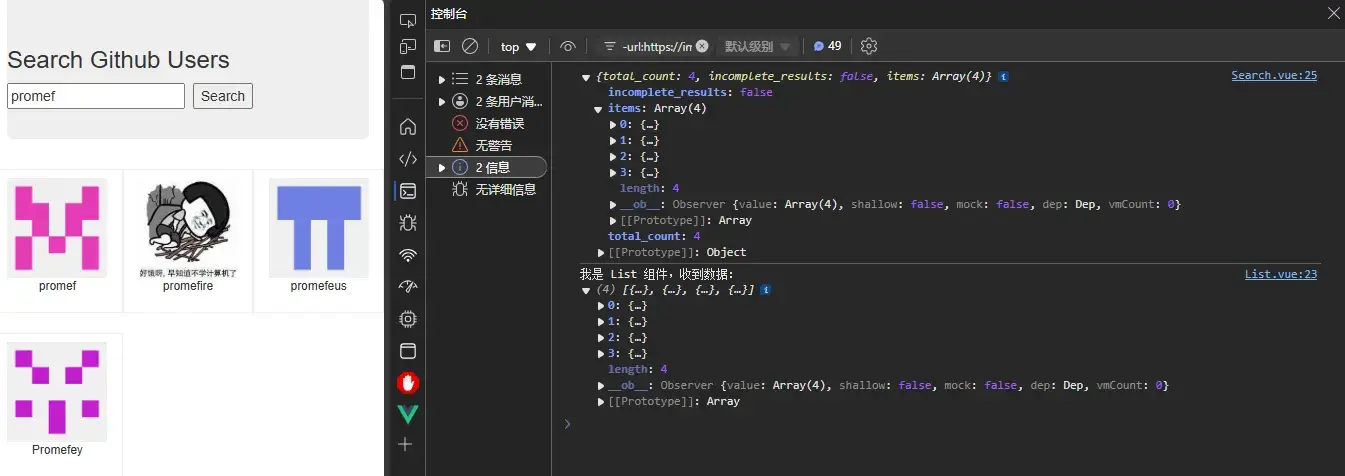
100 github 案例_完善案例
在之前的案例上增加搜索进度的判断:
{% tabs Tabs_100 %}
<template>
    <div>
        <!-- 展示用户列表-->
        <div class="row" v-if="info.users.length">
            <div class="card" v-for="user in info.users" :key="user.login">
                <a :href="user.html_url" target="_blank">
                    <img :src="user.avatar_url" style='width: 100px' />
                </a>
                <p class="card-text">{{ user.login }}</p>
            </div>
        </div>
        <!-- 展示欢迎词 -->
        <h1 v-show="info.isFirst">欢迎使用!</h1>
        <!-- 展示加载中 -->
        <div v-show="info.isLoading">加载中...</div>
        <!-- 展示错误信息 -->
        <div v-show="info.errMsg">{{ info.errMsg }}</div>
    </div>
</template>

<script>
/* eslint-disable vue/multi-word-component-names */
export default {
    name: 'List',
    data() {
        return {
            info: {
                isFirst: true,
                isLoading: false,
                errMsg: '',
                users: []
            }
        }
    },
    mounted() {
        this.$bus.$on('updateListData', this.handleUpdateListData);
    },
    beforeDestroy() {
        this.$bus.$off('updateListData', this.handleUpdateListData);
    },
    methods: {
        handleUpdateListData(dataObj) {
            console.log('我是 List 组件,收到数据:', this.info.users);
            this.info = {...this.info,...dataObj};
        }
    }
}
</script>

<style lang="css" scoped>
.album {
    min-height: 50rem;
    /* Can be removed; just added for demo purposes */
    padding-top: 3rem;
    padding-bottom: 3rem;
    background-color: #f7f7f7;
}

.card {
    float: left;
    width: 33.333%;
    padding: .75rem;
    margin-bottom: 2rem;
    border: 1px solid #efefef;
    text-align: center;
}

.card>img {
    margin-bottom: .75rem;
    border-radius: 100px;
}

.card-text {
    font-size: 85%;
}
</style><template>
<section class="jumbotron">
<h3 class="jumbotron-heading">Search Github Users</h3>
<div>
<input type="text" placeholder="enter the name you search" v-model="keyword" />
<button @click="searchUsers">Search</button>
</div>
</section>
</template>
<script>
/* eslint-disable vue/multi-word-component-names */
import axios from 'axios';
export default {
name: 'Test',
data() {
return {
keyword: ""
}
},
methods: {
searchUsers() {
this.$bus.$emit('updateListData', {isFirst: true, isLoading: true, errMsg: '', users: []});
axios.get(`https://api.github.com/search/users?q=${this.keyword}`)
.then((response) => {
console.log(response.data);
this.$bus.$emit('updateListData', {isLoading: false, errMsg: '', users: response.data.items});
})
.catch((error) => {
console.log(error);
this.$bus.$emit('updateListData', {isLoading: false, errMsg: error.message, users: []});
});
}
}
}
</script>
<style></style>{% endtabs %}
-
List.vue:-
List.vue中加入了显示欢迎词、展示加载中和展示错误信息等逻辑。 -
将数据存在了
this.info中,便于触发事件时可以直接更新对象里的值。javascript this.info = {...this.info,...dataObj};
-
101 vue-resource
vue-resource 是 Vue 的一个插件(虽然已年久失修),但是较老的项目可能还会用它。
安装之!
npm install vue-resource在 main.js 中引入并使用:
// 引入 Vue
import Vue from 'vue'
// 引入 App
import App from './App.vue'
// 引入插件
import VueResource from 'vue-resource'

// 关闭 Vue 的生产提示
Vue.config.productionTip = false

// 使用插件
Vue.use(VueResource)

// 创建 vm
new Vue({
	el: '#app',
	render: h => h(App),
	beforeCreate() {
		Vue.prototype.$bus = this
	},
})
在 Search.vue 中将 axios 改为 this.$http(它们的 API 基本上一样的):
export default {
    name: 'Test',
    data() {
        return {
            keyword: ""
        }
    },
    methods: {
        searchUsers() {
            this.$bus.$emit('updateListData', {isFirst: true, isLoading: true, errMsg: '', users: []});
            this.$http.get(`https://api.github.com/search/users?q=${this.keyword}`)
                .then((response) => {
                    console.log(response.data);
                    this.$bus.$emit('updateListData', {isLoading: false, errMsg: '', users: response.data.items});
                })
                .catch((error) => {
                    console.log(error);
                    this.$bus.$emit('updateListData', {isLoading: false, errMsg: error.message, users: []});
                });
        }
    }
}
102 默认插槽
注意
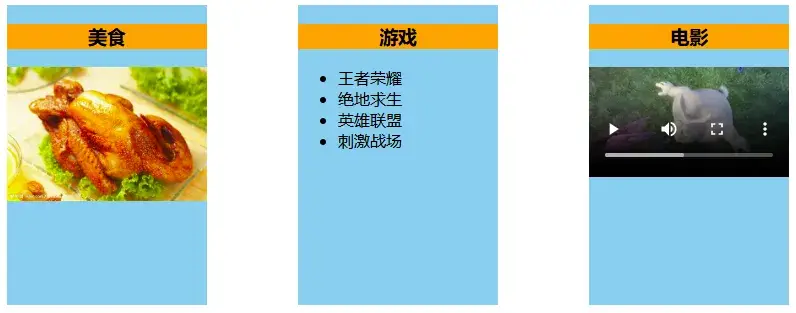
插槽(Slot)提供了一种将父组件的内容传递到子组件中特定位置的机制。它可以让组件的模板更加灵活和可定制。
{% tabs Tabs_102 %}
<template>
	<div class="container">
		<Category :listData="foods" title="美食">
			<img src="https://tse2-mm.cn.bing.net/th/id/OIP-C.L4qDFzWpNukuYVDODeUJ9QHaE9?rs=1&pid=ImgDetMain" alt="food">
		</Category>
		<Category :listData="games" title="游戏">
			<ul>
				<li v-for="(g, index) in games" :key="index">{{ g }}</li>
			</ul>
		</Category>
		<Category :listData="films" title="电影">
			<video controls src="https://www.w3schools.com/html/mov_bbb.mp4"></video>
		</Category>
	</div>
</template>

<script>
import Category from './components/Category.vue';
export default {
	name: 'App',
	components: {
		Category
	},
	data() {
		return {
			foods: ["火锅", "烧烤", "小龙虾", "海鲜"],
			games: ["王者荣耀", "绝地求生", "英雄联盟", "刺激战场"],
			films: ["《速度与激情3》", "《蝙蝠侠:黑暗骑士》", "《盗梦空间》", "《泰坦尼克号》"]
		}
	},
}
</script>

<style lang="css">
	.container {
		display: flex;
		justify-content: space-around;
	}

	h3 {
		text-align: center;
		background-color: orange;
	}

	img, video {
		max-width: 100%;
	}
</style><template>
<div class="category">
<h3>{{title}}</h3>
<slot>默认值。</slot>
</div>
</template>
<script>
/* eslint-disable vue/multi-word-component-names */
export default {
name: 'Category',
props: ['title']
}
</script>
<style lang="css" scoped>
.category {
background-color: skyblue;
width: 200px;
height: 300px;
}
</style>{% endtabs %}
103 具名插槽
当需要多个插槽时,可以给插槽命名。
{% tabs Tabs_103 %}
<template>
	<div class="container">
		<Category :listData="foods" title="美食">
			<img slot="center"
				src="https://tse2-mm.cn.bing.net/th/id/OIP-C.L4qDFzWpNukuYVDODeUJ9QHaE9?rs=1&pid=ImgDetMain" alt="food">
			<a slot="footer" href="www.baidu.com">更多</a>
		</Category>
		<Category :listData="games" title="游戏">
			<ul slot="center">
				<li v-for="(g, index) in games" :key="index">{{ g }}</li>
			</ul>
			<div slot="footer" class="foot">
				<a href="www.baidu.com">单机游戏</a>
				<a href="www.baidu.com">网络游戏</a>
			</div>
		</Category>
		<Category :listData="films" title="电影">
			<video slot="center" controls src="https://www.w3schools.com/html/mov_bbb.mp4"></video>
			<template v-slot:footer>
				<div class="foot">
					<a href="www.baidu.com">热门</a>
					<a href="www.baidu.com">经典</a>
					<a href="www.baidu.com">推荐</a>
				</div>
				<h4>欢迎前来观影</h4>
			</template>
		</Category>
	</div>
</template>

<script>
import Category from './components/Category.vue';
export default {
	name: 'App',
	components: {
		Category
	},
	data() {
		return {
			foods: ["火锅", "烧烤", "小龙虾", "海鲜"],
			games: ["王者荣耀", "绝地求生", "英雄联盟", "刺激战场"],
			films: ["《速度与激情3》", "《蝙蝠侠:黑暗骑士》", "《盗梦空间》", "《泰坦尼克号》"]
		}
	},
}
</script>

<style lang="css">
.container,
.foot {
	display: flex;
	justify-content: space-around;
}

h3 {
	text-align: center;
	background-color: orange;
}

h4 {
	text-align: center;
}

img,
video {
	max-width: 100%;
}
</style><template>
<div class="category">
<h3>{{title}}</h3>
<slot name="center">默认值。</slot>
<slot name="footer">默认值。</slot>
</div>
</template>
<script>
/* eslint-disable vue/multi-word-component-names */
export default {
name: 'Category',
props: ['title']
}
</script>
<style lang="css" scoped>
.category {
background-color: skyblue;
width: 200px;
height: 300px;
}
</style>{% endtabs %}
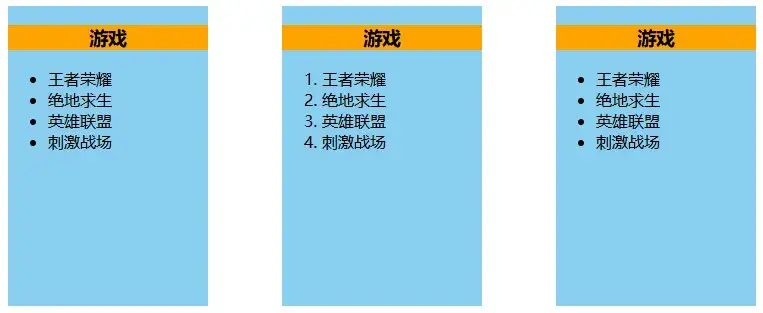
104 作用域插槽
{% tabs Tabs_104 %}
<template>
	<div class="container">
		<Category :listData="games" title="游戏">
			<template scope="{games}">
				<ul>
					<li v-for="(g, index) in games" :key="index">{{ g }}</li>
				</ul>
			</template>
		</Category>
		<Category :listData="games" title="游戏">
			<template scope="{games}">
				<ol>
					<li v-for="(g, index) in games" :key="index">{{ g }}</li>
				</ol>
			</template>
		</Category>
		<Category :listData="games" title="游戏">
			<template slot-scope="{games}">
				<ul>
					<li v-for="(g, index) in games" :key="index">{{ g }}</li>
				</ul>
			</template>
		</Category>
	</div>
</template>

<script>
import Category from './components/Category.vue';
export default {
	name: 'App',
	components: {
		Category
	},
}
</script>

<style lang="css">
.container,
.foot {
	display: flex;
	justify-content: space-around;
}

h3 {
	text-align: center;
	background-color: orange;
}

h4 {
	text-align: center;
}

img,
video {
	max-width: 100%;
}
</style><template>
<div class="category">
<h3>{{title}}</h3>
<slot :games="games">默认值。</slot>
</div>
</template>
<script>
/* eslint-disable vue/multi-word-component-names */
export default {
name: 'Category',
props: ['title'],
data() {
return {
games: ["王者荣耀", "绝地求生", "英雄联盟", "刺激战场"],
}
},
}
</script>
<style lang="css" scoped>
.category {
background-color: skyblue;
width: 200px;
height: 300px;
}
</style>{% endtabs %}
注意
插槽
-
作用:让父组件可以向子组件指定位置插入 html 结构,也是一种组件问通信的方式,适用于父组件 ==> 子组件。
-
分类:默认插槽、具名插槽、作用域插槽
-
使用方式:
-
默认插槽:
父组件中:
vue <Category> <div>html 结构 1</div> </Category>子组件中:
vue <template> <div> <!-- 定义插槽 --> <slot>插槽默认内容...</slot> </div> </template> -
具名插槽:
父组件中:
vue <Category> <template slot="center"> <div>html 结构 1</div> </template> <template w-slot:footer> <div>html 结构 2</div> </template> </Category>子组件中:
vue <template> <div> <!-- 定义插槽 --> <slot name="center">插槽默认内容...</slot> <slot name="footer">插槽默认内容...</slot> </div> </template> -
作用域插槽
理解:数据在组件的自身,但根据数据生成的结构需要组件的使用者来决定,(games 数据在 Category 组件中,数据所遍历出来的结构由 App 组件决定)
父组件中:
vue <Category> <template scope="scopeData"> <!-- 生成的是 ul 列表 --> <ul> <li v-for="g in scopeData.games" :key="g">{{ g }}</li> </ul> </template> </Category> <Category> <template scope="scopeData"> <!-- 生成的是 h4 标题 --> <h4 v-for="g in scopeData.games">{{ g }}</h4> </template> </Category>子组件中:
vue <template> <div> <slot :games."games"></slot> </div> </template> <script> export default{ name:'Category', props:['title'], // 数据在子组件自身 data(){ return { games:['红色整戒','穿越火线','劲舞团','超级玛丽'] } }, } </script>
-