官网
课程
1.1 了解网页结构
查看网页源代码
爬取网页: Scraping tutorial 1 | 莫烦 Python
<!DOCTYPE html>
<html lang="cn">
<head>
	<meta charset="UTF-8">
	<title>Scraping tutorial 1 | 莫烦 Python</title>
	<link rel="icon" href="https://morvanzhou.github.io/static/img/description/tab_icon.png">
</head>
<body>
	<h1>爬虫测试 1</h1>
	<p>
		这是一个在 <a href="https://morvanzhou.github.io/">莫烦 Python</a>
		<a href="https://morvanzhou.github.io/tutorials/data-manipulation/scraping/">爬虫教程</a> 中的简单测试.
	</p>

</body>
</html>from urllib.request import urlopen
html = urlopen(
"https://yulizi123.github.io/static/scraping/basic-structure.html"
).read().decode('utf-8')
# 因为这个网页有中文元素, 应该用 utf-8 解码
print(html)<!DOCTYPE html>
<html lang="cn">
<head>
<meta charset="UTF-8">
<title>Scraping tutorial 1 | 莫烦 Python</title>
<link rel="icon" href="https://morvanzhou.github.io/static/img/description/tab_icon.png">
</head>
<body>
<h1>爬虫测试 1</h1>
<p>
这是一个在 <a href="https://morvanzhou.github.io/">莫烦 Python</a>
<a href="https://morvanzhou.github.io/tutorials/data-manipulation/scraping/">爬虫教程</a> 中的简单测试.
</p>
</body>
</html>
先导: 正则表达式 Regular Expression
教程:
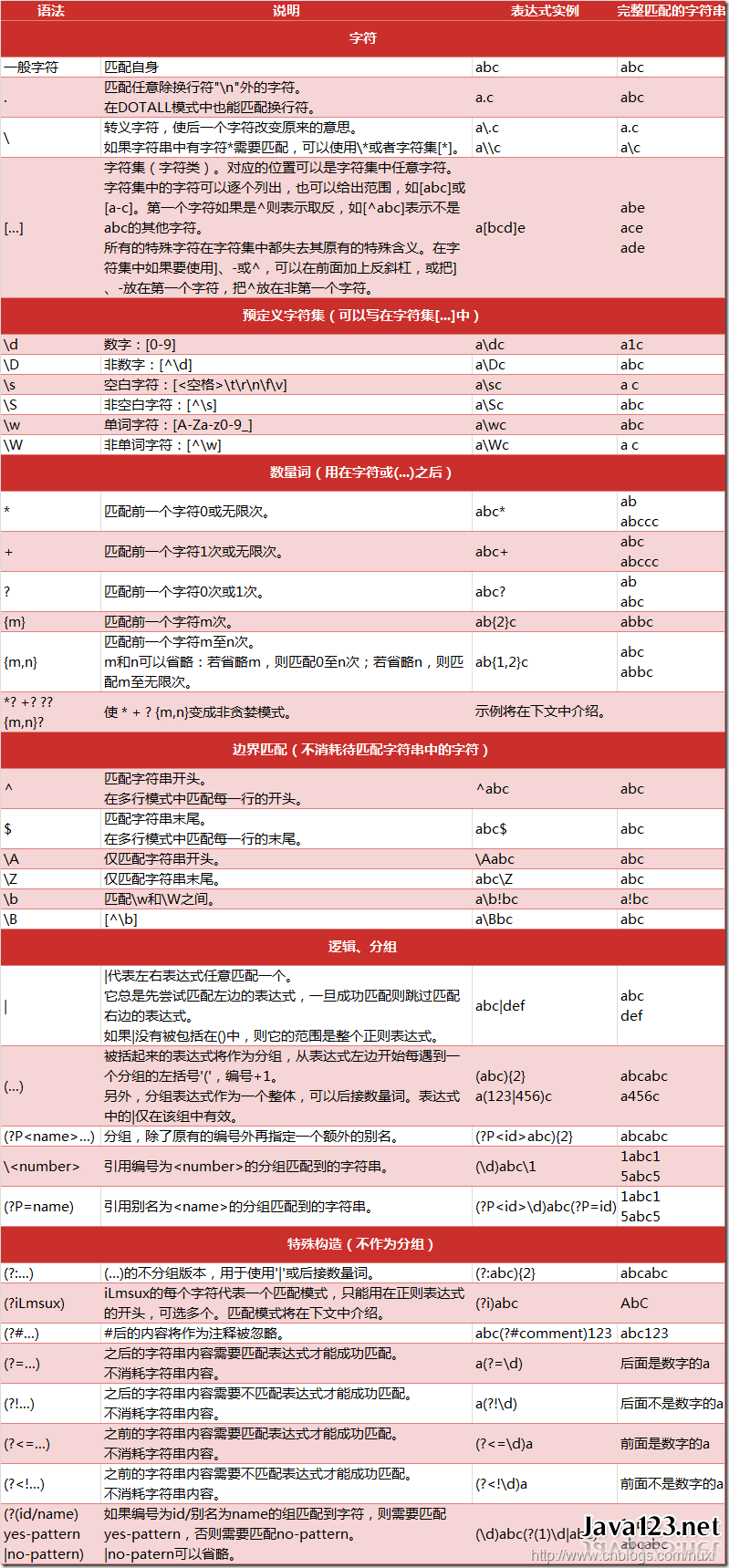
正则表达式 (Regular Expression) 又称 RegEx, 是用来匹配字符的一种工具. 在一大串字符中寻找你需要的内容. 它常被用在很多方面, 比如网页爬虫, 文稿整理, 数据筛选等等.
从浏览器中读取的代码中找到有用的信息
简单 Python 匹配
pattern1 = "cat"
pattern2 = "bird"
string = "dog runs to cat"
print(pattern1 in string)
print(pattern2 in string)
True
False
用正则表达式寻找配对
import re

pattern1 = "cat"
pattern2 = "bird"
string = "dog runs to cat"
print(re.search(pattern1, string))
print(re.search(pattern2, string))
<re.Match object; span=(12, 15), match='cat'>
None
在 string 12-15 之间找到了字符串 cat
匹配多种可能 使用[]
两种可能 run 或 ran
ptn = r"r[au]n"  # 加了 r 就是表达式, 没加就是字符串
print(re.search(ptn, "dog runs to cat"))
<re.Match object; span=(4, 7), match='run'>
匹配多种可能
print(re.search(r"r[A-Z]n", "dog runs to cat"))  # 大写字母
print(re.search(r"r[a-z]n", "dag runs to cat"))  # 小写字母
print(re.search(r"r[0-9]n", "dog r1ns to cat"))  # 数字
print(re.search(r"r[0-9a-z]n", "dog runs to cat"))  # 字母或数字
None
<re.Match object; span=(4, 7), match='run'>
<re.Match object; span=(4, 7), match='r1n'>
<re.Match object; span=(4, 7), match='run'>
特殊种类匹配
数字
# \d: 匹配所有数字
print(re.search(r"r\dn", "run r4n"))
# \d: 匹配所有非数字
print(re.search(r"r\Dn", "run r4n"))
<re.Match object; span=(4, 7), match='r4n'>
<re.Match object; span=(0, 3), match='run'>
空白
# \s: 任何空白, 如\t, \n, \r, \f, \v
print(re.search(r"r\sn", "r\nn r4n"))
# \S: 任何非空白
print(re.search(r"r\Sn", "r\nn r4n"))
<re.Match object; span=(0, 3), match='r\nn'>
<re.Match object; span=(4, 7), match='r4n'>
所有数字和下划线_
# \w: [a-zA-Z0-9_]
print(re.search(r"r\wn", "r\nn r4n"))
# \W: 与\w 相反
print(re.search(r"r\Wn", "r\nn r4n"))
<re.Match object; span=(4, 7), match='r4n'>
<re.Match object; span=(0, 3), match='r\nn'>
空白字符
# \b: 空格
print(re.search(r"\bruns\b", "dog runs to cat"))
print(re.search(r"\bruns\b", "dog runsto cat"))
# \B: 非空格
print(re.search(r"\Bruns\B", "dog runs to cat"))
print(re.search(r"\Bruns\B", "dogrunsto cat"))
<re.Match object; span=(4, 8), match='runs'>
None
None
<re.Match object; span=(3, 7), match='runs'>
特殊字符 任意字符
# \\: 匹配反斜杠\
print(re.search(r"runs\\", "runs\ to me"))
# .: 匹配除了\n 外的任何字符
print(re.search(r"r.ns", "r[ns to me"))
<re.Match object; span=(0, 5), match='runs\\'>
<re.Match object; span=(0, 4), match='r[ns'>
句尾句首
# ^: 在句首匹配
print(re.search(r"^dog", "dog runs to cat"))
# $: 在句尾匹配
print(re.search(r"cat$", "dog runs to cat"))
<re.Match object; span=(0, 3), match='dog'>
<re.Match object; span=(12, 15), match='cat'>
是否
# ()?: 无论括号内是否有内容, 都会被匹配
print(re.search(r"Mon(day)?", "Monday"))
print(re.search(r"Mon(day)?", "Mon"))
<re.Match object; span=(0, 6), match='Monday'>
<re.Match object; span=(0, 3), match='Mon'>
多行匹配
# 多行情况下
string = """
dog runs to cat.
I run to dog.
"""
print(re.search(r"^I", string))
print(re.search(r"^I", string, flags=re.M))  # 增加 flag 匹配多行
None
<re.Match object; span=(18, 19), match='I'>
0 或多次
# *: 出现 0 或多次都会被匹配
print(re.search(r"ab*", "a"))
print(re.search(r"ab*", "abbbbbbb"))
<re.Match object; span=(0, 1), match='a'>
<re.Match object; span=(0, 8), match='abbbbbbb'>
1 或多次
# +: 出现 1 或多次都会被匹配
print(re.search(r"ab+", "a"))
print(re.search(r"ab+", "abbbbbbb"))
None
<re.Match object; span=(0, 8), match='abbbbbbb'>
可选次数
# {n,m}: 出现 n-m 次之间都会被匹配(逗号后面不能加空格)
print(re.search(r"ab{2,10}", "a"))
print(re.search(r"ab{2,10}", "abbbbb"))
None
<re.Match object; span=(0, 6), match='abbbbb'>
group 组()
# \d+ 数字出现了 1 次或多次
# .+ 匹配所有除了\n 外所有的字符
match = re.search(r"(\d+), Date: (.+)", "ID: 021523, Date: Feb/12/2017")
print(match.group())
print(match.group(1))
print(match.group(2))
021523, Date: Feb/12/2017
021523
Feb/12/2017
组命名 ?P<组名>
match = re.search(r"(?P<id>\d+), Date: (?P<date>.+)", "ID: 021523, Date: Feb/12/2017")
print(match.group())
print(match.group("id"))
print(match.group("date"))
021523, Date: Feb/12/2017
021523
Feb/12/2017
findall 寻找所有匹配
print(re.findall(r"r[ua]n", "run ran ren"))
# | : 或
print(re.findall(r"r(u|a)n", "run ran ren"))
print(re.findall(r"run|ran", "run ran ren"))
['run', 'ran']
['u', 'a']
['run', 'ran']
re.sub 替换
print(re.sub(r"r[au]ns", "catches", "dog runs to cat"))dog catches to cat
re.split 分裂
print(re.split(r"[,;\.]", "a;b;c;d;e"))['a', 'b', 'c', 'd', 'e']
compile 先编译字符串
# compile
compiled_re = re.compile(r"r[ua]n")
print(compiled_re.search("dog ran to cat"))
<re.Match object; span=(4, 7), match='ran'>
小抄
使用正则表达式爬取网页标题
import re

# 读取<title>和</title>之间的内容
res = re.findall(r"<title>(.+?)</title>", html)
print("\nPage title is: ", res[0])
Page title is: Scraping tutorial 1 | 莫烦 Python
找到段落信息
res = re.findall(r"<p>(.*?)</p>", html, flags=re.DOTALL)  # flags=re.DOTALL 选取多行信息
print("\nPage paragraphs: ", res[0])
Page paragraphs:
这是一个在 <a href="https://morvanzhou.github.io/">莫烦 Python</a>
<a href="https://morvanzhou.github.io/tutorials/data-manipulation/scraping/">爬虫教程</a> 中的简单测试.
查找所有超链接信息
res = re.findall(r'href="(.*?)"', html)
print("\nAll links: ", res)
All links: ['https://morvanzhou.github.io/static/img/description/tab_icon.png', 'https://morvanzhou.github.io/', 'https://morvanzhou.github.io/tutorials/data-manipulation/scraping/']
2.1 BeautifulSoup 解析网页: 基础
可以使用 BeautifulSoup 进行一个高级的匹配!
pip install beautifulsoup4Requirement already satisfied: beautifulsoup4 in c:\users\gzjzx\anaconda3\lib\site-packages (4.11.1)
Requirement already satisfied: soupsieve>1.2 in c:\users\gzjzx\anaconda3\lib\site-packages (from beautifulsoup4) (2.3.1)
Note: you may need to restart the kernel to use updated packages.
BeautifulSoup 简单的用法
导入网页信息
from bs4 import BeautifulSoup
from urllib.request import urlopen

html = urlopen(
    "https://yulizi123.github.io/static/scraping/basic-structure.html"
).read().decode('utf-8')
print(html)
<!DOCTYPE html>
<html lang="cn">
<head>
<meta charset="UTF-8">
<title>Scraping tutorial 1 | 莫烦 Python</title>
<link rel="icon" href="https://morvanzhou.github.io/static/img/description/tab_icon.png">
</head>
<body>
<h1>爬虫测试 1</h1>
<p>
这是一个在 <a href="https://morvanzhou.github.io/">莫烦 Python</a>
<a href="https://morvanzhou.github.io/tutorials/data-manipulation/scraping/">爬虫教程</a> 中的简单测试.
</p>
</body>
</html>
把获得的网页信息"喂给"BeautifulSoup
soup = BeautifulSoup(html, features='lxml')  # 解析形式: lxml
print(soup.h1)  # 选出 h1
print('\n', soup.p)  # 选出 p
<h1>爬虫测试 1</h1>
<p>
这是一个在 <a href="https://morvanzhou.github.io/">莫烦 Python</a>
<a href="https://morvanzhou.github.io/tutorials/data-manipulation/scraping/">爬虫教程</a> 中的简单测试.
</p>
all_href = soup.find_all('a')  # 找到所有<a>属性
all_href = [l['href'] for l in all_href]
print(all_href)
['https://morvanzhou.github.io/', 'https://morvanzhou.github.io/tutorials/data-manipulation/scraping/']
all_href = soup.find_all('a')
print(all_href)
[<a href="https://morvanzhou.github.io/">莫烦 Python</a>, <a href="https://morvanzhou.github.io/tutorials/data-manipulation/scraping/">爬虫教程</a>]
all_href = soup.find_all('a')
for l in all_href:
    print(l['href'])
https://morvanzhou.github.io/
https://morvanzhou.github.io/tutorials/data-manipulation/scraping/
2.2 BeautifulSoup 解析网页: CSS
from bs4 import BeautifulSoup
from urllib.request import urlopen

html = urlopen(
    "https://yulizi123.github.io/static/scraping/list.html"
).read().decode('utf-8')
print(html)
<!DOCTYPE html>
<html lang="cn">
<head>
<meta charset="UTF-8">
<title>爬虫练习 列表 class | 莫烦 Python</title>
<style>
.jan {
background-color: yellow;
}
.feb {
font-size: 25px;
}
.month {
color: red;
}
</style>
</head>
<body>
<h1>列表 爬虫练习</h1>
<p>这是一个在 <a href="https://morvanzhou.github.io/" >莫烦 Python</a> 的 <a href="https://morvanzhou.github.io/tutorials/data-manipulation/scraping/" >爬虫教程</a>
里无敌简单的网页, 所有的 code 让你一目了然, 清晰无比.</p>
<ul>
<li class="month">一月</li>
<ul class="jan">
<li>一月一号</li>
<li>一月二号</li>
<li>一月三号</li>
</ul>
<li class="feb month">二月</li>
<li class="month">三月</li>
<li class="month">四月</li>
<li class="month">五月</li>
</ul>
</body>
</html>
soup = BeautifulSoup(html, features='lxml')
# 用类名做匹配
month = soup.find_all('li', {"class": "month"}) # 使用字典 查找<li>中 class 类中要包含 month 这个单词
for m in month:
    print(m)  # 如果只打印 m
    print(m.get_text())  # 显示里面的文字
<li class="month">一月</li>
一月
<li class="feb month">二月</li>
二月
<li class="month">三月</li>
三月
<li class="month">四月</li>
四月
<li class="month">五月</li>
五月
jan = soup.find('ul', {"class": "jan"})
print(jan)
<ul class="jan">
<li>一月一号</li>
<li>一月二号</li>
<li>一月三号</li>
</ul>
d_jan = jan.find_all('li')  # 将 jan 作为一个父对象
for d in d_jan:
    print(d.get_text())
一月一号
一月二号
一月三号
2.3 BeautifulSoup 解析网页: 正则表达
from bs4 import BeautifulSoup
from urllib.request import urlopen
import re

html = urlopen(
    "https://yulizi123.github.io/static/scraping/table.html"
).read().decode('utf-8')
print(html)
<!DOCTYPE html>
<html lang="cn">
<head>
<meta charset="UTF-8">
<title>爬虫练习 表格 table | 莫烦 Python</title>
<style>
img {
width: 250px;
}
table{
width:50%;
}
td{
margin:10px;
padding:15px;
}
</style>
</head>
<body>
<h1>表格 爬虫练习</h1>
<p>这是一个在 <a href="https://morvanzhou.github.io/" >莫烦 Python</a> 的 <a href="https://morvanzhou.github.io/tutorials/data-manipulation/scraping/" >爬虫教程</a>
里无敌简单的网页, 所有的 code 让你一目了然, 清晰无比.</p>
<br/>
<table id="course-list">
<tr>
<th>
分类
</th><th>
名字
</th><th>
时长
</th><th>
预览
</th>
</tr>
<tr id="course1" class="ml">
<td>
机器学习
</td><td>
<a href="https://morvanzhou.github.io/tutorials/machine-learning/tensorflow/">
Tensorflow 神经网络</a>
</td><td>
2:00
</td><td>
<img src="https://morvanzhou.github.io/static/img/course_cover/tf.jpg">
</td>
</tr>
<tr id="course2" class="ml">
<td>
机器学习
</td><td>
<a href="https://morvanzhou.github.io/tutorials/machine-learning/reinforcement-learning/">
强化学习</a>
</td><td>
5:00
</td><td>
<img src="https://morvanzhou.github.io/static/img/course_cover/rl.jpg">
</td>
</tr>
<tr id="course3" class="data">
<td>
数据处理
</td><td>
<a href="https://morvanzhou.github.io/tutorials/data-manipulation/scraping/">
爬虫</a>
</td><td>
3:00
</td><td>
<img src="https://morvanzhou.github.io/static/img/course_cover/scraping.jpg">
</td>
</tr>
</table>
</body>
</html>
查找所有图片链接
soup = BeautifulSoup(html, features='lxml')

img_links = soup.find_all("img", {"src": re.compile('.*?\.jpg')})
for link in img_links:
    print(link['src'])
https://morvanzhou.github.io/static/img/course_cover/tf.jpg
https://morvanzhou.github.io/static/img/course_cover/rl.jpg
https://morvanzhou.github.io/static/img/course_cover/scraping.jpg
设定特定的匹配规则
course_links = soup.find_all(
    'a', {'href': re.compile('https://morvan.*')})
for link in course_links:
    print(link['href'])
https://morvanzhou.github.io/
https://morvanzhou.github.io/tutorials/data-manipulation/scraping/
https://morvanzhou.github.io/tutorials/machine-learning/tensorflow/
https://morvanzhou.github.io/tutorials/machine-learning/reinforcement-learning/
https://morvanzhou.github.io/tutorials/data-manipulation/scraping/
2.4 小练习: 爬百度百科
设置源地址
from bs4 import BeautifulSoup
from urllib.request import urlopen
import re
import random

base_url = "https://baike.baidu.com"
his = ["/item/%E7%BD%91%E7%BB%9C%E7%88%AC%E8%99%AB/5162711"]
输出网址
url = base_url + his[-1]  # 添加 his 列表中的最后一个, 合并成网址
html = urlopen(url).read().decode('utf-8')
soup = BeautifulSoup(html, features='lxml')
print(soup.find('h1').get_text(), '\turl:', his[-1])
网络爬虫 url: /item/%E7%BD%91%E7%BB%9C%E7%88%AC%E8%99%AB/5162711
爬取链接
# 找到合法链接
# 分析链接的规律: 所有超链接都有<a target=_blank href XXX
# 以/item/开头
sub_urls = soup.find_all("a", {"target": "_blank", "href": re.compile("/item/(%.{2})+$")})

if len(sub_urls) != 0:
    his.append(random.sample(sub_urls, 1)[0]['href'])
else:
    # 没有找到合法链接
    his.pop()
print(his)
['/item/%E7%BD%91%E7%BB%9C%E7%88%AC%E8%99%AB/5162711', '/item/%E7%BD%91%E7%BB%9C%E6%95%B0%E6%8D%AE']
加入循环
from bs4 import BeautifulSoup
from urllib.request import urlopen
import re
import random

base_url = "https://baike.baidu.com"
his = ["/item/%E7%BD%91%E7%BB%9C%E7%88%AC%E8%99%AB/5162711"]

for i in range(20):  # 先爬 20 个
    url = base_url + his[-1]  # 添加 his 列表中的最后一个, 合并成网址
    html = urlopen(url).read().decode('utf-8')
    soup = BeautifulSoup(html, features='lxml')
    print(soup.find('h1').get_text(), '\turl:', his[-1])

    sub_urls = soup.find_all("a", {"target": "_blank", "href": re.compile("/item/(%.{2})+$")})

    if len(sub_urls) != 0:
        his.append(random.sample(sub_urls, 1)[0]['href'])
    else:
        # 没有找到合法链接
        his.pop()
print(his)
网络爬虫 url: /item/%E7%BD%91%E7%BB%9C%E7%88%AC%E8%99%AB/5162711
搜索引擎 url: /item/%E6%90%9C%E7%B4%A2%E5%BC%95%E6%93%8E
百度 url: /item/%E7%99%BE%E5%BA%A6
百度旅游 url: /item/%E7%99%BE%E5%BA%A6%E6%97%85%E6%B8%B8
上地 url: /item/%E4%B8%8A%E5%9C%B0
北至 url: /item/%E5%8C%97%E8%87%B3
西京赋 url: /item/%E8%A5%BF%E4%BA%AC%E8%B5%8B
缘竿 url: /item/%E7%BC%98%E7%AB%BF
西京赋 url: /item/%E8%A5%BF%E4%BA%AC%E8%B5%8B
扛鼎 url: /item/%E6%89%9B%E9%BC%8E
任鄙 url: /item/%E4%BB%BB%E9%84%99
孟说 url: /item/%E5%AD%9F%E8%AF%B4
乌获 url: /item/%E4%B9%8C%E8%8E%B7
秦国 url: /item/%E7%A7%A6%E5%9B%BD
雍城 url: /item/%E9%9B%8D%E5%9F%8E
秦德公 url: /item/%E7%A7%A6%E5%BE%B7%E5%85%AC
秦宪公 url: /item/%E7%A7%A6%E5%AE%81%E5%85%AC
秦静公 url: /item/%E7%A7%A6%E9%9D%99%E5%85%AC
秦文公 url: /item/%E7%A7%A6%E6%96%87%E5%85%AC
宝鸡 url: /item/%E5%AE%9D%E9%B8%A1%E5%B8%82
['/item/%E7%BD%91%E7%BB%9C%E7%88%AC%E8%99%AB/5162711', '/item/%E6%90%9C%E7%B4%A2%E5%BC%95%E6%93%8E', '/item/%E7%99%BE%E5%BA%A6', '/item/%E7%99%BE%E5%BA%A6%E6%97%85%E6%B8%B8', '/item/%E4%B8%8A%E5%9C%B0', '/item/%E5%8C%97%E8%87%B3', '/item/%E8%A5%BF%E4%BA%AC%E8%B5%8B', '/item/%E6%89%9B%E9%BC%8E', '/item/%E4%BB%BB%E9%84%99', '/item/%E5%AD%9F%E8%AF%B4', '/item/%E4%B9%8C%E8%8E%B7', '/item/%E7%A7%A6%E5%9B%BD', '/item/%E9%9B%8D%E5%9F%8E', '/item/%E7%A7%A6%E5%BE%B7%E5%85%AC', '/item/%E7%A7%A6%E5%AE%81%E5%85%AC', '/item/%E7%A7%A6%E9%9D%99%E5%85%AC', '/item/%E7%A7%A6%E6%96%87%E5%85%AC', '/item/%E5%AE%9D%E9%B8%A1%E5%B8%82', '/item/%E7%BA%A2%E6%B2%B3%E8%B0%B7']
在此建议大家, 因为有反爬虫机制, 大家最好给自己的程序加上 time.sleep(2), 不然你的程序也不能访问百度百科了
3.1 Post 登录 Cookies(Requests)
其实在加载网页的时候, 有几种类型, 而这几种类型就是你打开网页的关键. 最重要的类型 (method) 就是
get和post(当然还有其他的, 比如 head, delete). 刚接触网页构架的朋友可能又会觉得有点懵逼了. 这些请求的方式到底有什么不同? 他们又有什么作用?
我们就来说两个重要的,
get,post, 95% 的时间, 你都是在使用这两个来请求一个网页.
post账号登录 搜索内容 上传图片 上传文件 往服务器传数据 等
get正常打开网页 不往服务器传数据
安装 requests
pip install requestsRequirement already satisfied: requests in c:\users\gzjzx\anaconda3\lib\site-packages (2.27.1)
Requirement already satisfied: charset-normalizer~=2.0.0 in c:\users\gzjzx\anaconda3\lib\site-packages (from requests) (2.0.4)
Requirement already satisfied: idna<4,>=2.5 in c:\users\gzjzx\anaconda3\lib\site-packages (from requests) (3.3)
Requirement already satisfied: certifi>=2017.4.17 in c:\users\gzjzx\anaconda3\lib\site-packages (from requests) (2021.10.8)
Requirement already satisfied: urllib3<1.27,>=1.21.1 in c:\users\gzjzx\anaconda3\lib\site-packages (from requests) (1.26.9)
Note: you may need to restart the kernel to use updated packages.
使用 requests
get 请求
import requests
# import webbrowser

param = {"wd": "莫烦 python"}
r = requests.get('http://www.baidu.com/s', params=param)
print(r.url)
# webbrowser.open(r.url)  # 打开这个网页: 使用百度搜索 莫烦 python
http://www.baidu.com/s?wd=%E8%8E%AB%E7%83%A6python
post 请求
https://pythonscraping.com/pages/files/form.html
data = {'firstname': '莫烦', 'lastname': '周'}
r = requests.post('https://pythonscraping.com/pages/files/processing.php', data=data)
print(r.text)
Hello there, 莫烦 周!
使用 get 请求会返回信息, 而 post 请求不会
上传文件
https://pythonscraping.com/files/form2.html
上传图片也是post的一种
file = {'uploadFile': open('./images.png', 'rb')}
r = requests.post(
    'https://pythonscraping.com/pages/files/processing2.php', files=file)
print(r.text)
uploads/images.png
The file image.png has been uploaded.
登录
https://pythonscraping.com/pages/cookies/login.html
payload = {'username': 'Morvan', 'password': 'password'}
r = requests.post(
    'https://pythonscraping.com/pages/cookies/welcome.php',
    data=payload)
print(r.cookies.get_dict())  # 网页的 cookie 内容
r = requests.get('https://pythonscraping.com/pages/cookies/profile.php'
                 ,cookies=r.cookies)
print(r.text)
{'loggedin': '1', 'username': 'Morvan'}
Hey Morvan! Looks like you're still logged into the site!
使用 session 控制 cookie 的传递
session = requests.Session()
payload = {'username': 'Morvan', 'password': 'password'}
r = session.post('https://pythonscraping.com/pages/cookies/welcome.php', data=payload)
print(r.cookies.get_dict())
r = session.get("https://pythonscraping.com/pages/cookies/welcome.php")
print(r.text)
{'loggedin': '1', 'username': 'Morvan'}
<h2>Welcome to the Website!</h2>
You have logged in successfully! <br/><a href="profile.php">Check out your profile!</a>
3.2 下载文件
设置保存路径和图片地址
import os

os.makedirs('./img/', exist_ok=True)  # 设置保存路径
IMAGE_URL = "http://www.baidu.com/img/flexible/logo/pc/result.png"  # 设置图片地址
urlretrive url 检索
from urllib.request import urlretrieve

urlretrieve(IMAGE_URL, './img/images1.png')
('./img/images1.png', <http.client.HTTPMessage at 0x27e707a86a0>)
使用 requests
wb 是二进制格式打开一个文件, 源文件存在的话从头编辑, 替代原文件, 不存在的话则创建新文件
import requests

r = requests.get(IMAGE_URL)
with open('./img/images2.png', 'wb') as f:
    f.write(r.content)
如果要下载一个较大的文件
r = requests.get(IMAGE_URL, stream=True)
with open('./img/images3.png', 'wb') as f:
    for chunk in r.iter_content(chunk_size=32):  # 每次写入文件时写入 32 个字节
        f.write(chunk)
3.3 小练习: 下载国家地理美图
好像网站更新了, 有了反爬虫功能? 改成爬取February 27, 2018 | iDaily 每日环球视野
设置地址
from bs4 import BeautifulSoup
import requests

URL = "http://m.idai.ly/se/a193iG?1661356800"
设置爬虫参数
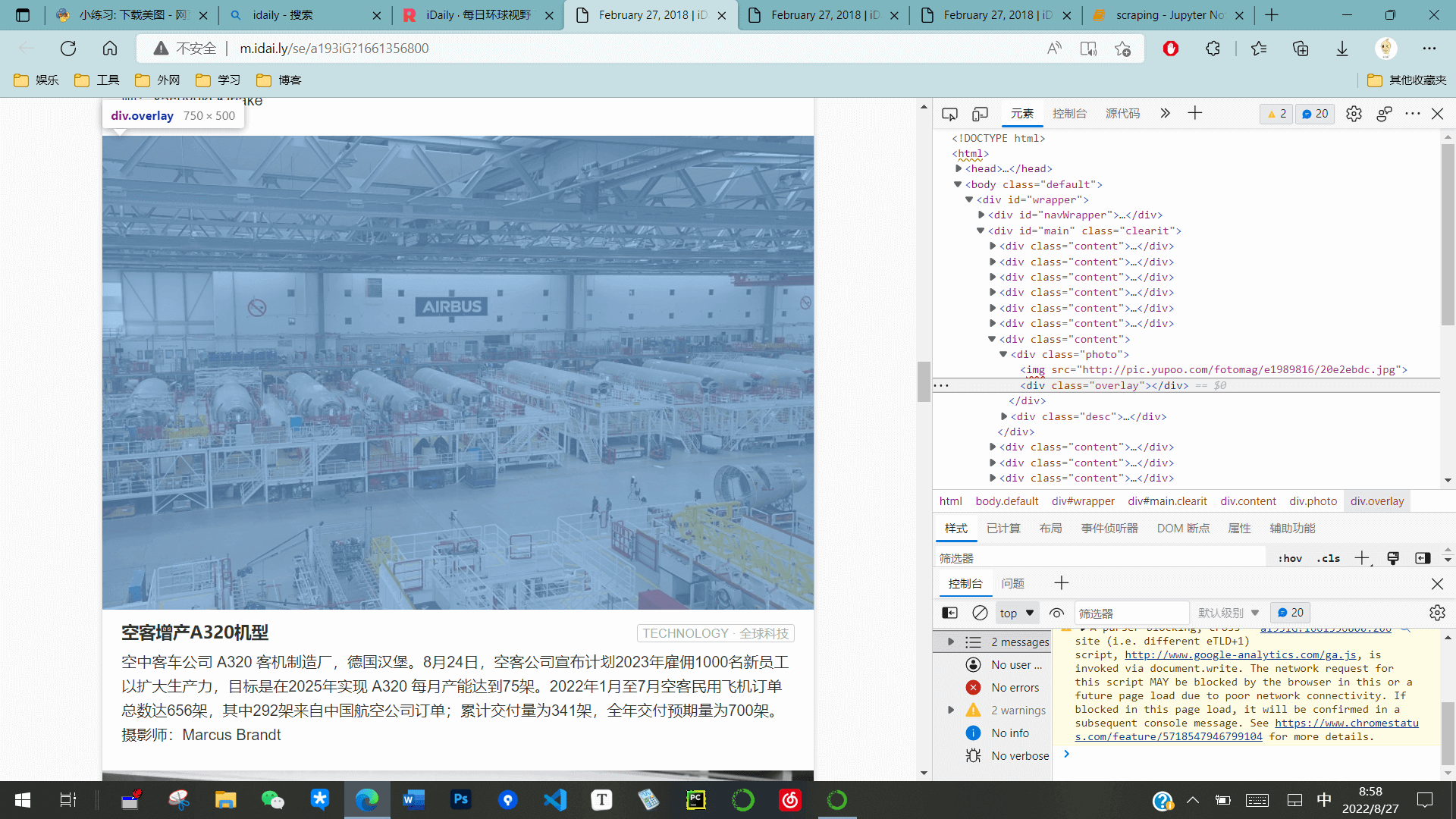
注意到图片都放在 div class="photo"的父对象中
html = requests.get(URL).text
soup = BeautifulSoup(html, 'lxml')
img_ul = soup.find_all('div', {'class': 'photo'})img_ul[<div class="photo"><img src="http://pic.yupoo.com/fotomag/H9yil7z0/TaRLX.jpg"/><div class="overlay"></div></div>,
<div class="photo"><img src="http://pic.yupoo.com/fotomag/757ee474/10530738.jpg"/><div class="overlay"></div></div>,
<div class="photo"><img src="http://pic.yupoo.com/fotomag/946704b4/66933a50.jpg"/><div class="overlay"></div></div>,
<div class="photo"><img src="http://pic.yupoo.com/fotomag/7aa989ff/b4882755.jpg"/><div class="overlay"></div></div>,
<div class="photo"><img src="http://pic.yupoo.com/fotomag/cb529779/d8c7a395.jpg"/><div class="overlay"></div></div>,
<div class="photo"><img src="http://pic.yupoo.com/fotomag/2e45a0cd/85b8cc7b.jpg"/><div class="overlay"></div></div>,
<div class="photo"><img src="http://pic.yupoo.com/fotomag/e1989816/20e2ebdc.jpg"/><div class="overlay"></div></div>,
<div class="photo"><img src="http://pic.yupoo.com/fotomag/42034c62/e67c02ab.jpg"/><div class="overlay"></div></div>,
<div class="photo"><img src="http://pic.yupoo.com/fotomag/267e386a/88c891b6.jpg"/><div class="overlay"></div></div>,
<div class="photo"><img src="http://pic.yupoo.com/fotomag/65ad43ae/e5d8c29e.jpg"/><div class="overlay"></div></div>,
<div class="photo"><img src="http://pic.yupoo.com/fotomag/1213e2a1/3faaaedd.jpg"/><div class="overlay"></div></div>,
<div class="photo"><img src="http://pic.yupoo.com/fotomag/d009c863/b6f97eca.jpg"/><div class="overlay"></div></div>,
<div class="photo"><img src="http://pic.yupoo.com/fotomag/76c66979/84fa84fa.jpg"/><div class="overlay"></div></div>,
<div class="photo"><img src="http://pic.yupoo.com/fotomag/9023854c/619b3b2e.jpg"/><div class="overlay"></div></div>,
<div class="photo"><img src="http://pic.yupoo.com/fotomag/8a75067c/2a3ecbf9.jpg"/><div class="overlay"></div></div>,
<div class="photo"><img src="http://pic.yupoo.com/fotomag/30e65430/a1f9a680.jpg"/><div class="overlay"></div></div>]
设置保存文件夹
import os

os.makedirs('./img/', exist_ok=True)
下载
for ul in img_ul:
    imgs = ul.find_all('img')
    for img in imgs:
        url = img['src']
        r = requests.get(url, stream=True)
        image_name = url.split('/')[-1]
        with open('./img/%s' % image_name, 'wb') as f:
            for chunk in r.iter_content(chunk_size=128):
                f.write(chunk)
        print('Saved %s' % image_name)
Saved TaRLX.jpg
Saved 10530738.jpg
Saved 66933a50.jpg
Saved b4882755.jpg
Saved d8c7a395.jpg
Saved 85b8cc7b.jpg
Saved 20e2ebdc.jpg
Saved e67c02ab.jpg
Saved 88c891b6.jpg
Saved e5d8c29e.jpg
Saved 3faaaedd.jpg
Saved b6f97eca.jpg
Saved 84fa84fa.jpg
Saved 619b3b2e.jpg
Saved 2a3ecbf9.jpg
Saved a1f9a680.jpg
得到爬取的文件:

4.1 多进程分布式爬虫
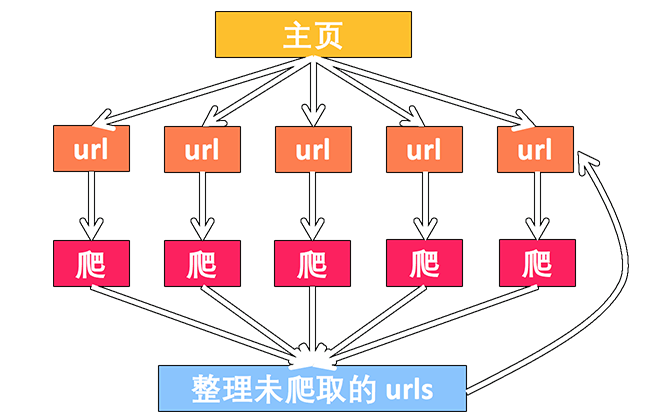
import multiprocessing as mp
import time
from urllib.request import urlopen, urljoin
from bs4 import BeautifulSoup
import re

base_url = "https://mofanpy.com/"

# 不要持续爬取一个网站的信息, 否则你可能再也登陆不上这个网页
if base_url != "https://127.0.0.1:4000/":  # 如果用外网, 就限制爬取
    restricted_crawl = True
else:
    restricted_crawl = False
定义爬取的函数
def crawl(url):
    response = urlopen(url)
    time.sleep(0.1)  # 对下载作一个轻微延迟: 0.1 秒
    return response.read().decode()
解析
def parse(html):
    soup = BeautifulSoup(html, 'lxml')
    urls = soup.find_all('a', {'href': re.compile('^/.+?$')})
    title = soup.find('h1').get_text().strip()
    # set() 函数创建一个无序不重复元素集,可进行关系测试,删除重复数据,还可以计算交集、差集、并集等。
    page_urls = set([urljoin(base_url, url['href']) for url in urls])
    url = soup.find('meta', {'property': 'og:url'})['content']
    return title, page_urls, url
常规方式爬取
unseen = set([base_url,])
seen = set()

count, t1 = 1, time.time()

while len(unseen) != 0:
    if restricted_crawl and len(seen) > 20:
        break

    print('\nDistributed Crawling...')
    htmls = [crawl(url) for url in unseen]

    print('\nDistributed Parsing...')
    results = [parse(html) for html in htmls]

    print('\nAnalysing...')
    seen.update(unseen)
    unseen.clear()

    for title, page_urls, url in results:
        print(count, title, url)
        count += 1
        unseen.update(page_urls - seen)
print('Total time: %.1f s' % (time.time() - t1, ))
Distributed Crawling...
Distributed Parsing...
Analysing...
1 莫烦 Python 主页 http://mofanpy.com/
Distributed Crawling...
Distributed Parsing...
Analysing...
2 数据处理 http://mofanpy.com/tutorials/data-manipulation
3 有趣的机器学习 http://mofanpy.com/tutorials/machine-learning/ML-intro/
4 机器学习 http://mofanpy.com/tutorials/machine-learning
5 Python 基础教学 http://mofanpy.com/tutorials/python-basic
6 其他效率教程 http://mofanpy.com/tutorials/others
Distributed Crawling...
Distributed Parsing...
Analysing...
7 Numpy 数据怪兽 http://mofanpy.com/tutorials/data-manipulation/numpy
8 Matplotlib 画图 http://mofanpy.com/tutorials/data-manipulation/plt
9 交互式学 Python http://mofanpy.com/tutorials/python-basic/interactive-python/
10 进化算法 (Evolutionary-Algorithm) http://mofanpy.com/tutorials/machine-learning/evolutionary-algorithm/
11 强化学习 (Reinforcement Learning) http://mofanpy.com/tutorials/machine-learning/reinforcement-learning/
12 自然语言处理 http://mofanpy.com/tutorials/machine-learning/nlp/
13 数据的伙伴 Pandas http://mofanpy.com/tutorials/data-manipulation/pandas
14 窗口视窗 (Tkinter) http://mofanpy.com/tutorials/python-basic/tkinter/
15 有趣的机器学习 http://mofanpy.com/tutorials/machine-learning/ML-intro
16 PyTorch http://mofanpy.com/tutorials/machine-learning/torch/
17 Keras http://mofanpy.com/tutorials/machine-learning/keras/
18 SciKit-Learn http://mofanpy.com/tutorials/machine-learning/sklearn/
19 Theano http://mofanpy.com/tutorials/machine-learning/theano/
20 多线程 (Threading) http://mofanpy.com/tutorials/python-basic/threading/
21 多进程 (Multiprocessing) http://mofanpy.com/tutorials/python-basic/multiprocessing/
22Linux 简易教学 http://mofanpy.com/tutorials/others/linux-basic/
23 Tensorflow http://mofanpy.com/tutorials/machine-learning/tensorflow/
24 生成模型 GAN 网络 http://mofanpy.com/tutorials/machine-learning/gan/
25 Git 版本管理 http://mofanpy.com/tutorials/others/git/
26 机器学习实战 http://mofanpy.com/tutorials/machine-learning/ML-practice/
27 网页爬虫 http://mofanpy.com/tutorials/data-manipulation/scraping
Total time: 7.4s
多进程爬取
unseen = set([base_url,])
seen = set()

pool = mp.Pool(4)
count, t1 = 1, time.time()
while len(unseen) != 0:
    if restricted_crawl and len(seen) > 20:
        break
    print('\nDistributed Crawling...')
    crawl_jobs = [pool.apply_async(crawl, args=(url,)) for url in unseen]
    html = [j.get() for j in crawl_jobs]

    print('\nDistributed Parsing...')
    parse_jobs = [pool.apply_async(parse, args=(html,)) for html in htmls]
    results = [j.get() for j in parse_jobs]

    print('\nAnalysing...')
    seen.update(unseen)
    unseen.clear()

    for title, page_urls, url in results:
        print(count, title, url)
        count += 1
        unseen.update(page_urls - seen)
print('Total time: %.1f s' % (time.time() - t1, ))
Distributed Crawling...
4.2 加速爬虫: 异步加载 Asyncio
之前我一直在想如何用
multiprocessing或者threading加速我的爬虫, 也做过了一些小实验, 确实, 我们看到了不小的效率提升. 但是当我更加深入的时候, 我发现, Python 还提供了一个有力的工具, 叫做asyncio. 这是一个仅仅使用单线程, 就能达到多线程/进程的效果的工具.
它的原理, 简单说就是: 在单线程里使用异步计算, 下载网页的时候和处理网页的时候是不连续的, 更有效利用了等待下载的这段时间.
那么, 我们今天就来尝试使用
asyncio来替换掉multiprocessing或者threading, 看看效果如何.
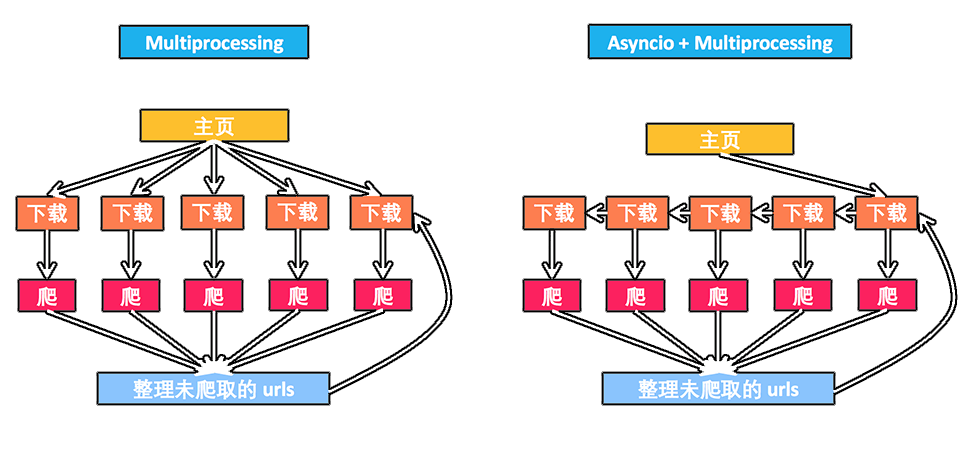
常规
import time


def job(t):
    print('Start job', t)
    time.sleep(t)
    print('Job', t, 'takes', t, 's')


def main():
    [job(t) for t in range(1, 3)]


t1 = time.time()
main()
print('NO async total time: ', time.time() - t1)
Start job 1
Job 1 takes 1s
Start job 2
Job 2 takes 2s
NO async total time: 3.010831594467163
asyncio
jupyter 对异步的支持不是特别好, 换 pycharm
import time
import asyncio


async def job(t):                   # async 形式的功能
    print('Start job ', t)
    await asyncio.sleep(t)          # 等待 "t" 秒, 期间切换其他任务
    print('Job ', t, ' takes ', t, ' s')


async def main(loop):                       # async 形式的功能
    tasks = [
    loop.create_task(job(t)) for t in range(1, 3)
    ]                                       # 创建任务, 但是不执行
    await asyncio.wait(tasks)               # 执行并等待所有任务完成


t1 = time.time()
loop = asyncio.get_event_loop()             # 建立 loop
loop.run_until_complete(main(loop))         # 执行 loop
loop.close()                                # 关闭 loop
print("Async total time : ", time.time() - t1)
Start job 1
Start job 2
Job 1 takes 1s
Job 2 takes 2s
Async total time : 2.019124984741211
常规方式爬取信息
import requests

URL = 'https://mofanpy.com/'


def normal():
    for i in range(2):
        r = requests.get(URL)
        url = r.url
        print(url)

t1 = time.time()
normal()
print("Normal total time:", time.time() - t1)
https://mofanpy.com/
https://mofanpy.com/
Normal total time: 0.26386022567749023
使用 asyncio
import aiohttp
import time
import asyncio

URL = 'https://mofanpy.com/'

async def job(session):
    response = await session.get(URL)       # 等待并切换
    return str(response.url)


async def main(loop):
    async with aiohttp.ClientSession() as session:      # 官网推荐建立 Session 的形式
        tasks = [loop.create_task(job(session)) for _ in range(2)]
        finished, unfinished = await asyncio.wait(tasks)
        all_results = [r.result() for r in finished]    # 获取所有结果
        print(all_results)

t1 = time.time()
loop = asyncio.get_event_loop()
loop.run_until_complete(main(loop))
loop.close()
print("Async total time:", time.time() - t1)
['https://mofanpy.com/', 'https://mofanpy.com/']
Async total time: 0.1562364101409912
5.1 高级爬虫: 让 Selenium 控制你的浏览器帮你爬
那么你什么时候会要用到 Selenium 呢? 当你:
- 发现用普通方法爬不到想要的内容
- 网站跟你玩捉迷藏, 太多 JavaScript 内容
- 需要像人一样浏览的爬虫
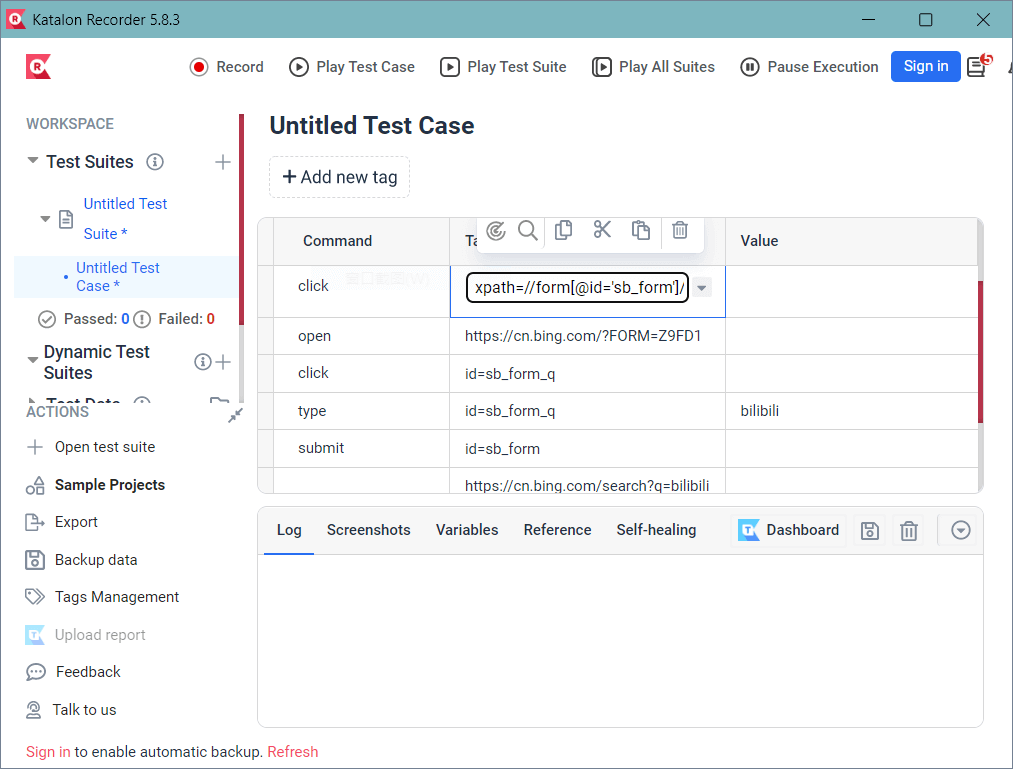
这个插件能让你记录你使用浏览器的操作. 我以前玩网游, 为了偷懒, 用过一个叫
按键精灵的东西, 帮我做了很多重复性的工作, 拯救了我的鼠标和键盘, 当然还有我的手指! 看着别人一直在点鼠标, 我心中暗爽~ 这个Katalon Recorder插件 +Selenium就和按键精灵是一个意思. 记录你的操作, 然后你可以让电脑重复上千遍.
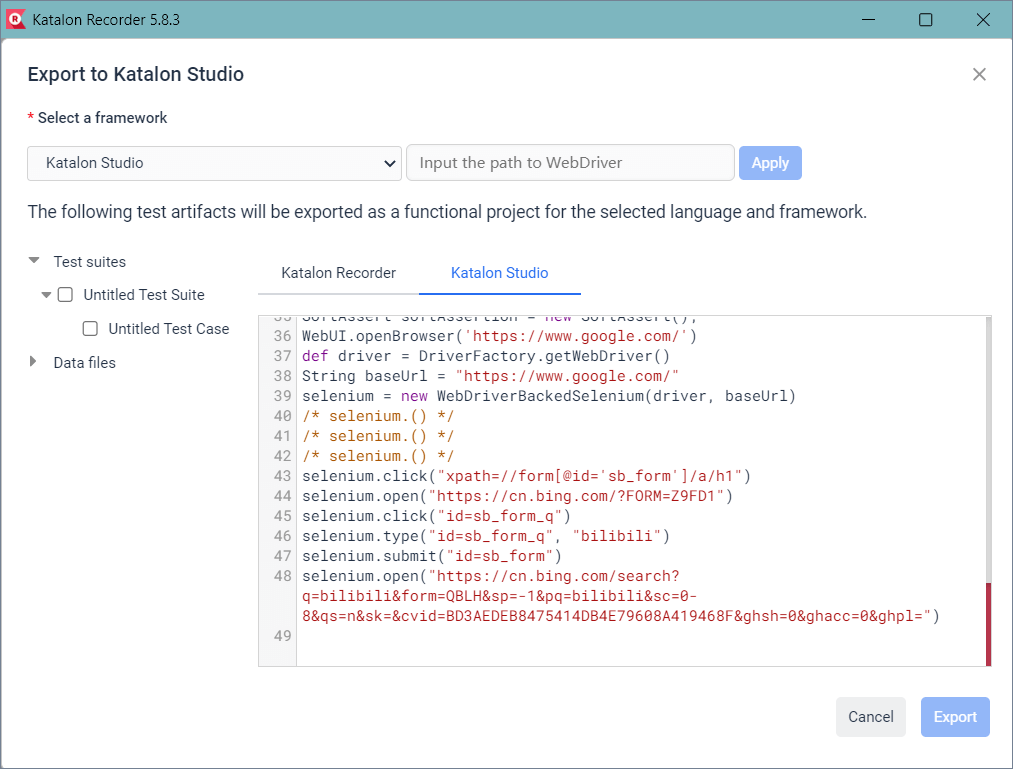
每当你点击的时候, 插件就会记录下你这些点击, 形成一些 log. 最后神奇的事情将要发生. 你可以点击 Export 按钮, 观看到帮你生成的浏览记录代码!
安装
selenium + Edge 浏览器_tk1023 的博客-CSDN 博客_edge selenium
"Hello world"
from time import sleep
from selenium import webdriver

driver = webdriver.Edge()  # 打开 Edge 浏览器

driver.get(r'https://www.baidu.com/')  # 打开 https://www.baidu.com/

sleep(5)  # 5 秒后
driver.close()  # 关闭浏览器
Python 控制浏览器
from selenium import webdriver

driver = webdriver.Edge()  # 打开 Edge 浏览器

# 将刚刚复制的帖在这
driver.get("https://mofanpy.com/")
driver.find_element_by_xpath(u"//img[@alt='强化学习 (Reinforcement Learning)']").click()
driver.find_element_by_link_text("About").click()
driver.find_element_by_link_text(u"赞助").click()
driver.find_element_by_link_text(u"教程 ▾").click()
driver.find_element_by_link_text(u"数据处理 ▾").click()
driver.find_element_by_link_text(u"网页爬虫").click()

# 得到网页 html, 还能截图
html = driver.page_source  # get html
driver.get_screenshot_as_file("./img/sreenshot1.png")
driver.close()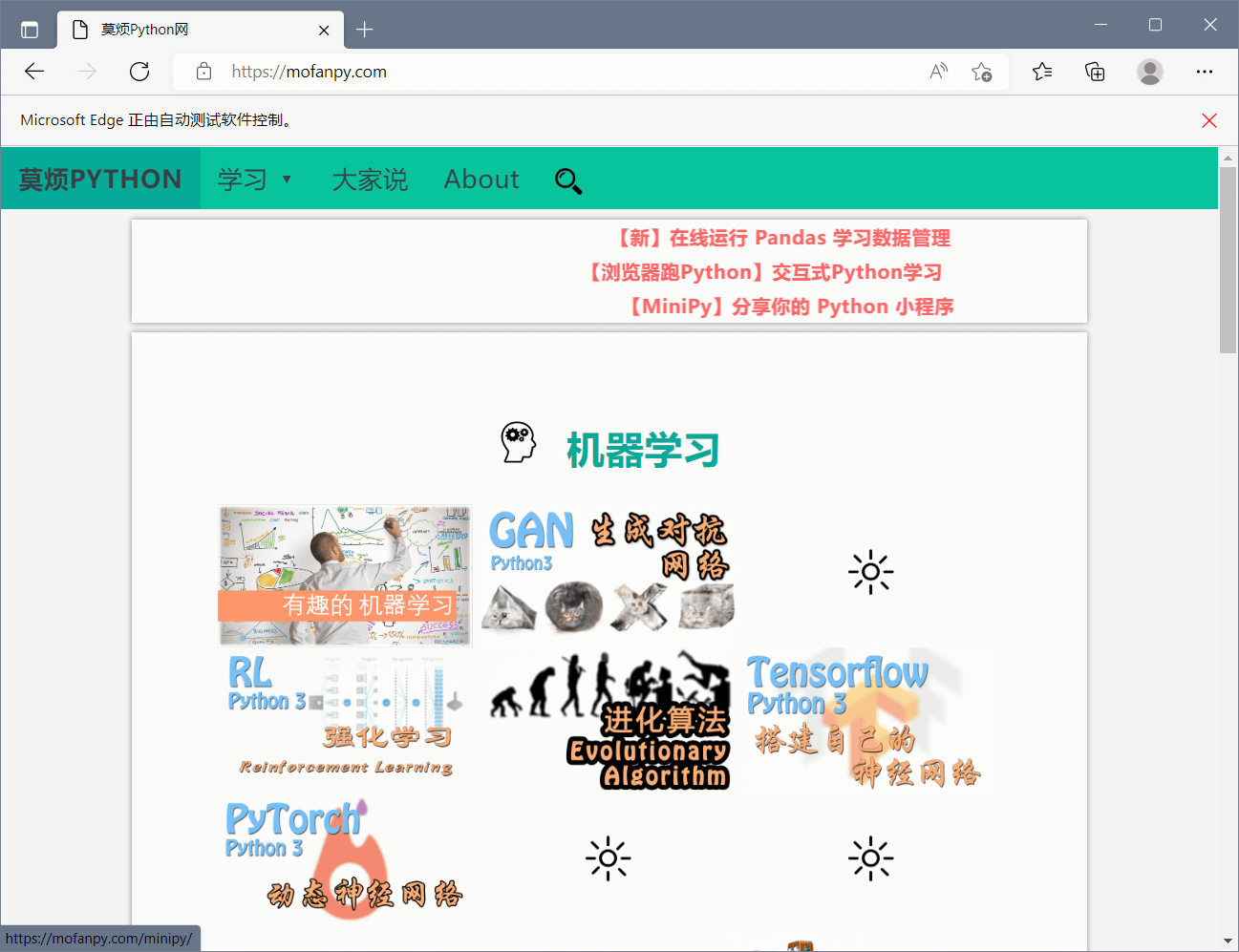
不过每次都要看着浏览器执行这些操作, 有时候有点不方便. 我们可以让 selenium 不弹出浏览器窗口, 让它安静地执行操作. 在创建 driver 之前定义几个参数就能摆脱浏览器的身体了.
# 原作者用的是 Chrome..执行不了
from selenium.webdriver.chrome.options import Options

chrome_options = Options()
chrome_options.add_argument("--headless")       # define headless

driver = webdriver.Chrome(chrome_options=chrome_options)
Selenium 能做的事还有很多, 比如填 Form 表单, 超控键盘等等. 这个教程不会细说了, 只是个入门, 如果你还想继续深入了解, 欢迎点进去他们的 Python 教学官网
最后, Selenium 的 优点我们都看出来了, 可以很方便的帮你模拟你的操作, 添加其它操作也是非常容易的,
但是也是有缺点的, 不是任何时候 Selenium 都很好. 因为要打开浏览器, 加载更多东西, 它的执行速度肯定没有其它模块快. 所以如果你需要速度, 能不用 Selenium, 就不用吧.
5.2 高级爬虫: 高效无忧的 Scrapy 爬虫库
import scrapy


class MofanSpider(scrapy.Spider):
    name = "mofan"
    start_urls = [
        'https://mofanpy.com/',
    ]
    # unseen = set()
    # seen = set()      # 我们不在需要 set 了, 它自动去重
    def parse(self, response):
        yield {     # return some results
            'title': response.css('h1::text').extract_first(default='Missing').strip().replace('"', ""),
            'url': response.url,
        }
        urls = response.css('a::attr(href)').re(r'^/.+?/$')  # find all sub urls
        for url in urls:
            yield response.follow(url, callback=self.parse)  # it will filter duplication automatically
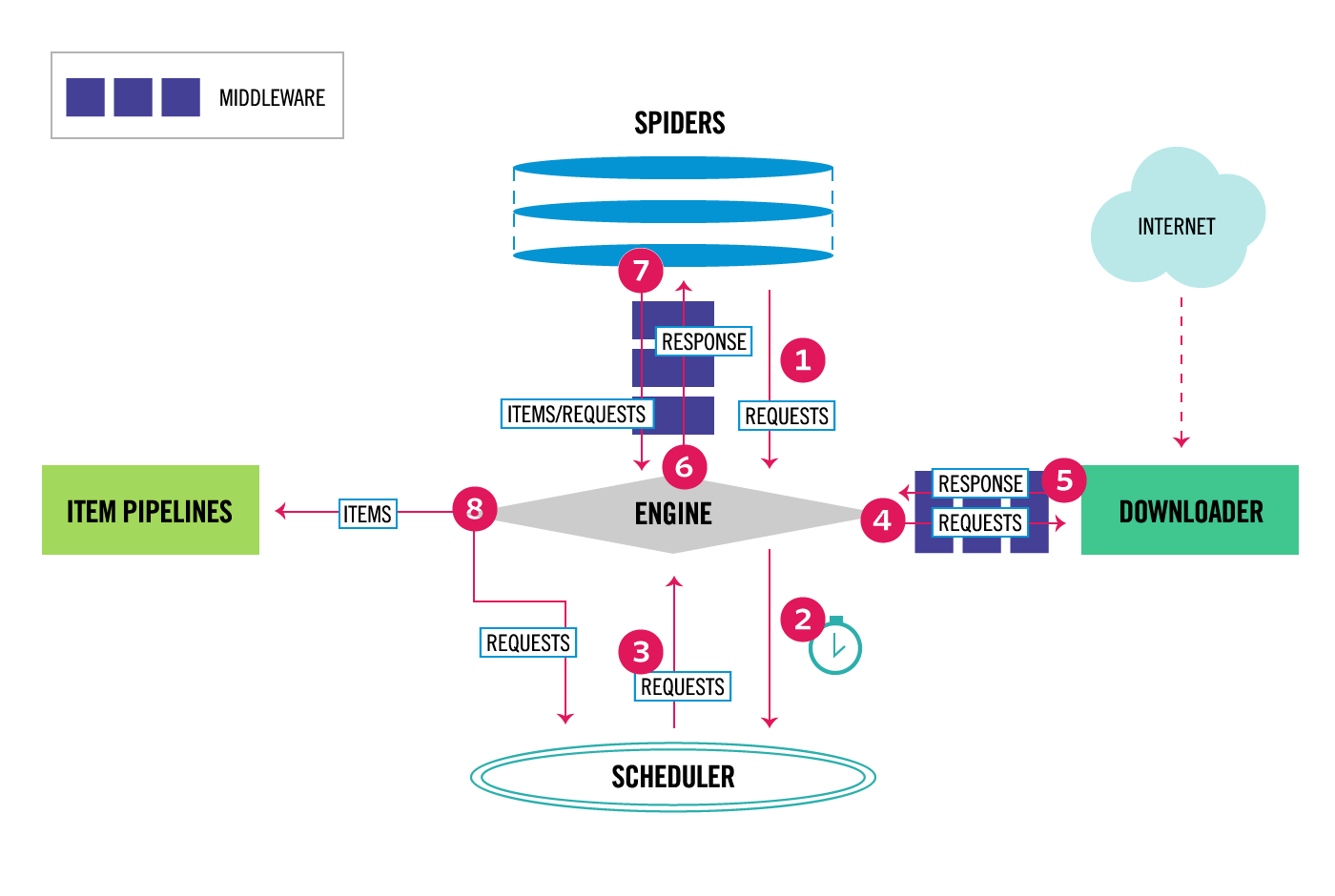
这个教程教你写出一个 Scrapy 形式的爬虫, 带你入门 Scrapy, 但是 Scrapy 不仅仅只有爬虫, 你需要学习更多. 那学习 Scrapy 的地方, 当然是他们自家网站咯.